
24/7 Customer Support

Free returns

Same-day & Next-day Delivery

Quality Guaranteed

Unlock Your Welcome Offers: FREE Delivery | Up to 80% OFF | Free 30-day JoyPlus trial
Download the APP
Buying a high-performance laptop in the UK is rarely just about choosing the newest processor or largest graphics card. Premium specifications can look impressive on a product page, yet the wrong combination may leave you with excessive fan noise, limited battery life, an unsuitable operating system or a display that does not match your work.
This guide explains the key checks to make before buying, then matches selected models to different types of user.
An Intel Core Ultra 9 laptop, AMD Ryzen 9 laptop or machine with an RTX 5080 laptop GPU label can indicate substantial capability, but the exact chip, cooling design and graphics power limit still matter. Two laptops with the same GPU family may perform differently depending on thermal management and power delivery.
For demanding applications such as video editing, 3D rendering and local AI tools, check the complete specification rather than relying on a processor badge alone.
A 4K laptop or OLED laptop can provide detailed images, strong contrast and rich colours. However, higher resolution can increase GPU demand and may reduce battery endurance during intensive use. OLED panels can also have different brightness, refresh-rate and burn-in care requirements from IPS displays.
For gaming, a 240Hz QHD+ screen may be more practical than 4K if high frame rates are important. For photography, design or video production, colour coverage and calibration information may matter more than refresh rate.
Powerful gaming laptops often require large chargers and may weigh over 2kg. They can also become hot during sustained workloads. A slim professional laptop may be easier to carry, but some models use soldered memory and offer fewer upgrade options.
Before purchase, check:
The processor affects compilation, multitasking, simulations and general responsiveness. A higher core count can help with parallel workloads, but software optimisation remains important.
For gaming laptops and laptops for 3D rendering, the dedicated GPU is usually the more significant component. An RTX 5090 laptop with 24GB GDDR7, such as the Lenovo Legion Pro 7 listed below, is aimed at users working with demanding games, GPU rendering and large creative projects. By contrast, an RTX 3050 or RTX 5050 configuration may be more appropriate for lighter creative work and mainstream gaming.
AI laptops may include an NPU for selected on-device AI functions. This can improve efficiency in compatible applications, but it does not replace CPU or GPU performance for every AI workload.
For demanding workloads, 32GB RAM is a sensible starting point, particularly when working with large media files, virtual machines, software development environments or multiple applications. A 64GB configuration can provide more headroom for advanced creative and technical use.
Storage affects project capacity and loading times. A 2TB SSD is useful for video libraries, games and design assets, although important files should also be backed up to external storage or a trusted cloud service. SSD capacity is not a substitute for a backup strategy.
Check whether memory is upgradeable. The Lenovo LOQ Essential configuration, for example, specifies 16GB as the maximum for that exact model, while some other laptops provide SO-DIMM slots or expandable memory.
For professional and creator laptops, assess:
macOS and Windows 11 also support different software libraries, peripherals and workflows. Confirm that your essential applications, plug-ins and games are compatible before selecting an operating system.

Why This Fits Their Persona: A practical option for UK students, first-time gaming laptop buyers and users combining study with everyday creative tasks.
The specification clearly identifies its 65W RTX 5050 GPU, 16GB memory limit and included 135W adapter, making expectations easier to set.
15.6-inch 144Hz Full HD display, 1TB SSD, UK keyboard and Gigabit Ethernet.
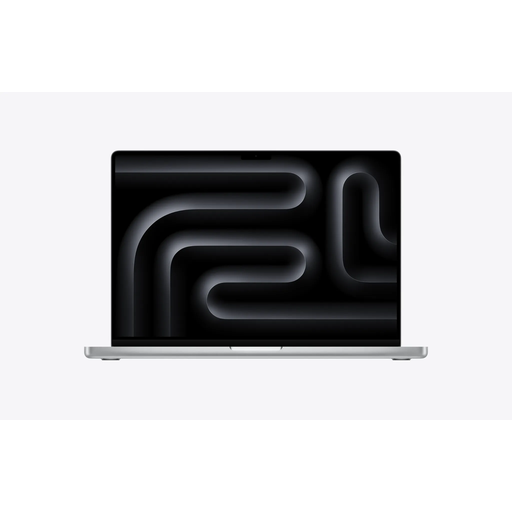
Why This Fits Their Persona: Suitable for professionals and creators who value a large colour-focused display, macOS and integration with other Apple devices.
It specifies 36GB unified memory, 2TB SSD storage and a Liquid Retina XDR display rather than relying only on general “pro” wording.
18-core CPU, 32-core GPU, 3456 × 2234 resolution, up to 120Hz ProMotion and Thunderbolt 5 connectivity.

Why This Fits Their Persona: Designed around colour-rich creative work, local AI functions, GPU-accelerated editing and high-capacity project storage.
The 64GB RAM and 2TB SSD provide clearly stated capacity, while the dedicated RTX 5080 GPU is specified with 16GB GDDR7 memory.
16-inch 3840 × 2400 OLED touchscreen, 120Hz refresh rate, Ryzen AI 9 HX 370 and Wi-Fi 7.
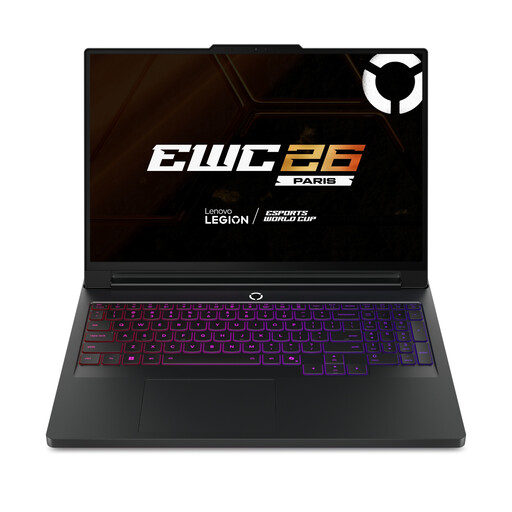
Why This Fits Their Persona: A desktop-replacement-style choice for high-refresh gaming, streaming, 3D work and demanding multitasking.
Its specification lists 24GB GDDR7 graphics memory, 64GB RAM, two SO-DIMM slots and two internal M.2 slots for clearer long-term planning.
Intel Core Ultra 9 275HX, RTX 5090, 16-inch OLED display and 240Hz refresh rate.
We have compiled a complete, real-time list of products that fully satisfy these strict selection criteria and UK safety regulations.
They can be, particularly for engineering, architecture, computing, design and media courses. Check weight, battery expectations and charger size before buying. A 14-inch professional laptop may be easier to carry between lectures, while a 16-inch or gaming model may offer stronger sustained performance but greater bulk.
A reasonable service life depends on workload, maintenance and upgradability. Models with 32GB or 64GB RAM, a 2TB SSD and a modern processor may remain suitable for demanding software for longer, but battery capacity will gradually decline. Keep ventilation clear, install system updates and back up important data regularly.
Usually, sustained gaming, rendering and AI workloads consume more power than office applications. Gaming laptops commonly draw more power through their dedicated GPU and high-wattage charger. To reduce running costs, use balanced or battery-saving modes for routine work and reserve maximum-performance profiles for intensive tasks.