
24/7 Customer Support

Free returns

Same-day & Next-day Delivery

Quality Guaranteed

Unlock Your Welcome Offers: FREE Delivery | Up to 80% OFF | Free 30-day JoyPlus trial
Download the APP
Buying high-performance laptops involves more than choosing the latest processor or the largest number on a product page. UK shoppers also need to consider graphics power, cooling, portability, display quality, operating system compatibility and long-term upgrade options.
A laptop that looks impressive on paper may still disappoint if its memory is soldered, its graphics card has a lower power limit, or its high refresh-rate screen is paired with hardware that cannot consistently use it. The right choice depends on how you work, where you use the laptop and which applications you expect to run.
An Intel Core Ultra 7, AMD Ryzen AI 9 or Apple M5 processor can suit demanding work, but the processor alone does not determine overall performance. Video editing, 3D design and modern games also rely heavily on the GPU, memory capacity and cooling system.
Check the complete specification, including:
For example, an RTX 50-series laptop may offer more recent graphics architecture than an RTX 40-series laptop, but actual performance varies by GPU model, thermal design and wattage.
A 144Hz, 165Hz or 240Hz screen can make scrolling and motion appear more fluid. However, the laptop must generate enough frames per second to take meaningful advantage of that refresh rate.
A gaming laptop with an RTX 5050 or RTX 4060 may be suitable for Full HD or QHD gaming, depending on the title and settings. A 4K laptop demands considerably more graphics power, particularly when ray tracing is enabled. Look for practical combinations of resolution, refresh rate, GPU capability and technologies such as adaptive sync.
A 16GB laptop can be suitable for office work, study and moderate creative applications. For large projects, virtual machines, software development or heavy multitasking, 32GB or 64GB laptop configurations provide more working space.
Also consider storage. A 1TB SSD laptop offers a practical starting point for apps, games and documents, while a 2TB SSD laptop is more suitable for large video libraries, game installations and high-resolution project files. Some thin professional laptops use soldered memory, so selecting the right capacity at purchase is important.
For general professional laptops, CPU efficiency and battery behaviour may matter more than dedicated graphics. For gaming laptops, creator laptops and laptops for video editing, a dedicated NVIDIA GPU can accelerate compatible applications and games.
Apple silicon models use integrated GPU architecture and unified memory, while Windows 11 laptops commonly separate system RAM from dedicated graphics memory. Neither approach is automatically suitable for every workflow: check the software requirements for your preferred editing, design, engineering or development tools.
AI-labelled machines may include an NPU for compatible local AI features. This can assist supported applications, but it does not replace a powerful GPU for every AI workload, rendering task or game.
An OLED laptop can provide strong contrast and rich blacks, while Mini LED and high-quality IPS panels may offer different advantages for brightness, longevity and viewing comfort. Check:
A touchscreen laptop can be useful for annotation, design and presentations, but it may add weight or affect battery consumption. A 16:10 display provides extra vertical space for documents, code and editing timelines.
A lightweight laptop is easier to carry between a London office, university campus or home workspace. High-powered gaming and creator systems are generally heavier because they need larger cooling systems and chargers.
Check for the ports you actually use, including USB-C, Thunderbolt, HDMI, SD card readers and Ethernet. Wi-Fi 7 is available on several current premium models, while Wi-Fi 6 and Wi-Fi 6E remain practical for many UK home and office networks.

Why This Fits Their Persona: A practical choice for students and first-time gaming laptop buyers who also need a Windows 11 machine for study and everyday tasks.
The specification clearly states its RTX 5050 GPU, 16GB DDR5 memory, 1TB SSD and 144Hz Full HD display, avoiding vague performance descriptions.
UK keyboard layout, HDMI 2.1, Gigabit Ethernet, 100% sRGB coverage and a numeric keypad.
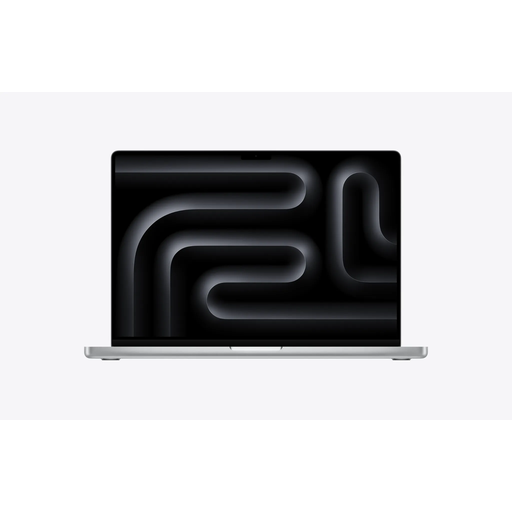
Why This Fits Their Persona: Suited to professionals using macOS laptops for demanding creative production, development, large projects and sustained multitasking.
Its listed 18-core CPU, 32-core GPU, 36GB unified memory and 2TB SSD provide a clear specification for intensive workflows.
Liquid Retina XDR display, ProMotion up to 120Hz, Thunderbolt 5, HDMI and SDXC connectivity.

Why This Fits Their Persona: Designed for creators, designers and video editors who need high-resolution touch input, substantial memory and dedicated graphics.
It pairs a 4K OLED touchscreen with an RTX 5080 Laptop GPU, 64GB memory and a 2TB SSD rather than relying on display resolution alone.
AMD Ryzen AI 9 HX 370, 64GB LPDDR5X, 16GB GDDR7 graphics memory and Wi-Fi 7.
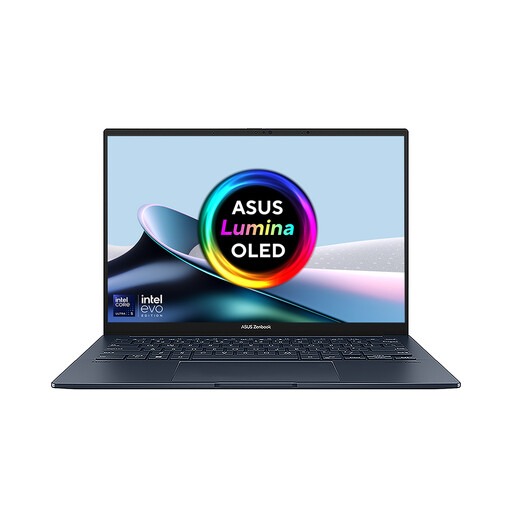
Why This Fits Their Persona: A useful fit for mobile professionals who regularly compare documents, manage spreadsheets or arrange creative tools across two screens.
Its dual-screen design provides a defined productivity benefit, while the detachable keyboard and kickstand support different working positions.
Dual 14-inch OLED touchscreens, Intel Core Ultra 7 255H, 16GB LPDDR5X and 1TB SSD.
We have compiled a complete, real-time list of products that fully satisfy these strict selection criteria and UK safety regulations.
Yes, although they may cost more, weigh more and use more power than standard office laptops. If you regularly compile code, edit media, use several monitors or run virtual machines, the additional CPU, memory and cooling capacity may be useful. For documents, web browsing and video calls alone, a lightweight professional laptop may be more practical.
Choose 16GB for general productivity and moderate creative work, 32GB for demanding multitasking, development and regular content creation, and 64GB for large video projects, 3D work, complex datasets or multiple virtual machines. Confirm whether the memory is upgradeable before buying.
Gaming and creator laptops can use more electricity under sustained load, particularly when connected to a high-wattage adapter. Battery life also depends on screen brightness, software, power mode and workload. For lower running costs during mobile work, compare battery capacity, processor efficiency and whether the laptop can complete routine tasks using integrated graphics.