
24/7 Customer Support

Free returns

Same-day & Next-day Delivery

Quality Guaranteed

Unlock Your Welcome Offers: FREE Delivery | Up to 80% OFF | Free 30-day JoyPlus trial
Download the APP
In a world of ever-growing file sizes, from 4K video projects to extensive photo libraries, waiting for data to transfer can be a significant bottleneck. You might have a new laptop with only USB-C ports, an older desktop with USB-A and a smartphone that’s constantly running low on storage. Juggling these devices often means slow cloud uploads or a tangle of adapters.
A modern, high-performance USB drive can solve these issues, offering a physical bridge for your digital life. This guide is designed to help you navigate the technical specifications and find a reliable storage solution that fits your needs, whether you're a creative professional, a student or simply someone who values their time and data security.
Choosing the right drive goes beyond just picking the largest capacity. Here are a few key factors to consider to ensure you get a device that performs as you expect.
You will often see terms like USB 3.2 Gen 1 on product descriptions. This standard refers to a transfer speed capability of up to 5 Gigabits per second (Gbps). However, the real-world performance of a fast memory stick is best understood by its read and write speeds, measured in megabytes per second (MB/s).
A standard USB 2.0 drive might offer write speeds of 5-10 MB/s, while a high speed USB C flash drive with SSD-level internals can exceed 500 MB/s or even 1000 MB/s.
As devices transition from the traditional rectangular USB-A port to the smaller, reversible USB-C, having a drive that supports both is incredibly practical. A dual USB flash drive features both connectors, allowing you to move files seamlessly between a new MacBook, an older Windows PC, an Android tablet and even the latest iPhone 15 models without needing any adapters. This versatility makes it a truly universal tool for data on the go.
Your data is valuable, so the drive that holds it should be built to last. Many modern drives now feature a metal USB stick construction, typically using zinc or aluminium alloy. This not only provides a more premium feel but also offers better protection against drops, knocks and daily wear and tear compared to plastic casings.
For those handling sensitive business or personal information, an encrypted flash drive provides an essential layer of security. These drives use hardware or software encryption (like AES-256) to protect your files. Some advanced models even incorporate biometric fingerprint scanners, ensuring that only authorised users can access the data.
Based on features, performance specifications and user-centric design, here are some noteworthy options available today.
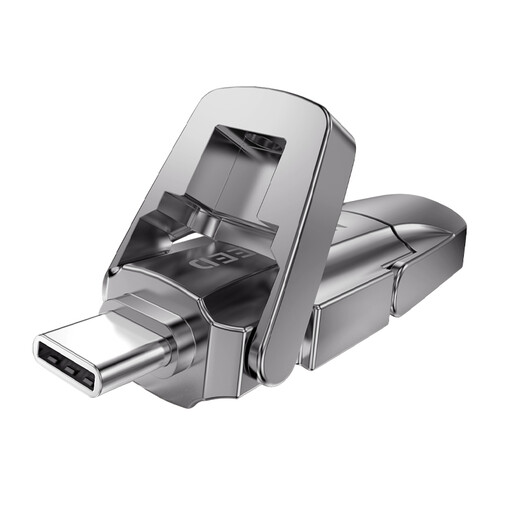
MOVESPEED USB Flash Drive – 512GB, 1090MB/s High-Speed Read
Why It Stands Out: This drive is built for users who cannot afford to wait. With read speeds of up to 1090MB/s and write speeds up to 1030MB/s, its performance is comparable to an internal solid-state drive (SSD). This makes it exceptionally well-suited for demanding tasks like editing 4K video directly from the drive or transferring massive project files in seconds. Its dual USB-A and Type-C connectors are protected by a durable zinc alloy flip cover.
thumb drive for iPhone 15 that can handle high-resolution video capture.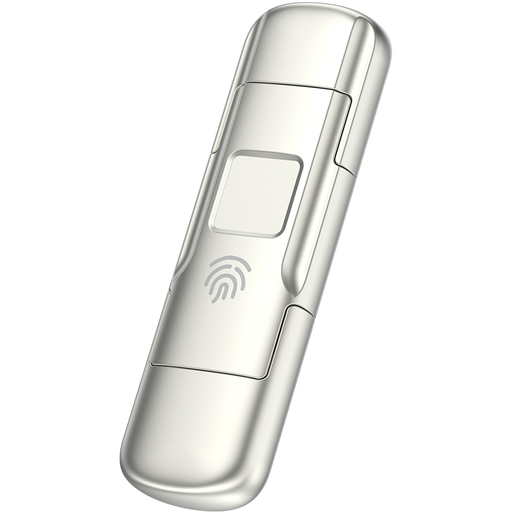
MOVESPEED USB Flash Drive – 256GB with Fingerprint Encryption
Why It Stands Out: For anyone handling confidential information, this encrypted flash drive offers peace of mind. It combines AES-256 hardware encryption with a fast and reliable fingerprint sensor, ensuring your data remains inaccessible if the drive is lost or stolen. It supports up to 10 different fingerprints, making it suitable for team use. Despite its security focus, it doesn't compromise on performance, offering solid read speeds of up to 550MB/s from its USB 3.2 thumb drive interface.
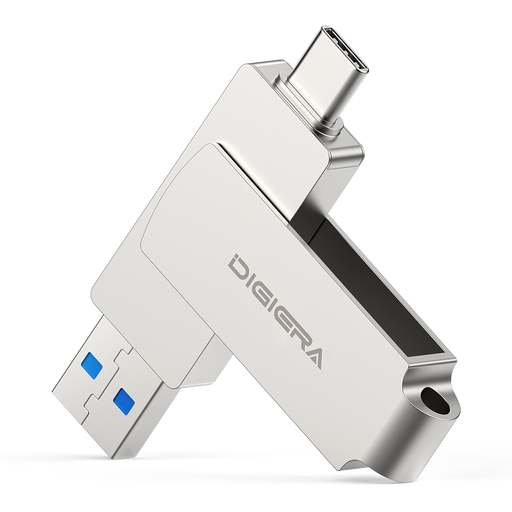
DigiEra USB Flash Drive – 256GB, USB 3.2 Dual Interface
Why It Stands Out: The DigiEra LUS320 strikes an excellent balance between speed, design and durability. It delivers a respectable read speed of up to 500MB/s, making it more than capable for daily backups, media storage and transferring work documents. Its standout feature is the 360° swivel design, which protects both the USB-A and USB-C connectors without a separate cap that could be easily lost. The compact metal USB stick body is both sturdy and helps with heat dissipation during intensive transfers.
256GB USB C drive option for everyday reliability.If these specific models don't quite match what you're looking for, or if you need a different capacity or feature set, there are many other choices available.
? Explore our full collection of USB sticks 3.0 to find the perfect fit.
1. What makes a USB-C flash drive "high speed"? A "high speed" designation typically refers to drives that use a modern interface like USB 3.2 Gen 1 or higher and contain high-performance flash memory, similar to that found in SSDs. This results in significantly faster read and write speeds (often above 400MB/s) compared to older USB 2.0 drives, which are much slower.
2. Can I use a high speed USB C flash drive with my iPhone 15? Yes. The iPhone 15, 15 Plus, 15 Pro and 15 Pro Max all feature a USB-C port. This allows you to connect a thumb drive for iPhone 15 directly to back up photos, videos and other files, or even record high-resolution ProRes video straight to the drive on Pro models.
3. Is a metal USB stick better than a plastic one? A metal USB stick generally offers superior durability and protection against physical damage like drops and pressure. The metal casing can also help dissipate heat more effectively during long file transfers, which can contribute to maintaining stable performance and a longer lifespan for the internal components.