For a sizeable local archive of home files, consider an external HDD; for frequent carrying and large-file transfers, consider a portable SSD. Which? identifies long-term backup as a strength of HDDs and faster transfers as a strength of SSDs. Keep a USB stick for selected manual copies, and consider cloud storage alongside a local drive if you need access from other devices; whichever drive you choose, check its connector, format and backup-tool compatibility.
Who these options suit
People keeping a growing home archive
If family photos, videos and documents are the priority, focus on enough local capacity for repeated backups and a way to restore files when needed. Which? discusses external drives as a route for protecting important computer files.
People moving large files regularly
If you carry projects or media between computers, transfer speed and portability may matter more than keeping the drive at a desk. Which? distinguishes the faster SSD route from HDDs used for long-term backup.
Households using Windows and Mac
Decide whether the drive is chiefly for sharing files or for an operating system’s automated backup tool. Microsoft documents File History backups to an external drive, while Apple sets separate disk-format requirements for Time Machine.
What matters when choosing
For personal Windows and Mac files, settle the drive’s main job before comparing capacity, connections and backup settings.
| Concern |
Buying checks |
Who this matters to |
| Local archive capacity |
Allow room for current files, future additions and backup versions. For Time Machine, Apple recommends a disk with at least twice the Mac’s storage capacity. |
When photos and videos keep accumulating, I want room for a repeatable local backup rather than a drive mainly for moving files. About 29% of consumers put archive capacity first. |
| Computer and backup-tool compatibility |
Check the port, supplied cable and current file format. Decide whether the drive must work with Windows File History, Mac Time Machine or ordinary file copies. |
If I use both Windows and Mac, I need the drive to work with my chosen backup routine, not merely open for file exchange. Around 29% of consumers prioritise backup-tool and mixed-device compatibility. |
| Speed and portability |
Match the drive’s connection to the computer and cable; check the conditions attached to any speed or durability claim for the exact model. |
Carrying large projects between locations makes transfer time and everyday knocks more relevant to me. About 24% of consumers put portable speed and resilience first. |
| Access across devices |
Decide whether you need an offline local copy, manual transfer or cloud access. For cloud storage, check account access, included folders and storage allowance. |
When I need current files on another device, a drive left at home cannot provide that access by itself. Roughly 18% of consumers make cross-device access their primary need. |
Backup mistakes to avoid
-
Assuming a shared-file format suits every backup tool
Seagate describes exFAT as useful for Windows-and-Mac file exchange but cautions against it for built-in backup utilities. Apple says Time Machine cannot back up to a Windows-formatted disk.
Choose between shared file copying and automated backup before formatting; if both jobs matter, check whether separate volumes or drives will suit your setup.
-
Reformatting a drive that already holds files
Apple warns that reformatting for Time Machine permanently removes existing data from the disk.
Check the drive’s format and copy existing files to another location before approving an erase or reformat operation.
-
Taking an SSD’s peak speed or rugged rating as unconditional
Samsung says the T7 Shield’s quoted peak speeds require a compatible host, cable and protocol. Its water, dust and drop claims depend on test conditions, and related damage is excluded from its warranty.
Check the exact SSD model, your computer’s port, the cable and the conditions behind any durability claim.
-
Relying on one drive without checking the copies
A drive that is disconnected or left elsewhere cannot provide immediate access to its files. Microsoft also advises ejecting external storage before disconnection to help avoid file loss or corruption.
Check that copied files are present, eject the drive before unplugging it and consider cloud storage alongside the local copy if access from other devices matters.
Brands to consider for external drives
Seagate
Its portable HDD lines offer options for a local archive or scheduled backups, depending on the model.
- Seagate lists 2 TB and 4 TB capacities and USB-C connectivity for its current Expansion portable line.
- Backup features and format requirements differ by line; check the exact model and intended backup tool.
Samsung
The T7 Shield is a portable SSD to examine if frequent carrying and large-file transfers are priorities.
- Samsung quotes sequential speeds of up to 1,050 MB/s read and 1,000 MB/s write for the T7 Shield under compatible host, cable and protocol conditions.
- Samsung’s IP65 and 3 m drop claims are conditional; it says actual resistance can vary and excludes related damage from warranty coverage.
Western Digital
Its WD Elements Portable line is an HDD option for keeping local copies of photos, videos and other files.
- Western Digital describes USB 3.2 Gen 1/USB 3.0 connectivity for its listed 750 GB WD Elements Portable model.
- Check capacity, formatting and warranty terms for the exact variant rather than applying one model’s details to the whole line.
External drives on Joybuy
These external HDDs and portable SSDs cover local home-file storage, from drives carried between computers to a larger drive kept at a desk. Cloud storage and USB sticks remain separate choices for the needs described above.
 No image available
Western Digital My Passport Ultra for Mac 5 TB, Silver
A portable HDD to consider for a sizeable Mac-focused local file archive. The listing describes Windows use as requiring a downloadable HFS+ driver; confirm that driver and your intended backup-tool setup before buying.
View on Joybuy
 No image available
Western Digital Elements Portable 4 TB, Black
A portable HDD for keeping a substantial collection of home files locally, with 4 TB capacity and USB 3.0 stated in its name. Check the format before Mac use: the listing says reformatting may be required.
View on Joybuy
 No image available
Samsung Portable SSD T7 4 TB, Grey
A portable SSD to consider if you frequently carry large files as well as keep a local copy. Its name specifies USB Type-C 3.2 Gen 2; check your computer’s port and cable before relying on the connection’s advertised performance, and confirm the format for your backup tool.
View on Joybuy
 No image available
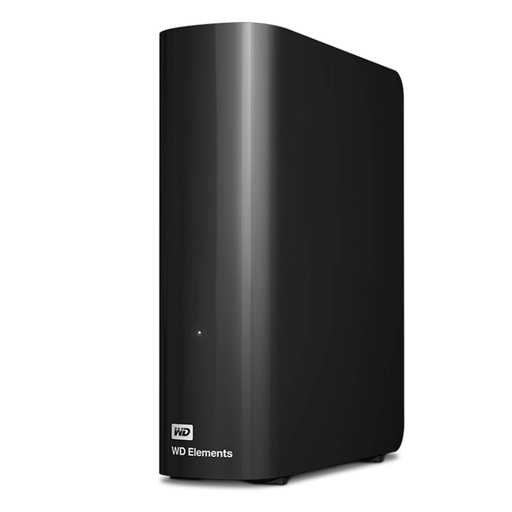
Western Digital Elements Desktop 10 TB
A desktop HDD for a large local archive that stays at a desk rather than travelling with you. It requires its AC power adapter; the listing says Mac use requires reformatting, so check the drive’s current format and preserve existing files before making changes.
View on Joybuy
 No image available
Western Digital My Passport Portable 2 TB, Black
A portable HDD to consider for a smaller local file collection than the higher-capacity models shown here. The listing describes scheduled backup software, but check the operating-system, driver and format requirements for the backup routine you plan to use.
View on Joybuy
Common questions
Can one external drive work with both Windows and Mac?
Yes, for ordinary file exchange when it uses a suitable shared format such as exFAT, according to Seagate. That does not establish compatibility with both systems’ automated backup tools: Apple says Time Machine cannot back up to a Windows-formatted disk. Choose the drive’s primary job before formatting it, and consider separate volumes or drives if you need both file exchange and automated backups.
How much capacity does a Time Machine drive need?
Apple recommends a backup device with at least twice the Mac’s storage capacity and advises using that disk only for Time Machine backups. This is guidance for a Mac Time Machine setup, not a capacity rule for every Windows or manual-copy workflow.
Can a USB stick take the place of an external backup drive?
A USB stick can move selected files manually, but copying files that way is a different routine from configured, versioned backups. Microsoft says Windows File History can make regular copies to an external drive or network location.
What should I do before unplugging a backup drive?
Check that the copied files are present, then use the computer’s eject option before disconnecting the drive. Microsoft advises ejecting external storage to help avoid file loss or corruption.


