Temporary window-side monitors
An indoor camera is worth considering if you need a removable view outside and have a socket near the window. Check its view after dark before relying on the recordings.


An indoor plug-in camera beside a window can be a removable option for daytime viewing, but night footage needs testing: infrared light may reflect from the glass and obscure the outside view. If seeing outside after dark is the priority, consider a weatherproof camera with its lens outside the glass, provided its fixing, power arrangements and field of view work for your home.
An indoor camera is worth considering if you need a removable view outside and have a socket near the window. Check its view after dark before relying on the recordings.
If footage after dark matters most, compare the window view with a weatherproof camera whose lens can sit outside the glass. The outdoor position still needs a suitable fixing and power arrangement.
If you want recordings without relying solely on cloud storage, check how the exact camera stores footage and what equipment it needs. Frame the view carefully if it could include neighbouring, public or communal space.
Consider it when: You need a removable setup with a nearby socket, chiefly for daytime viewing.
Trade-off: Glass glare and infrared reflections can obscure night footage; changing the angle or infrared setting may help, but the scene may then be too dark.
Consider it when: Night monitoring matters and a weatherproof camera can be fixed securely outside without drilling.
Trade-off: A cable-free camera still needs access for charging or maintenance, and its runtime depends on use and conditions.
| Concern | What to check | Who this matters to |
|---|---|---|
| Night footage | Test saved clips after dark at the intended window or outdoor position. Check glare and any adjustable infrared setting. | I need to recognise what happens outside at night, not just see a clear daytime preview. Around 36% of consumers put usable night footage first. |
| Placement and power | Confirm the permitted fixing, suitable surface, power route or charging access, and Wi-Fi reach. Check weather protection for outdoor use. | A permanent fixing is not possible in my home, so I need a position I can use and maintain safely. For around 29% of consumers, placement and power are the main concern. |
| Recording storage | Check whether the exact model records to a microSD card, hub or other local device, and whether compatible storage is included. | I want to keep recordings without depending solely on cloud history, and need to know how I will retrieve them. Around 21% of consumers prioritise recording control. |
| Privacy framing | Check the installed view and available privacy controls; avoid unnecessary capture beyond your property and review audio settings. | My intended view could include neighbours or a shared area, so I need to limit what the camera records. Privacy framing comes first for around 14% of consumers. |
Google Home and Nest Help identifies infrared reflections from windows and nearby surfaces as a cause of poor night-vision video. A clear daytime preview therefore does not establish what saved clips will show after dark.
Test live video and recordings at night in the intended position. Try a different angle or infrared setting if the camera allows it, then check whether the outside scene remains visible.
Manufacturer battery-runtime claims depend on usage and conditions. Frequent viewing, activity and the camera's settings can affect how often it needs attention.
Make sure you can safely reach the installed camera for charging or battery replacement, and check the conditions attached to any model-specific runtime claim.
Local recording can depend on a compatible card, hub or other device. Formatting a card can erase footage already on it.
Check the exact storage method, supported media, what is supplied and how you will preserve important clips before formatting or replacing storage.
The Information Commissioner's Office says UK data protection law applies when home CCTV captures someone else's property, a public area or a communal space. Audio recording can add a further intrusion.
Aim at the area you need to monitor, use suitable privacy controls where available and avoid unnecessary audio capture.
Tapo has plug-in and battery-powered camera lines relevant to the two placement routes.
Reolink has battery-camera and local-storage options relevant to removable outdoor placement and recording choices.
Google Home and Nest Help offers useful placement guidance for assessing a camera near a window.
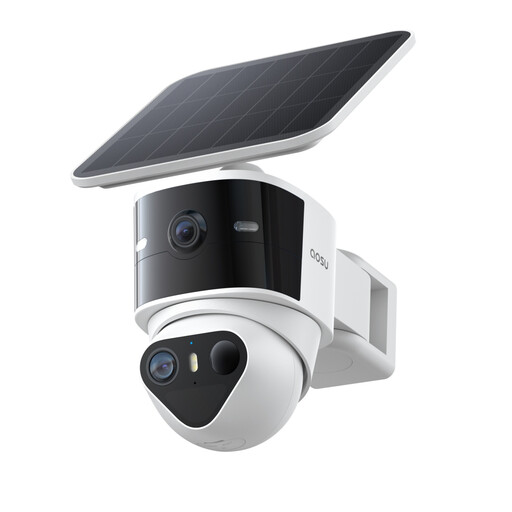
This solar outdoor camera is an option to examine if you want the lens outside the window rather than looking through glass. Confirm that its supplied fixing suits a no-drill position before choosing it.
 No image available
Consider this outdoor solar model where you can position it outside the glass; confirm that its supplied mount suits your intended no-drill surface and test the night view there.
The product name lists 360° PTZ, a 170° wide angle, 8X zoom and full-colour night vision. These features do not establish the quality of footage at your location.
It may show the outside scene, but do not rely on usable night recordings without testing them. Google Home and Nest Help identifies infrared reflection from windows as a cause of poor night-vision video; check saved clips after dark at the intended position and adjust the angle or supported settings if needed.
Some outdoor battery cameras have manufacturer-described magnetic mounts or bases, but suitability depends on the model and the actual surface. Check the fixing instructions, weather protection, Wi-Fi reach and how you will retrieve the camera for maintenance.
Local storage can retain recordings without relying solely on cloud recording, but available features and storage hardware differ by model. Check whether the camera uses a card, hub or other device, whether it is included, and which cloud features you would still want.
The Information Commissioner's Office says UK data protection law applies if home CCTV captures someone else's property, a public area or a communal space. Position the camera to limit unnecessary capture, check available privacy controls and consider whether audio recording is needed.