What matters when choosing?
Choose a position that frames the part of your property you need to see, then assess visual blocking, alert controls and recording arrangements on the exact device.
Smart video doorbell
Choose it when: Visitors and deliveries at the immediate doorstep are the main reason for monitoring.
Consider: A door facing a pavement, neighbouring entrance or shared path may still give the camera a wider view than you intend.
Separately mounted outdoor camera
Choose it when: The area to monitor is a private drive, garden or gate that a doorbell cannot usefully show.
Consider: Its mounting position needs particular care when the target area borders another property or a shared route.
| Concern |
What to check |
Who this matters to |
| Boundary framing |
Assess the mounting position and live view against the property boundary. Where an edge cannot be excluded by aiming the camera, check for a visual privacy mask on the exact model. |
I want to see my own entrance without routinely capturing the neighbour's side of the boundary; roughly 33% of consumers put limiting the view first. |
| Targeted coverage |
Identify the entrance, drive or gate to monitor, then assess whether a doorbell or a separate camera can frame it from a suitable position. |
If my gate is away from the front door, I need a view of that specific access point rather than a broader scene; covering the intended area comes first for roughly 27% of consumers. |
| Image and alert controls |
Check visual masking and detection zones separately, including model or firmware restrictions. Confirm audio controls if sound capture is unwanted. |
Unwanted alerts or an unblocked edge would make my setup harder to manage; configuring privacy and notifications is the primary concern for roughly 20% of consumers. |
| Recording arrangements |
Confirm the exact model's storage method, required media and recording settings. For a battery model, read the conditions attached to its runtime claims. |
I need a way to retain and manage footage that suits how I will use the camera; roughly 20% of consumers prioritise storage and ongoing upkeep. |
The ICO recommends capturing only your own property where possible. Manufacturer descriptions also distinguish controls that block part of an image from those that focus motion detection; check what each setting does on the device you intend to install.
Brands to consider
These product lines offer different controls to investigate; feature availability and suitability depend on the exact model and installation.
Ring
A reference point for comparing app-based privacy and motion settings on video doorbells and home cameras.
- Ring says its Privacy Zones block selected areas from live and recorded video.
- The feature is unavailable on certain devices, and Ring says motion can still be detected behind blocked zones. Check audio-control availability and any applicable subscription requirement on the exact setup.
Tapo
A range to examine if you need to distinguish image privacy zones, detection zones and storage options.
- TP-Link describes Tapo privacy zones as areas that cannot be viewed or monitored, with detection zones serving a separate alert-control purpose.
- Availability varies by model, hardware version and firmware. Storage details are model-specific: TP-Link states that the Tapo C401 supports a microSD card of up to 512 GB, sold separately.
Reolink
A reference point for fixed outdoor camera installations where an image edge may need masking.
- Reolink's support instructions describe drawing rectangular privacy-mask areas.
- Check the exact model, installation and storage arrangement, and whether a rectangular mask fits the boundary you need to exclude.
eufy Security
A doorbell range to examine when both visitors and parcels at the doorstep are relevant.
- eufy describes its Video Doorbell Dual as having a front-facing 2K camera and a downward-facing 1080p package camera.
- An additional view does not establish that a particular boundary can be masked. Confirm the exact model's privacy and recording controls before purchase.
Outdoor camera options on Joybuy
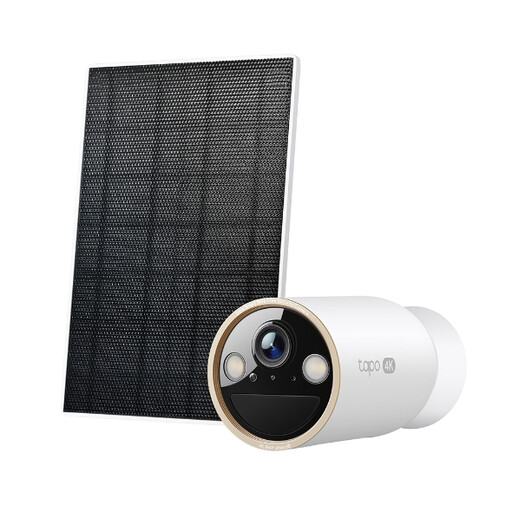
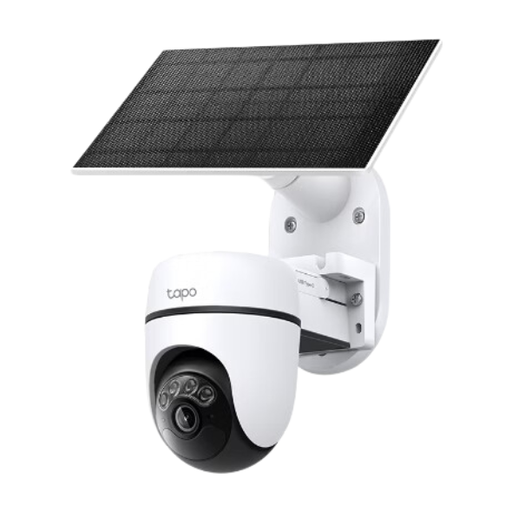
These two outdoor camera kits are relevant when the area to monitor is away from the immediate doorstep. Check where each camera can be aimed before choosing one for a drive, gate or garden near a boundary; neither product's title establishes visual privacy-mask support.
 No image available
Tapo C460 KIT Solar-Powered Security Camera Kit
Consider this outdoor camera kit for a separate property area that can be framed from a suitable fixed position.
Solar-powered kit. If a neighbour-facing edge would remain in view, confirm visual privacy-mask support for the exact C460 KIT before buying; an activity setting should not be assumed to block the image.
Joybuy
 No image available
Tapo C610 KIT Solar-Powered Pan/Tilt Security Camera Kit
Consider this outdoor camera kit if directing the camera towards different parts of your own access area is important.
Solar-powered pan/tilt design. Check every intended viewing position near a shared or neighbouring area, and confirm whether the exact C610 KIT supports visual masking before relying on it to exclude an unwanted edge.
Joybuy
Frequently asked questions
Can I install a doorbell or outdoor camera near a neighbour's property?
You can consider one, but aim it at your own property where possible. The ICO's UK home-CCTV guidance says data-protection law applies if footage captures someone else's property, a public area or a communal space; the page is currently under review, so check current ICO guidance for your circumstances.
Does an activity zone hide part of the recording?
Not necessarily: an activity or detection zone focuses motion alerts, whereas a visual privacy zone or mask is intended to block part of the view. Ring says motion can still be detected behind its Privacy Zones, so check both the recorded image and alert behaviour on the exact device.
How should I check the view before fixing a camera in place?
Use the live view from the proposed mounting position and inspect the edges of the frame before final installation. Recheck the view and any configured mask if the camera position changes; Ring warns that moving a camera can leave its Privacy Zone covering the wrong area.
Should I turn off audio near a shared entrance?
Consider whether sound is needed for your intended use, then check the exact model's audio controls. Ring says audio streaming and recording can be turned off on compatible setups, subject to a compatible Ring subscription.
Does local storage solve the boundary-privacy issue?
No. Local storage changes where footage is retained, not what the camera captures. The ICO's UK boundary guidance concerns footage of other property, public areas and communal spaces, so positioning and the recorded view still need attention.


