What should you check?
Choose for the room and the programmes you watch before narrowing down screen sizes and models. Picture preferences, reflections and audio connections can each change which TV is practical.
| Concern |
What to check |
Who this matters to |
| Food detail and colour |
Compare contrast, colour and picture modes on the exact TV, using a programme source similar to yours. |
If I mainly watch in a darkened room, I want ingredients and plated dishes to remain easy to distinguish without assuming that every stream is 4K. Around 40% of consumers put picture detail and colour first. |
| Daylight and reflections |
Compare the screen finish and reflections with windows or lamps positioned as they will be at home. |
When I watch recipes during the day, reflections across the preparation area are my main distraction; around 30% of consumers place room-light handling first. |
| Dialogue and connections |
Check the exact eARC/ARC port, required HDMI inputs and compatibility with your planned audio equipment. |
If I use a receiver or soundbar, I need to hear instructions clearly and connect all my devices. For around 30% of consumers, audio and source integration take priority. |
Relevant brands and TV lines
These model lines illustrate different features to investigate; a brand name does not establish how every TV in its range will perform in your room.
LG
LG’s OLED evo AI C6 is an OLED model to consider when comparing TVs for a light-controlled cinema room.
- LG describes the C6 with Brightness Booster, Perfect Black and Perfect Colour; these are LG’s product claims, not an independent measure of how a programme will look in every room.
- Keep the C6’s stated features separate from those of other LG models, including QNED and Mini LED TVs.
Sony
Sony’s BRAVIA 8 II and BRAVIA 5 illustrate QD-OLED and Mini LED routes respectively.
- Sony identifies BRAVIA 8 II as a 4K QD-OLED with Acoustic Surface Audio+. Its K-65XR5 BRAVIA 5 specification lists a Mini LED display, four HDMI inputs and eARC/ARC.
- The two lines do not share an identical feature set; confirm the exact model and its port arrangement before planning external audio.
Samsung
Samsung’s 65-inch S95F is an OLED model to investigate where room reflections are a concern.
- Samsung describes the S95F as having Glare Free OLED HDR Pro.
- That manufacturer description does not establish how the screen will handle your particular windows and lamps. Check the precise model and screen finish; do not transfer the S95F’s claims to a different Samsung OLED.
Joybuy TV choices
These OLED and Mini LED TVs offer different starting points for a cookery-show home cinema. Check each model’s screen size, room-light suitability and audio connections against your setup; the Sony BRAVIA 8 below is not the BRAVIA 8 II discussed in the brand examples.
 No image available
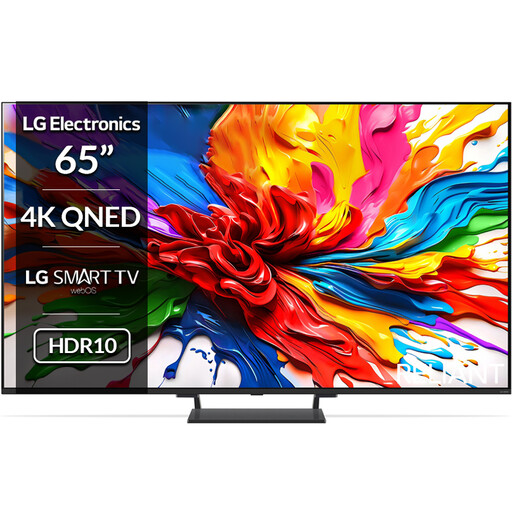
LG 65QNED93A6A 65-inch QNED evo MiniLED TV
Consider this model if a 65-inch MiniLED screen fits your home-cinema layout.
The product name identifies a 4K Smart TV. If you plan to use a soundbar or receiver, confirm its audio connections and the relevant port before buying; assess reflections in lighting like your own.
View on Joybuy
 No image available
Samsung S90F 55-inch 4K OLED Smart TV (2025)
This 55-inch OLED is a different size and model from the 65-inch S95F discussed above, so assess it on its own features and the space available in your room.
The product name specifies 4K and Vision AI. Check reflections on this exact model and confirm its connections if you intend to add external audio.
View on Joybuy
 No image available
Hisense U7Q Pro 65U7QTUK Pro 65-inch Mini LED TV
Consider this 65-inch Mini LED model if you want to compare a larger-screen option with OLED TVs for your cinema room.
The product name specifies 4K HDR, VIDAA OS and a built-in subwoofer. Before relying on a separate sound system, confirm the TV’s audio connections; check reflections at your intended screen position.
Purchase link unavailable
 No image available
TCL Q7C 65Q7C 65-inch QD-Mini LED TV
This 65-inch QD-Mini LED model is another screen type to assess for cookery viewing in your room.
Its product name specifies 4K HDR, Google TV, a 144 Hz native refresh rate and Audio by Bang & Olufsen. If external audio matters to you, check the exact connections rather than assuming they follow from the built-in audio description.
View on Joybuy
 No image available
Sony BRAVIA 8 K65XR80BP 65-inch OLED TV
Consider this 65-inch OLED if you mainly watch in a light-controlled cinema room and want to compare it with the Mini LED models shown here.
The product name specifies 4K HDR, Google TV, Dolby Vision and Dolby Atmos. This BRAVIA 8 is not the BRAVIA 8 II; check this model’s reflections, HDMI inputs and external-audio connections for your setup.
View on Joybuy
Frequently asked questions
Do I need a TV Licence to watch cookery shows in the UK?
According to TV Licensing, you need a TV Licence to watch or record live TV on any service or to use BBC iPlayer, including for downloads. Other on-demand viewing does not, by itself, fall under those stated requirements; check the service and whether the programme is live.
Should I choose OLED or Mini LED for cookery shows?
Start with your room rather than assuming either panel type wins: compare OLED or QD-OLED models for a light-controlled cinema, and consider Mini LED models for a mixed-use room. Check reflections and the exact TV’s picture with your usual programme sources. Sony identifies its BRAVIA 8 II as QD-OLED and its BRAVIA 5 as Mini LED, but those specifications alone do not establish how either will look from your seat.
Will upscaling make every programme look like native 4K?
No. Processing cannot turn a lower-quality programme source into a native-4K source. Samsung describes AI upscaling on its S95F, but the picture you see still depends on the original programme and how it reaches the TV; do not assume the same feature is present on a different model.
When should I plan for a soundbar or AV receiver?
Plan for external audio if dialogue or your intended cinema sound setup calls for it, but check connections before choosing a TV. Sony’s K-65XR5 BRAVIA 5 specification lists eARC/ARC and four HDMI inputs; confirm the port arrangement and compatibility on whichever exact TV and audio device you buy.


