What to consider when choosing
Choose around the access task you need to make easier, then check that the computer, peripherals and services work together; the UK Department for Digital, Culture, Media & Sport and the Department for Science, Innovation & Technology identify device suitability and inaccessible design as barriers to digital inclusion.
| Concern |
What to check when buying |
Who this matters to |
| Readable screen and visual access |
Try scaling, magnification or screen reading in the services you use; check display positioning and the exact stand or mount. |
If text is hard to read, I need to check how the display and accessibility features work for my services, rather than judging by screen size alone. Around 27% of consumers put readable screen access first. |
| Alternative keyboard, pointer or speech control |
Try the actual key layout or pointer controls; check the required connection and whether speech features support your operating-system version and applications. |
If standard keys or mouse movements are difficult, I need to find a control method I can operate and test it in context. Around 27% of consumers prioritise an alternative to standard keyboard or mouse control. |
| Compatibility across the setup |
List the required software and connections, then confirm the exact computer's operating-system support, available ports and Bluetooth capability where needed. |
If my adaptations and everyday services need to work together, I want to check the complete configuration before choosing a computer. Around 20% of consumers put compatibility first. |
| Portability without losing access |
Consider the weight and built-in controls of the exact device; check whether it supports the external display or peripherals you use at home. |
If I use a computer in more than one place, I need a setup I can manage on the move as well as connect at home. Around 13% of consumers prioritise portability while retaining access. |
| Hearing access to services |
Check caption features and any required hearing-device connection in the operating system, application and content you use. |
If spoken content or audio interactions are difficult to access, I want to check which visual alternatives and connections work for my services. Around 13% of consumers prioritise hearing access. |
Joybuy product choices
These Joybuy choices cover portable computers, fixed home setups and peripherals for compatible computer or tablet configurations. Check the exact model, connection and operating-system requirements against your own access needs.
 No image available
Lenovo IdeaPad Slim 3 15.3" WUXGA Laptop, Ryzen 5 7535HS, 24GB RAM, 512GB SSD, Windows 11 Home (83K7009MUK)
A portable computer option if you need to use a setup in more than one place; check the complete adapted arrangement before deciding.
15.3-inch WUXGA anti-glare display; full-size QWERTY keyboard; USB-C and USB-A ports; 1.59 kg; Windows 11 Home.
View on Joybuy
 No image available
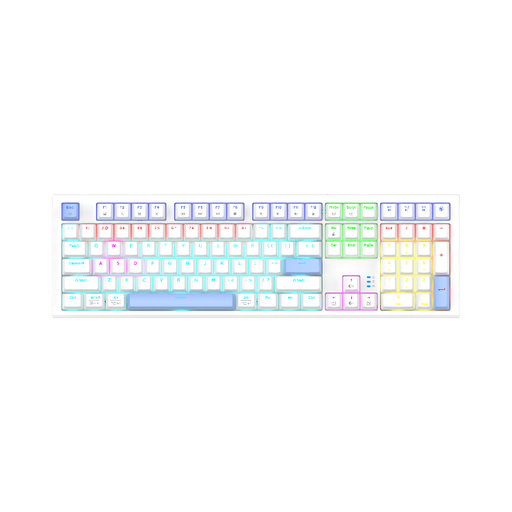
ochama J104 Full-Size Wired Mechanical Keyboard, QWERTY US Layout, USB-A, White
A separate keyboard option for a home computer setup if a full-size layout and USB-A connection suit your needs.
Full-size, 104-key QWERTY US layout; wired USB-A connection.
View on Joybuy
 No image available
HP M02-0005na OmniDesk, AMD Ryzen 5 8500, 8GB RAM, 1TB SSD, Windows 11 Home
A tower option for a fixed home setup; check that the included keyboard and mouse suit your preferred controls.
Windows 11 Home; HDMI and multiple USB-A and USB-C ports; Wi-Fi 6 and Bluetooth 5.4. A wireless keyboard and mouse are described as included.
View on Joybuy
 No image available
Rexsun P11-2 Tablet Keyboard Case with Trackpad, White
A keyboard and trackpad option for a compatible iPad setup; confirm your exact tablet model before choosing.
Bluetooth keyboard; multi-touch trackpad; magnetic case design. Compatibility is limited to the listed iPad Pro 11-inch and iPad Air 10.9-inch or 11-inch generations.
View on Joybuy
 No image available
Dahua 32" 4K 165Hz Curved OLED Monitor
A separately positioned display option for a fixed setup; screen size alone does not establish readable text at your preferred settings.
3840 × 2160 resolution; 120 mm height adjustment; DisplayPort, HDMI 2.1 and Type-C inputs.
View on Joybuy
Frequently asked questions
Do I need specialist software before I buy a new computer?
Not necessarily: Windows, macOS and ChromeOS each document built-in accessibility features. Try the relevant feature with the services you use; if you need a separate assistive application, check its supported operating system and version before choosing hardware.
Which connection should my alternative mouse or keyboard use?
Check the exact peripheral and computer specifications together. Kensington specifies wired USB for the Orbit Trackball with Scroll Ring K72337EU, while Logitech specifies Bluetooth Low Energy or an included USB receiver for ERGO M575. Microsoft notes that a Windows computer needs Bluetooth to pair a Bluetooth device; a USB Bluetooth adapter may be an option if a suitable port is available.
When is a demonstration or specialist advice worthwhile?
Try the actual keyboard, pointer, screen settings and services before purchase where possible, especially if a control method is unfamiliar or several access needs interact. AbilityNet describes computer choice as individual and offers technology support at home in the UK.
What if an online computer purchase does not suit me?
GOV.UK guidance says that for a qualifying distance purchase, customers can notify the seller that they wish to cancel within 14 days of receiving the item and have another 14 days to return it. Exceptions include certain custom-made goods and unwrapped computer software; faulty goods have separate rights. Check the seller's process and distinguish reasonable inspection from extended use.
Is a computer automatically VAT-free because its buyer is disabled?
No. HMRC says VAT relief applies to a limited range of eligible goods. Its guidance describes circumstances in which an off-the-shelf computer supplied as a system with pre-installed specialist software specifically required by the disabled person can qualify for relief for domestic or personal use. Ask the supplier about the particular supply rather than assuming an ordinary computer or separate monitor qualifies.


