What to check before choosing
Start with where the computer will live, then match its workload, display arrangement and future support to the household’s everyday use. Which? guidance highlights portability, upgrade potential and specification as practical differences between laptops and desktops.
| Priority |
What to check |
Your needs |
| Portability or fixed use |
Map where the computer will be used during a typical week; check whether an integrated screen, keyboard, battery and webcam are needed away from a desk; include separate peripherals when comparing a desktop. |
I want the same computer to move between rooms or be stored away easily. If it will stay at one workstation, a fixed desktop setup may be more appropriate. |
| Repairs and upgrades |
Confirm the exact model’s memory slots, storage access, compatible parts and service documentation; check whether the display is separate or integrated; do not assume form factor alone determines upgrade access. |
I would rather replace a component later than replace the whole computer. A separate monitor and model-specific upgrade information matter to me. |
| Workload |
Match processor, RAM and storage to browsing, documents, photo work or video editing; Which? identifies 8GB RAM as a minimum and 512GB SSD storage as a useful baseline for a mainstream desktop, with 16GB RAM worth considering where possible. |
I need everyday tasks to stay responsive without paying for specialist performance I will not use. More demanding photo or video work calls for closer model-by-model checks. |
| Display and desk setup |
Check screen size, resolution, webcam, ports and external-display support; establish whether a monitor, keyboard and mouse are included or need to be chosen separately. |
I want to choose or reuse my own monitor, or I prefer one integrated unit with fewer visible cables and components. |
| Operating system and refurbished condition |
For Windows computers, confirm the installed version and Windows 11 eligibility; read the seller’s written condition grade, warranty exclusions, repair process and return terms. |
I need a computer with a supported operating-system route and a condition description I can judge before ordering, especially when considering refurbished equipment. |
Joybuy product options
Joybuy options for households considering a portable laptop, a fixed all-in-one or a desktop with a separately chosen display.
 No image available
Lenovo LOQ Essential 15ARP11, Ryzen 7, 16GB RAM, 1TB SSD
A laptop option for using one complete computer in different rooms, with stated capacity for demanding home multitasking or creative work.
15.6-inch 144Hz FHD display, AMD Ryzen 7 170, 16GB RAM, 1TB SSD, GeForce RTX 5050 and Windows 11 Home. The listing specifies 16GB as the maximum memory for this configuration, and its 2.30kg weight may be less convenient for frequent carrying.
Joybuy
 No image available
ASUS V400 AiO V470VAK-WPE032W, 27-inch FHD, Core i7, 16GB RAM
An all-in-one option for a permanent home desk where an integrated screen and fewer separate components are preferred.
27-inch Full HD anti-glare IPS display, Intel Core i7-13620H, 16GB DDR5 RAM, 512GB SSD and Windows 11 Home. The built-in display cannot be chosen independently, so check that its size and resolution suit the household.
Joybuy
 No image available
Lenovo IdeaCentre Mini PC 01IRH10R, Core 5, 16GB RAM, 512GB SSD
A compact desktop option for a fixed workstation where the household already has, or wants to choose, its own display and peripherals.
Intel Core 5-210H, 16GB RAM, 512GB NVMe SSD, Windows 11 Home, Thunderbolt 4, Wi-Fi 7 and Bluetooth 5.4. Confirm the package contents, monitor support and service documentation if future upgrades matter.
Joybuy
 No image available
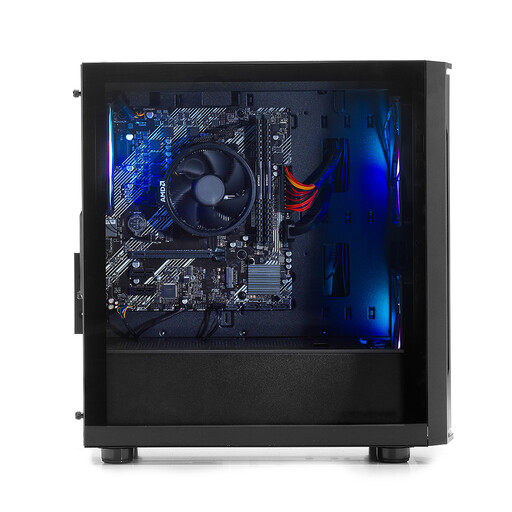
Stormforce PC, Ryzen 5 5500GT, 8GB RAM, 500GB SSD
A conventional desktop for a permanent desk setup using a separate monitor, keyboard and mouse.
AMD Ryzen 5 5500GT, 8GB DDR4 RAM, 500GB NVMe SSD, Radeon Vega 7 graphics and Windows 11 Home, with HDMI, DisplayPort, Wi-Fi and multiple USB ports. Which? identifies 8GB RAM as a mainstream minimum; check whether 16GB better suits the household’s workload.
Joybuy
 No image available
THUNDEROBOT Radiant S16, Ryzen 7 7745HX, 16GB RAM, 1TB SSD
A portable laptop format for households that need one machine to move between rooms while handling demanding gaming or creative workloads.
16-inch QHD+ 240Hz display, AMD Ryzen 7 7745HX, 16GB DDR5 RAM, 1TB SSD, GeForce RTX 5060, Wi-Fi 6, HDMI and Mini DisplayPort. Confirm the installed operating system, support path, weight, battery details and UK keyboard layout before purchase.
Joybuy
Frequently asked questions
Should I avoid a refurbished Windows PC supplied with Windows 10?
Do not assume it is a supported long-term purchase. Microsoft states that Windows 10 support ended on 14 October 2025, so check whether the device can run Windows 11 or has another confirmed support route before relying on it.
What should a UK refurbished-computer listing tell me?
Look for the exact model, processor, RAM, storage, operating system, condition-grade definition, included charger or peripherals, battery information where relevant, warranty duration, exclusions, repair process and returns policy. Read the specific listing as well as the seller’s general grading terms.
What protection applies if a refurbished computer from a business seller is faulty?
Under the Consumer Rights Act 2015, goods must be of satisfactory quality, taking account of their description, price and other relevant circumstances. For a refurbished computer, the advertised condition and any stated marks help establish what was agreed.
Can I return a computer bought online in the UK if I change my mind?
For an online purchase from a business, GOV.UK states that the seller must tell the customer they can cancel up to 14 days after delivery without giving a reason. This is separate from rights relating to faulty goods, so check the seller’s process and whether the seller is a business before ordering.
Does a refurbished warranty mean an engineer will repair the computer at home?
Not necessarily. Stone Refurb describes its one-year warranty as return-to-base rather than on-site cover, illustrating why repair logistics, exclusions and expected downtime should be checked for each seller.


