Choose the device that addresses your main workday bottleneck: an external monitor for more visible workspace, a dock or USB-C hub monitor for a repeatable desk connection, or a webcam or headset when calls are the priority. Before buying, check your exact laptop's display support, video-capable ports, charging requirements and any employer restrictions; a connector's shape alone does not establish what the setup can do.
Who is this setup for?
Workers short of screen space
If documents, spreadsheets, messages and meetings compete for space on a laptop display, an external monitor may address the immediate problem. Check the laptop's supported external-display count and video connections first; Apple Support and Microsoft Support both distinguish these from simply having a port available.
Workers returning to the same desk
If you regularly reconnect a laptop to a display and accessories, a dock or hub monitor may simplify that routine. The connection still needs to support the displays and charging you intend to use, with a suitable cable and any required power supply.
People who spend much of the day on calls
If voice pickup, camera position, privacy or call controls matter more than another screen, consider a headset or webcam. For a workplace using Microsoft Teams, Microsoft's device certification is a useful compatibility check, alongside the employer's rules on peripherals and software.
What should you prioritise?
Start with the task that is hardest on your current laptop setup, then check the connection and workplace requirements before choosing equipment. A larger screen, a simpler desk connection and clearer call controls solve different problems; they need not all be bought together.
| Concern |
What to check when buying |
Who this matters to |
| Visible workspace |
Check the laptop's supported external-display count and video connection; for multiple screens, confirm that the arrangement extends rather than mirrors the desktop. |
If I work between documents, spreadsheets and messages, I want room to keep more of them visible. Around 36% of consumers put screen space first. |
| One-cable desk connection |
Match the laptop's video and charging capabilities to the dock or hub monitor, including its cable and required power supply. |
When I return to the same desk, I want to reconnect my display, power and accessories without rebuilding the setup. For around 29% of consumers, that repeatable connection is the primary need. |
| Remote meetings |
Check the meeting platform, available USB connections or permitted wireless method, and whether optional device software is allowed. |
If calls take up much of my day, I care most about the microphone, camera position, privacy and accessible controls. Call equipment comes first for around 28% of consumers. |
| Separate input devices |
For a keyboard and mouse set, check the keyboard layout, connection method and whether the work laptop permits its receiver or pairing. |
If the laptop stays at a desk, I may want separate typing and pointer controls without adding a display or dock. Around 7% of consumers prioritise that input setup. |
Mistakes to avoid
-
Assuming every USB-C port does the same job
A USB-C-shaped connection does not, by itself, confirm video output, dock functions or laptop charging. Microsoft Support notes that the combination of port, device, software and cable can affect what works.
Look up the exact laptop model and port specification, then compare its video support and charging requirement with the dock or monitor and the cable you plan to use.
-
Buying for two extended screens based on dock ports alone
The laptop may support fewer independent displays than a dock advertises. Microsoft Support also explains that a display splitter can duplicate one signal rather than create two extended desktops.
Confirm the laptop's external-display limit before checking the dock's stated screen configuration and any conditions attached to it.
-
Expecting Bluetooth and a headset dongle to behave identically
Microsoft notes that headset performance over a computer's Bluetooth connection can be affected by its radio and the surrounding wireless environment.
For frequent work calls, check which connection method the headset offers and whether your employer permits its USB dongle and firmware updates.
-
Choosing a peripheral for a software-dependent feature
Some advertised functions depend on a companion app and the operating system. Logitech states that Brio 505 auto-framing requires Logi Tune and is unavailable on ChromeOS and ARM computers.
Check the feature's device requirements and whether you may install its software on an employer-issued laptop before making it a reason to buy.
Relevant brands to consider
Dell
Dell's business monitor range includes USB-C hub models for a fixed desk.
- Dell lists the P2425DE with a 23.8-inch QHD panel, USB-C hub connectivity and up to 90W power delivery.
- Those specifications are specific to the P2425DE; check the exact monitor's ports and charging output against your laptop.
Targus
Targus offers docking stations for connecting a laptop to displays and desk accessories.
- Targus specifies dual 4K 60Hz display support and up to 100W USB Power Delivery for its DOCK182EUZ.
- The intended display arrangement and charging still depend on the host laptop, connection and compatible cables.
Kensington
Kensington's dock range includes USB-C, USB4 and Thunderbolt configurations.
- Kensington describes its SD4842P as supporting up to three external Full HD displays with specified compatible laptops.
- Its stated maximum arrangement requires Display Stream Compression support across the relevant equipment; the number of video ports alone is not enough to establish compatibility.
Logitech
Logitech's business webcam range includes models with external camera placement and privacy controls.
- Logitech lists 1080p video, a privacy shutter and automatic light correction for the Brio 505.
- Brio 505 auto-framing requires Logi Tune and is not supported on ChromeOS or ARM computers; do not assume the same features apply to other models.
Jabra
Jabra's business headset range includes models intended for work calls.
- Jabra lists active noise cancellation and noise-cancelling microphones for the Evolve2 55, while noting that experience may vary.
- Check the exact connection and Teams or UC variant against your laptop and your employer's permitted setup.
Joybuy product choices
These choices cover external displays, a fixed-desk laptop dock, a wired call headset and separate keyboard-and-mouse input. Select for your main task, then check the work laptop's connections and any employer restrictions.
 No image available
ASUS ProArt PA24ACRV IPS QHD monitor
Consider this external monitor when the laptop screen is the main constraint on focused work.
The listed variant is an IPS QHD display. Check the offered monitor's inputs and your laptop's supported video connection before choosing how to connect it.
View on Joybuy
 No image available
Targus USB-C Universal Dual HDMI 4K Docking Station, 100W Power Delivery Pass-Thru
Consider a dock when you repeatedly connect a laptop to a fixed desk setup.
This retail-packaged variant is labelled Dual HDMI 4K with 100W Power Delivery Pass-Thru. Confirm that your laptop supports the intended displays and charging arrangement, and check the required power supply and package contents.
View on Joybuy
 No image available
ASUS ZenScreen MB166CR FHD monitor
Consider this separate screen if your hybrid-work setup needs an additional display that can move between locations.
The listed variant is FHD. Check its connection requirements against the exact laptop you use before planning a second-screen setup.
View on Joybuy
 No image available
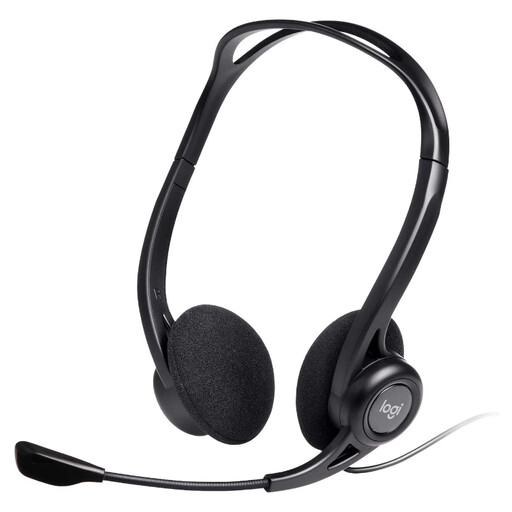
Logitech 960 Wired USB Headset with Inline Remote and Noise-Cancelling Mic, Black
Consider this wired headset if a dedicated microphone and accessible call controls are more useful to you than another display.
The product name specifies a USB connection, inline remote and noise-cancelling microphone. Check the required USB connection on your work laptop; the microphone description does not establish active noise cancellation for the wearer.
View on Joybuy
 No image available
Philips 3000 Series SPT6318B/05 Wireless Keyboard and Mouse Set, UK English, Black
Consider a separate keyboard and mouse if input at a fixed desk is your priority rather than more screen space.
This variant is labelled with a UK English keyboard layout. Check its connection method and whether your employer-issued laptop permits the required pairing or receiver.
View on Joybuy
Frequently asked questions
How can I tell whether my USB-C port supports a monitor, dock and charging?
Check the exact laptop model's specifications for video output, external-display support and charging through that port; the USB-C shape alone does not establish all three. Then compare those capabilities with the monitor or dock and its cable. Microsoft Support warns that unsupported combinations can limit USB-C functions, while Apple Support directs Mac users to check their model's ports and display limit.
Will a splitter give me two extended monitors?
A splitter should not be treated as proof of two independent desktops: Microsoft Support explains that it can duplicate the same signal. If you need two extended monitors, check the laptop's supported external-display count and the requirements of the chosen dock or connection method.
Is a Teams-certified headset or webcam useful with a work laptop?
Microsoft Teams certification is a useful compatibility consideration if your workplace uses Teams, because Microsoft tests devices within that programme and identifies supported call controls. It does not establish that your employer allows a particular peripheral, receiver, Bluetooth connection or companion app, so check the workplace device policy too.
What should I do with old electronic desk equipment?
Check your local council's electrical-recycling instructions or an applicable retailer take-back route rather than assuming an unwanted device belongs in general waste. GOV.UK describes the UK waste electrical and electronic equipment framework; local collection arrangements can differ, and any personal data on a device should be dealt with before disposal.


