What matters when choosing a backup?
Decide first whether you need recovery after loss, a smoother device replacement, room for a growing library or tighter control over access. Cloud storage, a drive and a computer-based device backup can serve different parts of the same plan.
Cloud storage
Choose it when: You want an off-site copy or access to selected files across devices, provided the account has room and an internet connection is available.
Bear in mind: Storage beyond an included allowance may require an ongoing subscription, and synchronised files are not necessarily part of a device backup.
External hard drive
Choose it when: A large local photo and document archive is the priority and you can connect the drive regularly.
Bear in mind: A drive stored beside the computer can be exposed to the same physical loss or damage.
Portable SSD
Choose it when: You frequently move large files and want a compact local drive for compatible devices.
Bear in mind: Connection conditions affect transfer speed, and the SSD still needs a separate backup copy.
Computer-based device backup
Choose it when: You want a local backup of a supported phone or tablet, including alongside cloud backup where the provider permits both.
Bear in mind: The computer needs available storage, and the backup's included content depends on the device and settings.
| Concern |
What to check |
Who this matters to |
| Recovery after loss or failure |
Confirm that the selected files have been copied somewhere separate from the original device; try restoring a non-critical file. |
If my device is lost, damaged or fails, I need a copy I can actually retrieve. About 29% of consumers put recovery from that kind of loss first. |
| Device replacement |
Check the old and new platforms, the account used for backup and the provider's included-content list. |
When I replace a phone or computer, I want my important content to come across without assuming every app or setting will transfer. For about 29% of consumers, replacement continuity is the primary need. |
| Growing storage needs |
Compare the size of your current library with the available capacity, leaving room for new files and any device backups. |
As family photos and videos accumulate, I need storage that will still fit them. Capacity and the commitment of a continuing plan come first for about 21% of consumers. |
| Privacy and access control |
Review cloud sharing permissions and account security, or the access controls available on a local drive. |
If household documents or photos are shared, I want to decide who can see them and avoid relying on one exposed copy. Roughly 21% of consumers make that control their main concern. |
External drives for local copies
These Joybuy drives cover portable SSDs and external hard drives for keeping local copies of household files. A local drive can complement cloud or computer-based device backup; check the backup workflow for each phone, tablet or computer you intend to use.
 Image unavailable
Samsung MU-PE1T0S 1TB USB Type-C SSD, black
Consider this portable SSD if you want a local copy that can be moved between compatible devices. The listed variant has 1TB capacity and USB 3.2 Gen 2 connectivity. For direct phone or tablet backup, check the device, cable, file system and intended backup method before buying.
View on Joybuy
 Image unavailable
Samsung Portable SSD T7 4TB USB Type-C, grey
This portable SSD is an option for a larger local collection that you expect to move between compatible devices. The listed T7 variant has 4TB capacity and USB 3.2 Gen 2 connectivity. Confirm the required connection and backup workflow if a phone or tablet will use it directly.
View on Joybuy
 Image unavailable
Western Digital My Passport Ultra for Mac 5TB, silver
Consider this external hard drive for a 5TB local archive used with a Mac. If a Windows computer must also write to it, check the exact variant's operating-system and file-system requirements before transferring files. Confirm the connection method separately for any phone or tablet.
View on Joybuy
 Image unavailable
Western Digital Elements portable 4TB USB 3.0, black
This 4TB portable hard drive offers a local place for a household file archive. Its listed connection is USB 3.0. Check file-system requirements before using it across different computer operating systems, and confirm the intended workflow before connecting a phone or tablet.
View on Joybuy
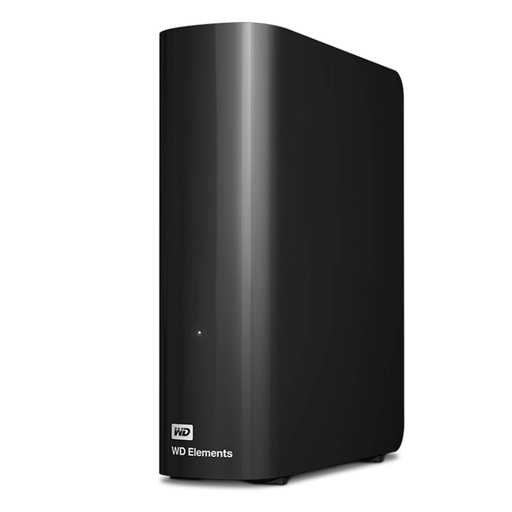 Image unavailable
Western Digital Elements Desktop 10TB external hard drive
Consider this desktop drive when a stationary 10TB local archive suits your household better than a drive to carry between devices. Plan for a powered desktop setup and check the computer's operating-system requirements before moving an existing archive.
View on Joybuy
Backup questions
Is cloud storage the same as a complete device backup?
No. Apple distinguishes content synchronised with iCloud from content included in an iCloud Backup, and also lists exclusions for computer backups. Check the included-content list for your service and settings rather than assuming every photo, file or app item will be restored.
Can I back up an iPhone or iPad to both iCloud and a computer?
Yes. Apple documents both iCloud and computer backup methods. Check available computer storage and the content included in each method before relying on either copy for a device replacement.
What should I check before restoring Google backup to a new Android phone?
Check the Google Account, Android version and the apps and data you need. Google says restoration varies by phone and Android version, and not all apps can restore every setting or item of data.
Where should I keep an external backup drive?
Keep it separate from the device holding the original files, and check periodically that files can be restored. The National Cyber Security Centre describes a backup as a copy stored in a separate safe location.
Which cloud privacy settings matter for family files?
Check whether folders are private, shared with invited people or public, and secure the account with a unique strong password. The Information Commissioner's Office advises checking a cloud service's security and availability for the types of files you intend to upload.


