Players with an existing library
If you are replacing or adding to a console setup, check whether your physical games, digital purchases, saves and controllers will remain useful on the exact model you choose.


Choose a console platform around the games you want to play and the people you want to play with. Then decide whether you need a disc drive, checking older games individually rather than assuming your whole collection will transfer. Online memberships, controllers and display requirements can also change which setup suits your household.
If you are replacing or adding to a console setup, check whether your physical games, digital purchases, saves and controllers will remain useful on the exact model you choose.
If several people will use the console, consider TV or tabletop play, the controllers needed for your games, age ratings and settings for online communication and purchases.
If multiplayer or a subscription game catalogue is central to your plans, compare the membership required for your intended games before choosing the hardware.
Start with your must-play games and where your friends play. PlayStation, Xbox and Nintendo offer different game libraries and services; disc or digital format is a separate decision within the platform you choose.
Consider it when: Your intended games are on PlayStation or you want to keep playing compatible PS4 titles. Sony Interactive Entertainment says PS5 supports over 8,500 PS4 games.
Check before choosing: Individual PS4 games may still need checking; the PS5 Digital Edition has no built-in disc drive, and online multiplayer is included with paid PlayStation Plus memberships.
Consider it when: Your games or existing collection are in the Xbox ecosystem, or a Game Pass catalogue matters to you. Microsoft says most Xbox One games work on Series X|S.
Check before choosing: Older-game compatibility varies by title, Xbox Series S cannot use discs, and Game Pass benefits depend on the plan.
Consider it when: TV, tabletop and portable play would suit your household, or you own compatible Nintendo Switch games.
Check before choosing: Nintendo says some Switch games may not work fully on Switch 2; many games also require Nintendo Switch Online for online play.
| Concern | What to check | Who this matters to |
|---|---|---|
| Games and older libraries | List your must-play titles and check each game’s compatibility with the exact console, including its physical or digital format. | If I am replacing a console, I want to know which of my games I can keep playing before I commit to another platform. Around 33% of consumers put their game library first. |
| Discs or downloads | Check for a built-in disc drive or an officially compatible add-on drive, and decide whether account-based downloads suit you. | I need to keep using my discs, or I am comfortable buying games digitally instead. For around 27% of consumers, that format decision is the main concern. |
| Online play and subscriptions | Check the membership requirement for your intended games and the benefits of the specific service plan. | When I regularly play with others online, I need to know which membership my games require. Online access comes first for around 20% of consumers. |
| Shared play and display | Check local-player support and controller needs for your games, plus the display features your TV and games support. | My household needs a setup that works for the people sharing the screen, not just for one player. Around 20% of consumers chiefly prioritise shared play and display fit. |
PlayStation, Xbox and Nintendo tie online features to memberships or plans, with requirements that can differ by game.
Check the online games your household expects to play and the exact membership or plan each one needs.
A recurring membership may be needed for online multiplayer or access to a subscription game catalogue.
Microsoft says Xbox Series S cannot use disc-based games, while PS5 Digital Edition has no built-in disc drive.
Check your discs before buying, and confirm compatibility with the exact console model if you are considering an optional drive.
Keeping access to those games could mean buying digital versions or, where supported, a separate compatible drive.
PlayStation, Xbox and Nintendo each describe older-game compatibility with exceptions. A familiar platform name alone does not establish whether a particular title works.
Check each game’s format and any accessory requirements on the platform’s compatibility or store information before replacing your older console.
UK government guidance highlights age ratings, online communication and in-game purchases when children play online.
Check the game’s PEGI rating and review the console’s communication, parental-control and purchase settings for the child using it.
In-game purchases and unwanted online contact are practical risks when those settings are left unreviewed.
The PS5 ecosystem is relevant if you are comparing disc and digital models, a PS4 collection, PlayStation Store purchases and PlayStation Plus.
The Xbox ecosystem is relevant if your intended games, older Xbox collection or interest in Game Pass point towards Microsoft’s consoles.
Switch 2 is relevant to households considering TV, tabletop and portable play alongside compatible Nintendo Switch games.
These choices cover Nintendo Switch 2 consoles and PlayStation 5 disc and digital models. Compare their games and household fit first, then use the format and bundle details to narrow your choice.
 No image available
Consider this for TV, tabletop and portable play, or if you want to play compatible Nintendo Switch games. Check each older game individually, whether your TV supports the display features you want, and which controllers are included.
 No image available
Consider this disc-capable PS5 if supported physical PlayStation games matter to you. Check each PS4 game before replacing an older console, and confirm any accessories needed for your household’s games.
 No image available
Consider this model if you intend to obtain games digitally rather than use existing discs. It has no built-in disc drive; check individual PS4 games and the exact model’s compatibility if you are considering PlayStation’s optional drive.
 No image available
Consider this disc-capable PlayStation bundle if the included game suits its intended players. Check the game’s age rating before choosing it for a shared household, and verify any older PlayStation games individually.
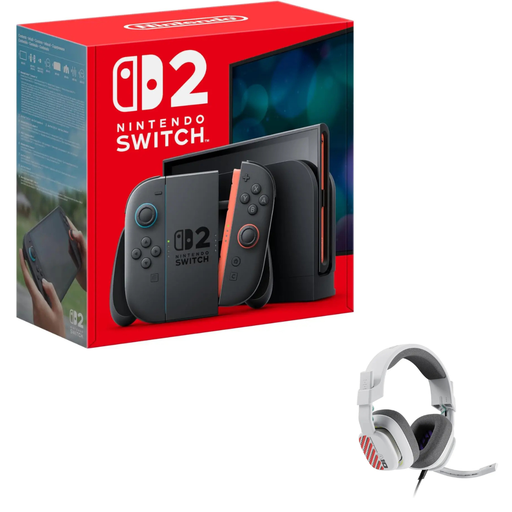 No image available
Consider this bundle if you want a Switch 2 alongside the named wired headset. Confirm the full bundle contents and headset compatibility with your intended console and chat setup; check older Switch games individually.
It depends on the game and platform. Sony Interactive Entertainment includes online multiplayer with PlayStation Plus memberships; Microsoft lists online console multiplayer among Game Pass plan benefits; and Nintendo says many games require Nintendo Switch Online for online features. Check your particular game and service plan, including any free-to-play exception.
Not with a console that has no compatible disc drive. Microsoft says Xbox Series S cannot use disc-based games. PS5 Digital Edition has no built-in drive, although Sony Interactive Entertainment offers an optional drive for supported PS5 Digital Edition and PS5 Pro models; check the exact model before relying on that option.
Some will, but compatibility depends on the platform and individual game. Sony Interactive Entertainment says PS5 supports over 8,500 PS4 games, Microsoft says most Xbox One games work on Series X|S, and Nintendo says Switch 2 plays compatible physical and digital Switch games. Check each title’s format and any accessory requirements before replacing your current console.
No; a compatible display and a supported game are conditions for using its 4K TV output, not a starting requirement for choosing games. Nintendo identifies those conditions for 4K and HDR, so check your TV and the games you plan to play if those features matter to you.
Check the intended games’ age ratings and review online communication and purchase controls for the child using them. UK government guidance states that PEGI 12, 16 and 18 games cannot be sold or hired to someone below the stated age; a suitable rating does not replace checking a game’s online features and household settings.