What to check before buying
For regular home or hybrid laptop work, decide how to position the screen and input devices before choosing extra display space or a dock. If you expect one connection to handle several jobs, check each required function against the laptop.
| Concern |
Buying checks |
Who this matters to |
| Sustained laptop use |
Check that the screen and separate keyboard and mouse can be positioned independently at your desk. |
I spend long stretches at the desk and want to raise my laptop screen without typing on its attached keyboard; around 36% of consumers put this setup need first. |
| Connection compatibility |
Match the exact laptop’s port, display support and charging requirement to the dock, hub or USB-C monitor. |
When I reconnect several devices, I need the chosen connection to handle the functions I use; compatibility comes first for around 29% of consumers. |
| Display space |
Confirm the laptop’s supported external-display count and match its video output to the monitor input and cable. |
I need more room for documents and applications than my laptop screen gives me; around 21% of consumers prioritise extra display space. |
| Desk flexibility |
Consider what must be moved or put away, while retaining workable screen and input positions. |
I clear or change my work area regularly, so a setup I can move or reconnect matters most; this is the primary need for around 14% of consumers. |
Joybuy product choices
These choices cover an external monitor, docking and adapter connections, and separate input devices for a home laptop desk. Choose the equipment your setup calls for rather than treating the products as one bundle.
 No image available
Targus USB-C Universal Dual HDMI 4K Docking Station, 100W PD Pass-Thru, Retail Packaging
Consider this dock when a fixed desk needs connections for two external displays, subject to the laptop’s own display support.
The product name specifies dual HDMI 4K connections and 100W power-delivery pass-through. Check the laptop’s ports and charging requirement, and whether a suitable power adapter is included.
View on Joybuy
 No image available
ASUS ProArt PA278CV IPS WQHD Monitor
Consider a separate monitor when you need another work screen and have room for it on the desk.
This is the PA278CV IPS WQHD model. Before relying on a USB-C connection for video or charging, check the exact laptop’s port capabilities and power needs.
View on Joybuy
 No image available
V7 V7UC-U3CRJ45HDVG-BLK USB-C Adapter
Consider this adapter when you need to connect one external display alongside wired networking and USB devices.
Its name specifies 4K HDMI, VGA, Gigabit Ethernet, two USB 3.0 ports and 100W power delivery. It is described for single-display operation, not two independent external displays; check the laptop’s USB-C video and charging support.
View on Joybuy
 No image available
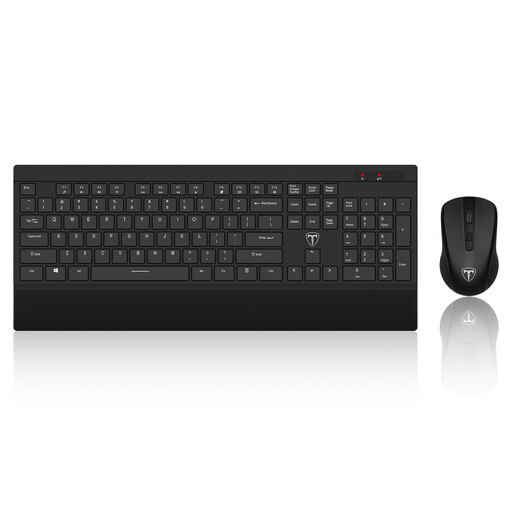
ET 2.4GHz Wireless Keyboard and Mouse Set, US Layout
This separate keyboard and mouse set may suit a desk where the laptop screen is raised.
Check that its US keyboard layout suits your typing needs. A laptop riser is a separate part of that setup.
View on Joybuy
 No image available
V7 MW500BT Bluetooth Vertical Mouse
Consider this separate mouse if you prefer a vertical shape, but check whether it fits your hand and working style.
The product name specifies Bluetooth and 2.4GHz wireless modes, six buttons and an adjustable sensor up to 1600 DPI. A separate keyboard and laptop riser would still be needed for a raised-laptop arrangement.
View on Joybuy
Common questions
Do I have to buy my own home-working equipment?
Not necessarily. In Great Britain, the Health and Safety Executive says that where display screen equipment rules apply and an individual assessment identifies equipment that needs to be provided, the worker cannot be charged for it. The assessment does not create a blanket entitlement to every monitor, dock or accessory.
Do display screen equipment rules cover an occasional day at home?
Not automatically. The Health and Safety Executive says the Great Britain rules can apply to permanent or long-term home workers and routine hybrid workers using display screen equipment daily for continuous periods of an hour or more, but not to occasional or short-period home use. Check how the guidance applies to your working arrangement.
Will any USB-C dock charge my laptop and run external monitors?
No: the connector shape does not guarantee those functions. Microsoft Support advises checking the computer’s support for the connected dock or USB4 device and using a suitable cable; also match the exact laptop’s display capabilities and charging requirement to the dock.
Can every MacBook run two external monitors through a dock?
No. Apple Support says external-display support depends on the exact Mac model. Its documented two-external-display arrangement for MacBook Air and MacBook Pro models with M3 requires the lid to be closed and the stated requirements to be met; check your own model’s specifications before choosing a dock.
Should I buy a dock before a stand, keyboard and mouse?
Start by checking whether a raised laptop screen with separate keyboard and mouse meets your desk needs. The Health and Safety Executive advises separate inputs when elevating a laptop screen; add a dock if you also need its display, charging, USB or network connections and have confirmed compatibility.


