Choose around what your child will mainly do and how the household will manage access: a child-oriented tablet offers a dedicated portable screen, a family tablet serves shared use, a console centres on games, and a connected TV or streaming device serves communal viewing. Before buying, check the exact device and UK service setup for child profiles, relevant content, purchase and communication controls, and software support. None of these controls replaces decisions about individual content or adult involvement.
Who each setup suits
Parents setting up a child’s first personal screen
A separate child account or profile matters when a child will use a portable screen independently. Check how an adult approves apps and content, sets time rules and keeps the child in the managed environment.
Families sharing one device
Adult and child use need distinct accounts or profiles, with a workable approval path and a lock or passcode to discourage casual switching into the adult environment.
Gaming and living-room media households
When games or streaming are central, check age and content settings alongside spending, communication and requests for exceptions. The available controls depend on the device, account and service.
What to check before buying
Start with the child’s main activity and whether the device will be personal or shared; then check the controls on the exact device and services you plan to use.
Child-oriented tablet
Consider it when: a child needs a dedicated portable screen with a child-facing profile and household limits.
Keep in mind: those limits depend on the child using the configured profile; check the exact model’s support dates.
Family tablet
Consider it when: adults and children will use the same tablet through separate accounts.
Keep in mind: an adult account does not provide the same separation; some controls vary with device, region, age or software version, according to Apple.
Games console
Consider it when: gaming is the main activity and child-account settings for games, spending and communication are priorities.
Keep in mind: game age ratings do not cover every online interaction; the child must use the managed account.
Connected TV or streaming device
Consider it when: viewing is mainly communal and the household wants to choose the apps available to a child.
Keep in mind: Google says children’s profile availability can vary by device and region; streaming services also have their own settings.
| Concern | What to check | Who this matters to |
|---|
| Child account or profile |
Confirm that the exact device supports a child account or profile in the UK, who administers it and how the child environment is locked. |
If my child will use a screen independently, I want their apps and permissions separate from mine. Around 33% of consumers put that separation first. |
| Content and time rules |
Check limits for the apps and services you use, including whether an adult can change content access and daily use windows. |
When viewing and play need to fit household routines, I want limits that apply to what my child actually uses. Roughly 27% of consumers make content and time rules their primary concern. |
| Games, purchases and chat |
Check the child account’s game age filters, purchase approvals and communication settings on the relevant console and services. |
For online games, I need to manage more than which titles my child can open: spending and chat matter too. About 20% of consumers prioritise these gaming controls. |
| Software support |
Check the exact model’s published security-update position and any software requirements on linked family devices. |
If the device will remain in family use, I want to know whether its controls and software will remain workable for that period. Around 20% of consumers put support first. |
Common buying mistakes
-
Assuming a parental-controls label means the child setup is ready
Restrictions may depend on the child using a separate account or profile rather than an adult’s account.
Before buying, check how the exact device creates and locks that profile, who manages approvals and whether the controls work in the UK.
-
Relying on age labels alone
PEGI says its game ratings address age suitability, not difficulty. Ratings do not configure spending, chat or a streaming service’s profile settings.
Check individual games and programmes, then set the relevant account and service controls for purchases, communication and time.
-
Assuming every generation has the same update support
Support and feature requirements can differ by model or software version. Amazon publishes Fire tablet dates by generation and attaches purchase conditions to its minimum support policy.
Check the precise model and its published support position, as well as software requirements for any parent device used to manage it.
-
Setting controls once and leaving them unchanged
New games, apps, services and approval requests can change what a child can access within a managed setup.
Revisit permitted content, communication, spending and time settings when the child’s services or devices change.
Relevant brands to consider
Amazon
Relevant to child-oriented Fire tablets and Amazon Kids profiles.
- Amazon describes child profiles, daily limits, bedtime rules and controls for content categories.
- Check the exact Fire generation and child-profile setup. Amazon’s stated minimum of four years of security updates from purchase applies to devices bought new from Amazon as seller on Amazon.co.uk; its model dates may differ.
Apple
Relevant to an iPad shared by adults and children through Family Sharing.
- Apple describes Screen Time controls for apps, websites, communication and content, managed through a child’s own Apple Account.
- Some controls vary by device, region or child age, and newer features can require particular software versions across family devices.
Google
Relevant to Google TV setups with a children’s profile.
- Google describes parent-selected apps, profile locks, time tools and rating-based restrictions.
- Google says children’s profiles may not be available on every device or in every region; check the precise UK setup.
Microsoft Xbox
Relevant to Xbox gaming households using a Microsoft family group.
- Xbox describes approval for content above a child’s selected age level; Microsoft documents family-group age filters and screen-time controls for supported connected devices.
- Coverage depends on the child account, family-group connection and devices or services in use.
PlayStation
Relevant to households managing a child’s PlayStation account.
- PlayStation describes controls for playtime, spending, messaging, age restrictions and approval requests.
- The child needs to use the managed account. PlayStation advises completing the child’s email verification and signing them into the console.
Child-oriented tablets on Joybuy
These tablets relate to the dedicated portable-screen route. Compare their stated configurations, then check the child-account controls and software support of the exact model before deciding; the device choices above also include shared tablets, consoles and TV setups.
 No image available
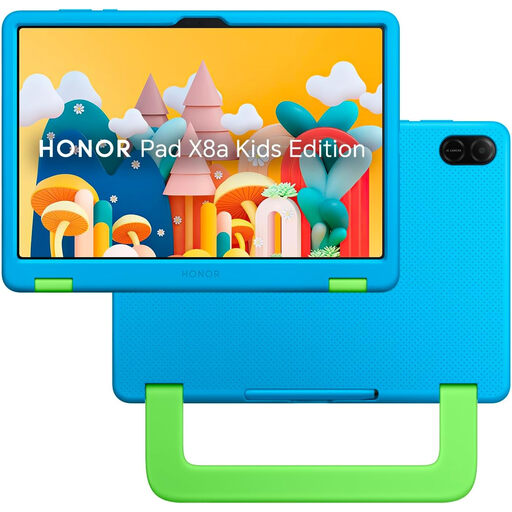
HONOR X8A Kids 11-inch Wi-Fi tablet, 128GB, Space Grey
For a child’s dedicated portable screen, check how its child account and adult-managed settings work on the exact model in the UK.
The listed configuration has an 11-inch screen, Wi-Fi and 128GB storage. Check its security-update support before buying.
View on Joybuy
 No image available
Alldocube Kido 8-inch tablet, 3GB+32GB, blue case
For a child’s portable screen, check what the advertised Child Lock controls and whether it provides the account separation you need.
The title lists Android 15, 3GB RAM, 32GB storage and a protective case. It states that no power adapter is included, so check which compatible adapter is needed. Confirm the exact model’s security-update support.
View on Joybuy
Questions parents ask
Do parental controls make a connected device safe without adult involvement?
No. Device controls can manage access, time, purchases or communication, but they do not replace supervision or decisions about individual content and interactions. Ofcom’s UK research covers how parents monitor and manage children’s media use; check the settings of each service your child uses as well.
What account setup should I check before giving a child a tablet?
Check for a dedicated child account or profile rather than relying on an adult account. Apple says a child using its Family Sharing controls should have their own Apple Account; Amazon directs parents setting up a Fire tablet for an under-13 child towards a child profile. Check the process and available controls on the exact tablet.
What does a PEGI rating tell me about a game?
A PEGI rating indicates the age suitability of the game’s content, not how difficult it is, according to PEGI. Check the game’s content descriptors separately, then review spending, chat and age restrictions on the child’s console account.
Can I rely on the TV device’s child profile for every streaming service?
No. Check both whether the precise TV device supports a children’s profile in the UK and what controls each streaming service offers. Google says profile availability varies by device and region; a device-level profile does not settle which individual programmes are suitable.
How should software updates affect the choice?
Check support for the exact model and any software requirements on linked family devices. Amazon publishes Fire tablet security-update dates by generation, with conditions attached to its minimum policy for devices bought new from Amazon as seller on Amazon.co.uk. Apple notes that some newer Screen Time controls require specified software versions across family devices.


