Buying priorities
Work from the identified workstation need to the compatible accessory: check positioning first, then laptop and display connections, physical mounting and any employer requirements.
| Priority |
What to check |
Your needs |
| Screen and input positioning |
Check whether the laptop screen needs to be raised; use separate keyboard and mouse when the typing surface must remain at a workable height; consider a separate monitor when more display area is needed. |
I want to position the screen independently from the keyboard and mouse during prolonged laptop work. |
| Laptop and dock compatibility |
Confirm the exact laptop model, operating system, port standard and supported display count; match the cable or adapter to both laptop and monitor; compare dock power delivery with the laptop’s charging requirement. |
I need the monitor, adapter or dock to support the display setup, peripherals and charging arrangement I actually use. |
| Monitor-arm fit |
Match the monitor’s VESA mounting-hole pattern and actual weight to the arm’s stated range; check whether the desk supports the required clamp, grommet or other fixing method. |
I want a desk-mounted display support that fits both my monitor and my desk. |
| Employer and IT fit |
Check the workstation-assessment process, equipment policy and approved-device list; confirm arrangements for repairs, technical support and security before connecting work systems. |
I need to know whether my employer should assess, provide, approve or support the equipment before I buy it myself. |
Joybuy product options
Joybuy options here cover adding a separate display or a consolidated desk connection for sustained home or hybrid laptop work. Choose only after checking the workstation need, laptop compatibility and any employer requirements.
 No image available
ASUS ZenScreen MB249C IPS USB-C Monitor
Relevant for a home or hybrid workstation needing a separately positioned display.
23.8-inch Full HD IPS monitor with HDMI and USB-C video connectivity. The listing also states kickstand, C-clamp arm and partition-hook mounting options.
Confirm that the laptop supports the required USB-C DisplayPort Alt Mode video path and charging arrangement. Check the actual monitor weight if portability or mounting load matters.
Joybuy
 No image available
Targus USB-C Universal Dual HDMI 4K Docking Station
Relevant when you repeatedly connect two displays and several desk peripherals through one USB-C host connection.
Listed with two HDMI 2.0 outputs, USB ports, Gigabit Ethernet, card readers and up to 100W USB-C power-delivery pass-through.
Verify the laptop’s display configuration, operating-system support and USB-C video capability. The 100W rating is pass-through, so check the required external power arrangement and laptop charging requirement.
Joybuy
 No image available
ASUS ZenScreen MB166C 15.6-inch Portable USB-C Monitor
Relevant for mobile or space-limited laptop work that needs an additional screen.
15.6-inch Full HD IPS portable display with a USB Type-C upstream connection stated to carry video and power, plus an anti-glare surface.
Check that the laptop USB-C port supports compatible display video. This model has no listed HDMI input, and a separate display does not by itself address keyboard or pointing-device positioning.
Joybuy
 No image available
CRUA 32-inch 1500R Curved QHD Monitor
Relevant for a fixed home desk needing a larger, separately positioned display.
32-inch 2560 × 1440 monitor with HDMI and DisplayPort inputs, tilt adjustment and VESA 100 × 100 mm mounting support. The listing states a 165Hz capability.
Confirm that the laptop, cable and selected input support the intended QHD output. For an arm, compare the monitor’s actual weight, VESA interface and desk attachment requirements with the arm’s limits.
Joybuy
 No image available
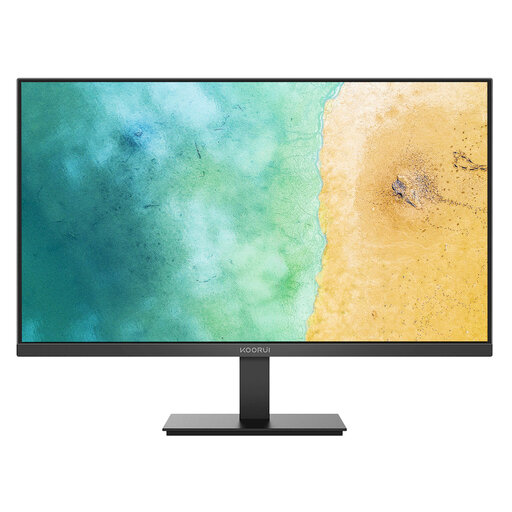
KOORUI MB27V29FS2 27-inch IPS Monitor
Relevant for a relatively fixed workstation needing a separate Full HD display.
27-inch Full HD IPS monitor with HDMI and VGA inputs, tilt adjustment and VESA 100 × 100 mm mounting support.
Check the laptop’s compatible output or adapter before buying. If using a monitor arm, verify monitor weight, VESA pattern, arm capacity and desk attachment method; consider separate input devices if laptop keyboard and trackpad positioning remains an issue.
Joybuy
Frequently asked questions
Do UK Display Screen Equipment rules apply to everyone who occasionally uses a laptop at home?
No. The Health and Safety Executive says the rules can apply to people working at home permanently or long term, or routinely splitting work between home and workplace, when they use display-screen equipment daily for continuous periods of an hour or more. It says they do not apply to people using display equipment only occasionally or for short periods at home.
Should I buy a monitor or a laptop riser first for sustained laptop work?
Choose according to the identified workstation issue. Health and Safety Executive guidance describes separating the keyboard and mouse so a laptop screen can be raised on a riser or similar support; a separate display is another option. A riser with separate input devices can suit a screen-height issue, while an external monitor can suit work needing more display space or an independently positioned screen.
Can any USB-C dock run my monitor and charge my laptop?
No. Check the laptop model, supported external-display configuration, port and cable standards, and the dock’s offered charging power. Apple states that display support varies by Mac model and by display resolution and refresh rate, while DisplayLink provides a compatibility check for PCs using its USB graphics software.
What should I check before buying a monitor arm?
Confirm the monitor’s VESA mounting-hole pattern and actual weight, then compare both with the arm’s supported VESA interface and weight range. Also check whether the desk accepts the required clamp, grommet or other attachment method. VESA identifies FDMI as the relevant mounting-interface standard, and Ergotron identifies hole pattern and monitor weight as key compatibility criteria.
Should I ask my employer before personally buying home-working equipment?
Yes, when the equipment is intended to address sustained work. The Health and Safety Executive says that, where the rules apply, the assessment should be individual and cover the whole workstation. Acas says employers should agree what equipment, repairs, technical support and training are needed, including who provides or pays for equipment and repairs.


