What to check before buying
Settle the gaming platform first, then choose supporting equipment for the games, group chat and room where you will play. A console and a PC are alternative ways to run the game; a display, headset and network connection are separate choices that must fit the route you take.
Gaming console
Choose it when: Your group’s games are confirmed for that console and its play arrangement suits your home.
Allow for: Online-play access, accounts and cross-play depend on the particular game and console ecosystem. PlayStation says most PS4 and PS5 games require PlayStation Plus for online multiplayer; Nintendo Switch Online covers supported titles, while Xbox says free-to-play multiplayer is open to every Xbox player.
Gaming PC or laptop
Choose it when: Your intended games support PC and the individual titles let you join friends on their platforms.
Allow for: Check each game’s PC requirements and account system; PC availability alone does not guarantee cross-play with every console.
| Concern |
What to check |
Who this matters to |
| Playing with the group |
Check each game’s supported platforms and cross-play rules, plus its account and console online-play requirements. |
If my friends use different devices, I need to know we can actually join the same game before choosing hardware. Around 36% of consumers put group compatibility first. |
| Connection reliability |
Distinguish broadband service from Wi-Fi coverage; check service availability at your address and the signal where you play. |
Playing in a room with weak Wi-Fi makes a new gaming device a poor fix for the connection I rely on. For around 29% of consumers, network reliability is the primary concern. |
| Voice communication |
Agree on the group’s chat service, then check account linking and microphone or headset connections. |
I want to coordinate with friends without discovering that our chosen chat routes cannot work together. Voice communication comes first for around 21% of consumers. |
| Display fit |
Match the screen’s inputs and refresh modes to the gaming device, cable and modes supported by the games. |
Whether I use a shared TV or a desk monitor, I want its features to match the output I will use. Around 14% of consumers prioritise display fit. |
Joybuy products for the setup
These products cover different parts of a home multiplayer setup: a console or PC route, a shared display, voice-chat equipment and home Wi-Fi coverage. Choose the gaming device around your games and friends, then check whether the supporting items fit that device and the conditions in your home.
 No image available
Nintendo Switch 2 Console (UK Version)
A console route if your group’s intended games support Switch 2. Nintendo says online play is available in supported titles through Nintendo Switch Online; check each game’s cross-play and access requirements.
Variant: UK Version.
View on Joybuy
 No image available
CyberPowerPC JOYB1004 Gaming PC Bundle
A desktop route for games that support PC play with your group; check each game’s PC requirements and cross-play arrangements. Confirm the included monitor and headset suit your intended display and chat setup.
Listed configuration: AMD Ryzen 5 7500F, NVIDIA GeForce RTX 5060 8GB, 16GB DDR5, 1TB NVMe SSD and Windows 11 Home. The bundle name includes a monitor, keyboard, mouse, headset and mousepad.
View on Joybuy
 No image available
Hisense 55E8QTUK (55-inch E8Q) Mini LED 4K TV
A shared-screen option if a 55-inch television fits your room. Check which output modes your gaming device and chosen games support rather than assuming the screen’s higher-refresh mode will always be used.
The product name lists 4K HDR, VIDAA OS and 144Hz Game Mode PRO.
View on Joybuy
 No image available
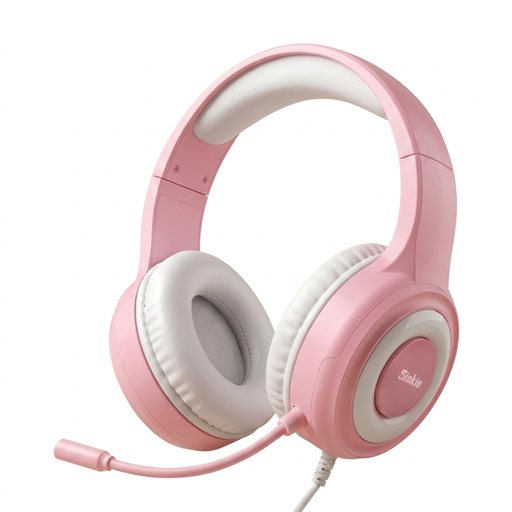
Siukie CH25 Wired Gaming Headset (USB and 3.5mm)
A microphone-equipped headset to consider after your group has chosen its voice-chat service. Check how its connections work with your particular console, controller or PC; a platform named in a product title does not establish compatibility with every chat arrangement.
The product name specifies an over-ear wired design, a microphone, 50mm drivers, USB and a 3.5mm jack.
View on Joybuy
 No image available
NETGEAR Orbi 370 RBE373 WiFi 7 Mesh System (3-Pack)
A mesh option to assess if weak Wi-Fi coverage, rather than the broadband service, is the connection problem. Check your existing network arrangement and where the units could be placed before choosing it; Ofcom notes that Wi-Fi cannot outperform the broadband connection.
The product name lists dual-band BE3600 and 2.5Gbps Ethernet.
View on Joybuy
Common questions
Can friends play together if they buy the same game on different platforms?
Not necessarily: cross-play depends on the particular game and can have platform-specific settings. Epic Games lists Fortnite on PlayStation, Xbox, Nintendo Switch and PC, but its support guidance also describes differing cross-play settings. Check the intended title’s rules before choosing hardware.
Do console games require a subscription for online multiplayer?
The requirement depends on the console and game. PlayStation says most PS4 and PS5 games need PlayStation Plus for online multiplayer; Nintendo Switch Online covers supported Switch and Switch 2 titles. Xbox says free-to-play multiplayer is open to every Xbox player and lists online console multiplayer in its applicable Game Pass plans. Check the exact game before arranging access.
Can my group use Discord voice chat on a console?
PS5 and Xbox support Discord voice chat after the relevant platform and Discord accounts are linked. PlayStation says PS5 Discord voice chat cannot run alongside PlayStation party voice chat; on Xbox, Discord channels and Xbox party chat are separate arrangements. Agree on one chat route before choosing a headset.
Will a 120Hz TV give every PS5 game 120fps?
No. For PS5 output at 4K/120Hz, Sony specifies a compatible 4K 120Hz display, HDMI 2.1 support and cable, the console’s 120Hz output setting and a game that supports the mode. Check the game and the display’s input, not just the advertised refresh rate.
Should I change my router or broadband service first?
Identify where the connection is limited before changing either one. Ofcom says Wi-Fi cannot outperform the broadband service, so check service availability at your address as well as signal and router placement in the gaming room. If the service is adequate but coverage is weak, an in-home connection change may be the relevant step.


