Before buying network equipment, test a device connected to the router by Ethernet where possible: a slow wired connection points towards the broadband service rather than Wi-Fi coverage. Wire fixed devices, adding a switch if you need more ports; consider traffic-priority controls when a call or game needs precedence, or mesh when weak coverage also affects other rooms. If the wired connection remains inadequate, check for outages and speak to your provider before upgrading equipment.
Who is this for?
Households protecting work calls
For households where a video meeting or voice call must remain usable while someone else streams, downloads or games. Ofcom recommends checking competing use and testing over Ethernet where possible; wiring a work device or assessing traffic-priority controls may then help identify the appropriate next step.
Shared-home gamers and streamers
For people trying to keep a console or gaming PC connected while high-definition streams and large downloads run elsewhere. Check whether the difficulty persists on a wired connection before deciding between local network changes and a discussion with the broadband provider.
Multi-room Wi-Fi households
For households where shared use is compounded by weak Wi-Fi in rooms away from the router. Ofcom identifies mesh as a way to improve signal strength and coverage; adding wired ports with a switch alone will not extend Wi-Fi into those rooms.
What should you check first?
Start by separating the incoming broadband connection from Wi-Fi and wired-network problems. The next check depends on whether trouble persists over Ethernet, affects particular fixed devices, occurs mainly in distant rooms or appears when activities compete.
| Concern |
What to check when buying |
Who this matters to |
| Broadband-line limits |
Check for outages and compare an Ethernet test near the router with the speed expected for your service. Contact the provider if the connection falls short. |
When calls and streams falter even near the router, I need to establish whether the incoming service is the limit. Around 31% of consumers put line diagnosis first. |
| Wired reliability |
Count the devices and the router uplink, then check available ports, cable routes and the link speeds you need. |
If my work computer or console can stay in one place, I would rather give it a wired connection than depend on Wi-Fi during busy periods. For around 31% of consumers, that local connection is the primary concern. |
| Multi-room coverage |
Check where the signal weakens, whether node placement is practical and whether the mesh system suits your existing router or modem setup. |
When the connection works near the router but struggles in other occupied rooms, I need better coverage where people actually use their devices. Around 23% of consumers would address coverage first. |
| Traffic priority |
Check the exact router or mesh model’s quality of service (QoS) options, including device or activity priorities and any bandwidth settings. |
If the line and coverage are adequate but downloads clash with a call or game, I want that activity to take priority. Prioritisation comes first for around 15% of consumers. |
Purchasing mistakes to avoid
-
Replacing the router before testing the broadband connection
A new Wi-Fi device will not resolve an outage or an inadequate incoming connection. Ofcom advises using an Ethernet-connected device to help assess broadband speed without Wi-Fi obscuring the result.
Check the provider’s outage information, test near the router over Ethernet where possible and compare the result with what your provider says to expect before changing equipment.
-
Treating mesh as a speed upgrade for every household
Mesh can improve Wi-Fi signal strength and coverage, but it cannot make the underlying broadband connection faster, as Ofcom explains.
Consider mesh when weak signal away from the main router is part of the problem; otherwise investigate the line or the connection to priority devices first.
A larger home may need additional nodes to reach the rooms in use.
-
Choosing a switch by port count alone
Extra ports help connect fixed devices, but a Gigabit switch will not provide a faster-than-Gigabit wired link to equipment that needs one.
Allow a port for the connection back to the router and check that the switch, router and priority devices meet your required link speed.
-
Assuming every QoS feature works alike
TP-Link’s router and Deco guidance describes different device and activity priority settings; available controls depend on the model. QoS manages contention rather than adding broadband capacity.
Read the exact model’s setup guidance and check whether it can prioritise what matters in your household, including any required upload and download bandwidth settings.
Relevant brands to consider
These product lines illustrate different equipment routes; the features described by each manufacturer depend on the exact model.
TP-Link
Deco mesh systems and selected routers are relevant when coverage or configurable traffic priority is part of the decision.
- TP-Link describes device or activity priority on compatible models. Its Deco BE65 specifications list four 2.5 Gbps ports and combined wired and wireless backhaul.
- Check QoS controls, port layout and compatibility with your broadband setup on the exact model; these specifications do not establish the speed a particular home will receive.
NETGEAR
Its range includes unmanaged switches for adding wired ports and standalone routers for households assessing higher-speed network connections.
- NETGEAR lists five Gigabit ports and plug-and-play operation for the GS305v3 switch; its Nighthawk RS700S page lists Wi-Fi 7 and a 10 Gig internet port.
- A switch does not extend Wi-Fi or raise broadband-line capacity. Manufacturer-rated router speeds are not a prediction of speeds throughout a specific home.
eero
The Max 7 is a mesh option for households considering both whole-home coverage and multi-gig wired connections.
- eero lists two 10 Gigabit Ethernet ports for the Max 7 and describes multi-gig backhaul.
- Check the pack size and network equipment needed for your layout. eero’s stated coverage and device figures depend on building conditions, interference and connected devices.
Joybuy products for wired connections and coverage
These choices cover switches for adding wired devices, mesh systems for homes that also have weak multi-room Wi-Fi, and an adapter for connecting a compatible computer by Ethernet. Diagnose a slow wired broadband connection before treating any of them as the answer to a service problem.
 No image available
D-Link DGS-108GL 8-Port Gigabit Switch
Consider this unmanaged switch when several fixed devices need Ethernet and your router has too few ports.
Its product name specifies eight Gigabit ports. Allow one for the router connection and check that Gigabit links meet your devices’ needs; a switch does not increase the incoming broadband speed or extend Wi-Fi.
View on Joybuy
 No image available
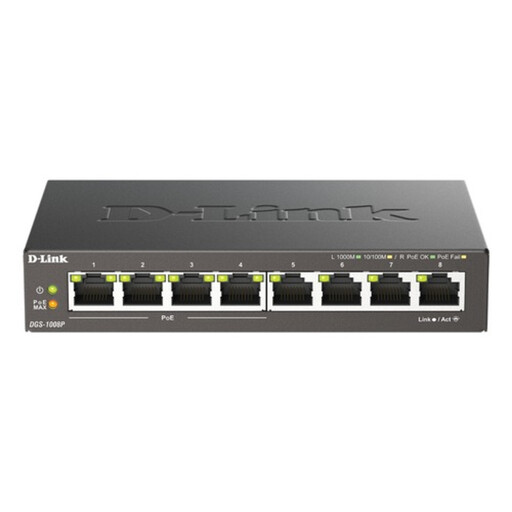
D-Link 8-Port Gigabit PoE Switch
This unmanaged switch is relevant when several devices need wired connections and compatible equipment also needs power over Ethernet (PoE).
The product name identifies eight Gigabit ports and PoE capability. Check the powered devices’ PoE requirements against the switch’s port and power specifications before purchase; it will not increase broadband capacity or Wi-Fi coverage.
View on Joybuy
 No image available
NETGEAR Orbi 370 RBE373 Wi-Fi 7 Mesh System, 3-Pack
Consider a three-unit mesh system when weak Wi-Fi across rooms accompanies simultaneous household use.
This model is identified as a dual-band BE3600 system with 2.5 Gbps Ethernet. Check how it connects to your existing modem or gateway and where its units can be placed; mesh will not increase the speed delivered by your broadband service.
View on Joybuy
 No image available
TP-Link Deco BE65 BE9300 Wi-Fi 7 Mesh System, 3-Pack
This three-pack is relevant when rooms away from the router need better Wi-Fi coverage and a mesh installation fits the home.
TP-Link lists four 2.5 Gbps ports for the Deco BE65 and supports combined wired and wireless backhaul. Confirm the port arrangement, broadband setup compatibility and exact QoS controls needed for your installation; mesh does not raise broadband-line speed.
View on Joybuy
 No image available
V7 V7UC-U3CRJ45HDVG-BLK USB-C Gigabit Ethernet Adapter
This adapter offers a wired connection for a compatible USB-C computer that needs to stay connected during a work call or other fixed task.
Its product name also specifies 4K HDMI, VGA, 100W Power Delivery and two USB 3.0 ports. Check your computer’s USB-C Alt Mode support and allow for a cable route to the router or switch; the adapter serves one computer and cannot increase broadband-line capacity.
View on Joybuy
Common questions
How do I tell whether the broadband service or my home network is the problem?
Test a computer or tablet connected to the router by Ethernet where possible. Ofcom recommends a wired connection when assessing broadband speed because Wi-Fi can affect the result; check for outages and compare the result with the speed expected for your service, then contact your provider if the connection falls short.
When should I consider a mesh Wi-Fi system?
Consider mesh when weak Wi-Fi in multiple rooms is part of the problem, rather than when the broadband connection itself is slow. Ofcom says mesh can improve signal strength and coverage without increasing the performance of the underlying broadband service.
Will a network switch make our internet faster?
No: a switch adds local wired connections but cannot increase the speed supplied by your broadband service. It may suit several fixed devices when the router has too few Ethernet ports; check the port count and required link speeds before choosing one.
What should I check on a router with traffic-priority controls?
Check whether the exact model can prioritise the devices or activities you care about during busy periods. TP-Link’s QoS guidance describes model-dependent controls, and some setups ask for total upload and download bandwidth; these settings manage contention rather than create more capacity.


