Start by checking whether the problem is the broadband connection or Wi-Fi within the home: compare performance near the router with the rooms where calls, streaming or gaming suffer. If the connection is adequate but coverage remains weak across rooms, consider mesh; use Ethernet for fixed devices and a cabled access point where a weak area can be reached by cable. A replacement router needs to fit the provider setup, while powerline is worth testing only when a cable route is impractical.
Who needs a network change?
Households with weak rooms
If calls or streams work near the router but struggle across floors or behind obstructing materials, the connection within the home deserves attention. Ofcom identifies room layout and materials as factors in Wi-Fi performance.
People using a fixed desk or console
A stationary work computer, gaming PC or console is a candidate for a direct Ethernet connection when a cable route is practical. That avoids depending on the wireless link to that device.
Renters seeking a low-disruption change
Movable equipment may suit a home where drilling or permanent cable runs need approval. Check the applicable tenancy terms before making alterations; Lambeth Council, for example, requires written permission from its secure tenants for alterations or improvements.
What should you check before buying?
For calls, streaming and gaming on one household connection, compare performance near the router with the problem room before choosing equipment. As Ofcom notes, improving Wi-Fi within the home cannot make it outperform the broadband service feeding it.
| Concern |
What to check |
Who this matters to |
| Coverage across rooms |
Try a central router position first. If weak rooms persist, check mesh placement and whether the model supports a wired link between units. |
If calls drop in an upstairs room while Wi-Fi works near the router, I need coverage beyond one router position. Around 27% of consumers would put that coverage need first. |
| Fixed-device connection |
Measure a practical Ethernet route and count the ports needed. Check a switch or access point separately if several devices or another Wi-Fi location need cabling. |
For a desk or console that stays put, I would rather assess a cable route than depend on a weak wireless hop. Around 27% of consumers would prioritise that fixed-device connection. |
| Connection and router capacity |
Compare near-router performance with the household's simultaneous use. Before replacing a router, confirm its connection requirements with the provider. |
When several people are online together, I need to know whether the constraint is the service or the router before adding coverage equipment. Around 20% of consumers would make that distinction their primary concern. |
| Installation flexibility |
Check tenancy terms before drilling or mounting equipment. Consider whether movable units or an existing cable route meet the need. |
If permanent alterations may need permission, I want an arrangement I can use without assuming I may drill. Around 13% of consumers would put installation flexibility first. |
| Rooms without a cable route |
Check plug positions and return terms for powerline equipment, then test it between the intended rooms rather than relying on its advertised rate. |
If a difficult room cannot practically receive a new Ethernet cable, I need another way to try connecting it. Around 13% of consumers would make that no-new-cable need their priority. |
Common buying mistakes
-
Buying mesh before locating the bottleneck
Mesh addresses coverage within the home, not the speed supplied by the broadband connection. Ofcom notes that Wi-Fi cannot outperform that underlying service.
Compare a test near the router with one in the weak room before deciding whether to change the service, router or coverage equipment.
-
Expecting a new router or mesh kit to fix every call or game
A weak wireless hop, router placement and the broadband line are different constraints. A fixed device may have a practical wired option instead.
Check the Ethernet route for stationary devices; if choosing mesh, check whether cabling between units is possible.
-
Replacing provider equipment without checking the setup
Ofcom advises that third-party routers can be harder to configure and that provider help may be limited when a problem occurs. Full-fibre setups also need the correct connection to the optical network terminal.
Confirm the required WAN connection, provider authentication and any digital-phone requirements before changing the router. Keep the existing setup available until the new one works.
-
Treating powerline as a guaranteed cable replacement
TP-Link describes hybrid powerline mesh as using electrical wiring to reach past obstacles, but performance in a particular home depends on its electrical environment.
Check the seller's return terms and test the equipment between the actual rooms before relying on it for important calls or gaming.
Relevant brands to consider
TP-Link
Its Deco range includes mesh options for extending Wi-Fi across rooms, including models with wired links between units and a hybrid powerline model.
- TP-Link describes Ethernet backhaul between compatible Deco units as an alternative to a wireless link between them.
- The Deco P9 powerline approach depends on the home's electrical environment; check the exact model and layout.
NETGEAR
Its Orbi range includes mesh systems with wired connectivity for households assessing coverage alongside connected devices.
- NETGEAR lists tri-band Wi-Fi 7, a 10 Gig internet port and 2.5 Gig wired connectivity for its Orbi 870 range.
- Those specifications apply to that range, not every Orbi model, and do not resolve a constrained broadband service.
ASUS
Its ZenWiFi range offers mesh choices with differing wireless standards, band arrangements and Ethernet-port classes.
- ASUS lists ZenWiFi models across Wi-Fi 6 and Wi-Fi 7 and a range of wired-port classes.
- Check the exact model's ports and fit with the household's devices and broadband connection.
Ubiquiti
Its switching and access-point equipment is relevant to a planned installation with Ethernet runs and multiple wired devices.
- Ubiquiti explains that compatible Power over Ethernet equipment can carry data and power to an access point through one cable.
- Check the power standard, available power budget, cable route and any permission needed for mounting.
Joybuy products for mesh and wired setups
These products cover multi-room mesh systems and a switch for a planned wired setup. Choose mesh for persistent coverage gaps after checking the connection near the router; a switch serves cabled devices or a compatible access point and does not create Wi-Fi on its own.
 No image available
TP-Link Deco BE22 BE3600 Wi-Fi 7 Mesh System (3-Pack)
Consider this three-unit mesh system if several rooms remain weak after adjusting router placement. The name specifies Wi-Fi 7 and BE3600; check the cable and provider setup if you intend to use wired connections between units.
View on Joybuy
 No image available
NETGEAR Orbi 370 RBE373 WiFi 7 Mesh System (3-Pack)
This three-pack is relevant when Wi-Fi needs to reach several rooms. Its name specifies dual-band BE3600 and 2.5Gbps Ethernet; check the required modem or gateway arrangement and the intended unit positions before buying.
View on Joybuy
 No image available
TP-Link Deco BE25 Wi-Fi 7 Mesh System (3-Pack)
A three-unit mesh option for coverage gaps across rooms. Check where each unit would sit and whether the system fits the existing provider equipment before changing the household network.
View on Joybuy
 No image available
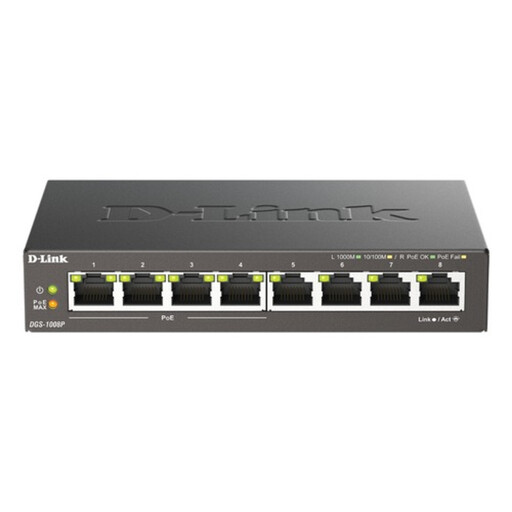
D-Link 8-Port Gigabit PoE Unmanaged Desktop Switch
Consider a switch when several stationary devices, or a planned access point, need wired network connections. This is an eight-port Gigabit PoE switch, not a Wi-Fi access point; check powered-device compatibility and the cable route before installation.
View on Joybuy
 No image available
TP-Link Deco BE65 BE9300 Tri-Band Wi-Fi 7 Mesh System (3-Pack)
This three-pack is an option to assess for Wi-Fi across multiple rooms. The name identifies tri-band Wi-Fi 7 and BE9300; check its Ethernet connections, backhaul arrangement and compatibility with the provider setup if those affect your installation.
View on Joybuy
Questions about shared-home networking
Do I need home-network equipment or a faster broadband connection?
Compare performance near the router with performance in the problem room before choosing equipment. A good near-router result and poor distant-room result point towards coverage or in-home networking; poor results in both places warrant checking the service and router as well. Ofcom notes that Wi-Fi cannot outperform the broadband service.
Can a new router connect directly to a full-fibre ONT?
It depends on the router and provider setup. Openreach guidance says the optical network terminal should remain switched on and connect to the router through an appropriate Ethernet WAN connection; confirm provider authentication, digital-phone requirements and support arrangements before replacing provider equipment.
Can I drill or mount an access point in a rented home?
Check your tenancy agreement and seek permission where it requires it before drilling, mounting or changing cabling. Requirements depend on the property and tenancy: Lambeth Council, for example, requires its secure tenants to obtain written permission for alterations or improvements.
Will powerline networking work like an Ethernet cable for gaming or calls?
Do not assume it will perform like a direct Ethernet run in your home. TP-Link describes hybrid powerline mesh as using electrical wiring to reach past obstacles, but the result depends on the property; test the intended rooms and check return terms before relying on it for important calls or gaming.


