
24/7 Customer Support

Free returns

Same-day & Next-day Delivery

Quality Guaranteed

Unlock Your Welcome Offers: FREE Delivery | Up to 80% OFF | Free 30-day JoyPlus trial
Download the APP
A stable internet connection has become as essential as electricity or running water in the modern UK household. Yet, many of us still battle with frustrating Wi-Fi dead zones, buffering video calls and crippling lag during online gaming. The market for home networking solutions is flooded with technical jargon and promises of "blazing-fast" speeds, making it easy to spend money on the wrong equipment.
As the Joybuy Product Recommendation Officer, my role is to help you navigate this complex landscape. We will look past the marketing hype to identify the common pitfalls that lead to buyer's remorse and focus on the practical solutions that deliver reliable performance for your specific needs.
Before you add any device to your basket, be aware of these frequent missteps:
To make an informed choice, you don't need to be a network engineer. Just focus on these key parameters.
The number on the box matters. Wi-Fi 6 (802.11ax) is the current workhorse, offering significant speed and efficiency improvements over older standards. It's more than capable of handling 4K streaming, multiple smart home devices and busy family networks. A Wi-Fi 7 router, on the other hand, is the next generation. It's designed for multi-gigabit speeds, offering even lower latency and higher capacity. It's a sound choice if you have an ultrafast fibre connection (1 Gbps+) and devices that support the standard, but for most UK homes, Wi-Fi 6 provides an excellent balance of performance and value.
How you deliver the signal is just as important as the signal itself.
Based on common UK living situations, here are some practical home networking solutions that address the pitfalls and deliver on their promises.

Why This Fits Their Persona: Perfect for a busy family spread across a typical UK semi-detached or terraced house. This system provides consistent coverage from the loft conversion office to the garden room, supporting simultaneous streaming, gaming and remote work without arguments over bandwidth.
It directly counters the "one-size-fits-all" router myth by using multiple nodes to create a blanket of reliable Wi-Fi, eliminating dead zones that a single router can't reach.
Provides true whole-home coverage with a single network name for seamless roaming. The AI-driven mesh technology optimises connections automatically.
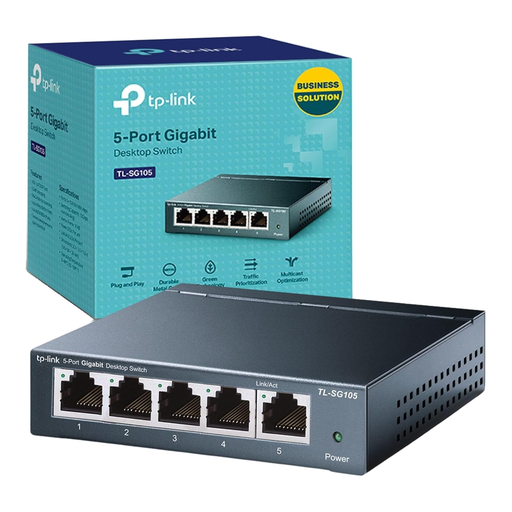
Why This Fits Their Persona: This user prioritises stability and low latency for their stationary setup. Whether for competitive gaming or critical work video conferences, a wired connection is non-negotiable. This switch allows them to connect a PC, console and printer with a single cable run from the router.
It avoids the "forgetting the wire" trap by providing a simple, cost-effective and highly reliable way to expand wired connectivity without needing a complex new router.
Plug-and-play setup requires no configuration. The durable steel case and fanless design ensure silent, long-term operation. Provides five full-speed Gigabit ports.
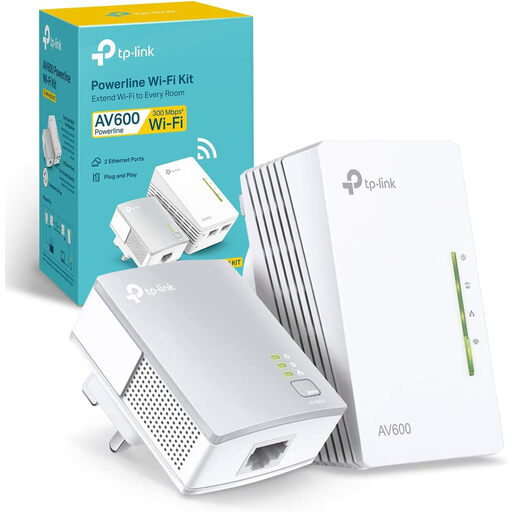
Why This Fits Their Persona: For someone living in a rented flat or house-share, making major changes to the network isn't an option. This kit provides a simple, non-invasive way to get a strong signal into a bedroom or study where the main router's Wi-Fi doesn't reach, using the existing electrical wiring.
This avoids the trap of buying an expensive new router to solve a localised problem. It's a targeted, affordable fix that delivers both a new Wi-Fi hotspot and wired Ethernet ports.
Extremely simple plug-and-play setup. It's often more reliable than a standard Wi-Fi extender, especially in buildings with thick walls that interfere with wireless signals.
We have compiled a complete, real-time list of products that fully satisfy these strict selection criteria and UK safety regulations.
A good quality router should function well for 3-5 years. While the hardware itself may last longer, networking standards and security protocols evolve. After this period, manufacturers may stop providing crucial security updates and newer devices on your network may not be able to perform at their full potential. An upgrade every few years is advisable for both performance and security.
Not at all. Most modern mesh Wi-Fi systems are designed with user-friendliness in mind. Setup is typically handled through a smartphone app that guides you through the process step-by-step. It usually involves plugging the main node into your modem, creating a network name and password and then placing the satellite nodes in other rooms where they will connect automatically.
Not directly. To achieve the maximum speeds offered by Wi-Fi 7, your laptop or smartphone must also have a Wi-Fi 7 compatible wireless card. However, a new router can still provide benefits for your entire network. Its more powerful processor and advanced features can manage network traffic more efficiently, leading to a more stable and responsive experience for all connected devices, even older ones.