For music from a home-office computer without a separate amplifier, choose a powered or active pair with an input your computer can use. Passive bookshelf speakers remain an option if you already have a compatible amplifier; whichever route you take, check desk fit and the connections needed for your other sources.
Who these speakers are for
Tidy-desk music listeners
If your work computer is the main music source, a powered pair can keep a separate amplifier off the desk. Consider wireless playback or a subwoofer connection only if you expect to use them; the KEF LSX II LT and Audioengine A2+ Gen 3 illustrate different combinations of these features.
Multi-source home-office listeners
If you also use a phone, TV, streamer, turntable or games console, list those sources before choosing speakers. KEF, Audioengine and Edifier document different input sets on the models discussed here, so a connection that suits one setup may not suit another.
Desk-based creators and critical listeners
If an audio interface or mixer shares your desk with the computer, wired inputs and accessible controls may matter more than network playback. Edifier lists balanced inputs, a front headphone output and monitor and music modes on the MR4.
What matters when choosing
Decide whether you want amplification built into the speakers, then match the inputs to your sources and measure the space available on your desk.
| Concern |
What to check |
Who this matters to |
| Simple computer playback |
Choose a powered or active pair if you do not want a separate amplifier. Confirm that your computer can use one of its listed inputs. |
I want to play music from my work computer without finding space for another component. Roughly 37% of consumers put straightforward computer playback first. |
| Desk placement |
Compare published cabinet dimensions with usable desk width and depth, leaving room for cables and any stands or pads. |
My speakers need to fit beside the screen without taking over the work surface; about 27% of consumers make practical placement their main concern. |
| Multiple sources |
Match each device to a suitable listed input, whether USB-C, HDMI ARC, optical, Bluetooth, RCA/AUX or balanced TRS. Check service and device compatibility for network features. |
I may switch between computer music and another source, so the connections need to suit both. Around 27% of consumers prioritise that flexibility. |
| Interface and monitor controls |
Check connector type and signal-level requirements for your interface or mixer, alongside the position of volume and headphone controls. |
My desk also serves audio editing or music-making, and I need the speakers to work with that equipment; roughly 9% of consumers place this wired workflow first. |
Buying pitfalls
-
Assuming every bookshelf pair connects directly to a computer
A conventional passive pair needs compatible amplification; “bookshelf” describes a speaker format, not whether amplification is built in.
Decide whether you want powered speakers or a separate amplifier-and-speaker setup before comparing inputs.
The passive route can also require a compatible amplifier and additional cables.
-
Expecting Bluetooth to cover every source
A TV, games console or audio interface may need a different connection. KEF, Audioengine and Edifier list materially different inputs on their cited models.
Write down the outputs on every source you intend to use, then match each one to a speaker input.
A missing physical input may mean using an adapter, switcher or another source component.
-
Judging soundtrack playback by cabinet size alone
A compact pair may fit your desk, but its size does not establish whether its bass presentation will match your room, listening position or preference.
Measure the available space and consider a subwoofer output as a possible future connection, not a promise about the bass you will hear.
Changing the placement later may call for stands, pads or a rearranged work surface.
-
Putting unwanted powered speakers in household rubbish
The Office for Product Safety and Standards advises taking unwanted electrical products to an appropriate recycling collection point rather than putting them in household rubbish.
Check your local electrical-waste collection options when replacing an old pair.
Brands to consider for this setup
KEF
KEF presents the LSX II LT as a compact active system for listeners who want computer audio alongside other digital and wireless sources.
- KEF UK lists USB-C, HDMI ARC, optical, Bluetooth, AirPlay 2, Google Cast and a subwoofer output for the LSX II LT.
- Check compatibility with the services and devices you use, as well as cable reach and placement for your particular desk.
Audioengine
Audioengine positions the A2+ Gen 3 as a compact powered system for desktop music listening.
- Audioengine lists USB-C audio, aptX Adaptive Bluetooth, an analogue input and a subwoofer output for this model.
- For the exact version offered by a UK seller, confirm mains compatibility and warranty terms before ordering.
Edifier
Edifier’s MR4 is a powered monitor-style option for desks shared with analogue sources, an interface or a mixer.
- Edifier lists balanced TRS and RCA/AUX inputs, a front headphone output and monitor and music modes on the MR4.
- If you need TV or network playback, check the connections on the particular model you plan to buy rather than assuming monitor-style inputs cover them.
Joybuy products for a home-office music setup
These choices cover two different setups: a powered desktop pair for computer playback, and passive bookshelf pairs for listeners using a compatible amplifier. Check the space and connection requirements for the route you prefer.
 No image available
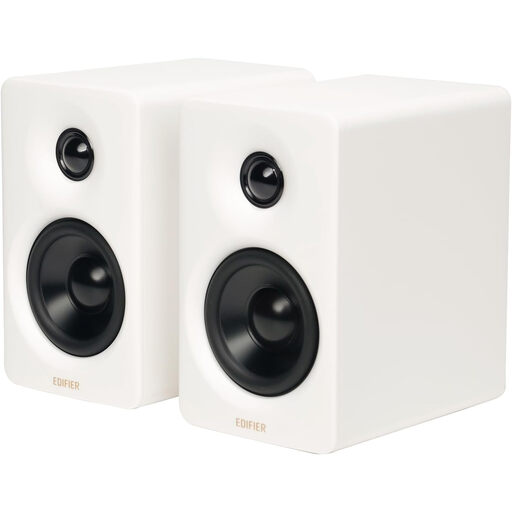
Edifier M60 multimedia speakers, Bluetooth 5.3, 66 W RMS
Consider this desktop pair if you want computer music playback with USB-C or AUX input rather than a separate amplifier. Its listed options also include Bluetooth 5.3; check that your computer and any other sources can use the connections you need.
The product name specifies 66 W RMS, a 3-inch mid-bass driver and a 1-inch tweeter. Measure the space available for both speakers before ordering.
View on Joybuy
 No image available
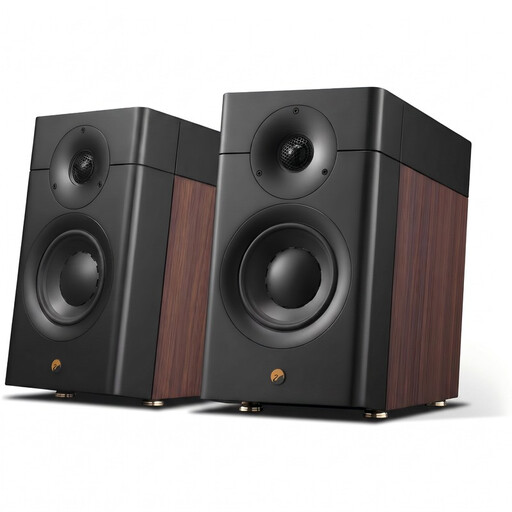
HiVi-Swans D3.1MKII passive bookshelf speakers
Consider this pair for home-office music if you have, or plan to use, a compatible amplifier. These are passive speakers, so check the connection path from your computer through the amplifier and confirm that the cabinets fit their intended position.
The product name specifies a 2-way design, a 6.5-inch mid-bass driver, a 28 mm tweeter, 8 Ω impedance and 10–120 W power handling.
View on Joybuy
 No image available
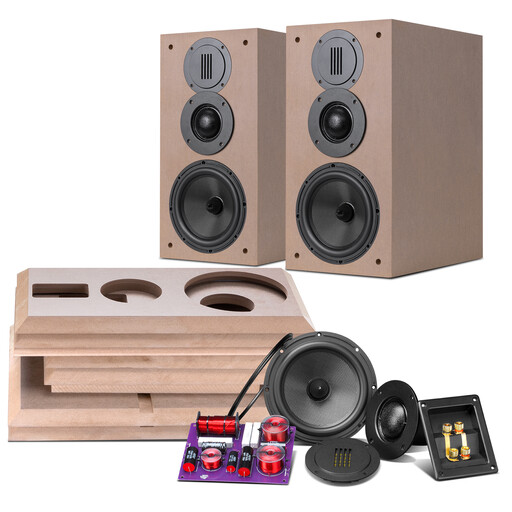
HiVi-Swans DIY3.1 passive bookshelf speakers, one pair
This passive pair suits a home-office music setup built around a compatible amplifier, rather than a direct connection from the computer to the speakers. Check amplifier compatibility, the cables needed from your computer and the space available for the pair.
The product name identifies the DIY3.1 model and specifies a 6.5-inch speaker size.
View on Joybuy
Common questions
Do home-office bookshelf speakers need an amplifier?
Powered or active speakers have amplification built in, while passive bookshelf speakers need a compatible amplifier. If you want to connect a computer without adding one, check that the powered pair also has an input your computer can use.
Should I choose USB-C, Bluetooth or an analogue input?
Choose an input that works with the source you will use most often. USB-C can serve a compatible computer, Bluetooth can suit a compatible phone or computer, and analogue or balanced connections may matter for an interface or mixer; check every additional source separately.
What should I do with powered speakers I no longer want?
Take unwanted powered speakers to an appropriate electrical-waste collection point rather than putting them in household rubbish, as advised by the Office for Product Safety and Standards. Check which collection options are available locally when replacing them.


