Relevant brands and configurations
These examples illustrate specific product lines and configurations; check the exact model and regional specification rather than applying them to every product from a brand.
HP
HP’s cited all-in-one is an integrated Windows desktop with a 23.8-inch Full HD display.
- HP lists 8 GB RAM and a 512 GB SSD for model 24-cr0040na.
- Check the exact screen, included accessories and upgrade options against your workload.
Dell
Dell’s cited Tower Plus EBT2250 configuration is a separate-case option for buyers comparing higher-capacity setups for demanding work.
- Dell lists an RTX 5080, 32 GB RAM and two SSDs for the cited configuration.
- Dell notes that selecting different options changes the specifications; confirm the configuration and parts compatibility.
Lenovo
The ThinkCentre M70q Gen 5 is a compact desktop line for buyers pairing a small computer with a separate monitor.
- Lenovo’s product reference lists two DDR5 SODIMM slots and provision for up to two M.2 SSDs.
- Configurations vary by region and model, so confirm the UK specification and which peripherals are included.
Apple
Apple’s iMac is an integrated-screen option, while Mac mini models are designed for use with an external display and compatible peripherals.
- Apple lists a 24-inch 4.5K display for the cited iMac and external-display connections for the Mac mini.
- Compare the exact memory, storage, ports and accessories, and check that your applications and peripherals work with macOS.
Joybuy product choices
The products below focus on compact desktops, plus one tower configuration for a separate-screen workstation.
 No image available
SOYO Y5Pro Mini PC, Intel Core i5-8250U/8350U, 8GB DDR4, 256GB SATA SSD
A compact option for a fixed desk setup; check which listed processor variant applies and whether the connections suit your monitor and peripherals.
Windows 11; dual HDMI, Type-C video output, four USB ports and 1G Ethernet.
View on Joybuy
 No image available
ASUS Ascent GX10, 128GB Unified Memory, 1TB NVMe SSD
Consider this compact system for AI development and technical computing; its software environment may not suit a standard Windows desktop workflow.
NVIDIA DGX OS; HDMI 2.1, USB-C display outputs and 10G Ethernet. The 128GB unified memory is integrated and not user-upgradeable.
View on Joybuy
 No image available
Apple Mac mini (2026), M6, 16GB, 256GB SSD
A compact Mac desktop for a separate-monitor setup; plan for a compatible screen and input devices, and check that your applications work with macOS.
12-core CPU and 12-core GPU; HDMI, Thunderbolt 4, Ethernet, Wi-Fi 7 and Bluetooth 6.
View on Joybuy
 No image available
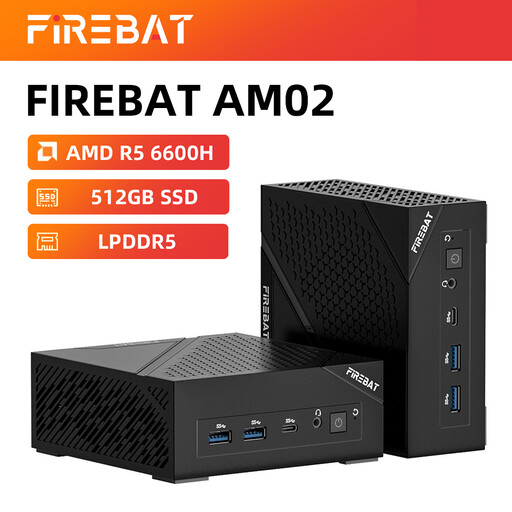
FIREBAT AM02L Mini PC, AMD 6600H, 16GB LPDDR5, 512GB M.2 NVMe
A compact Windows desktop listed for daily browsing and study; check its operating system and ports against your work software and monitor.
Windows 11 Home; HDMI 2.1, DisplayPort 1.4, Wi-Fi 6, Bluetooth 5.2 and 2.5G Ethernet.
View on Joybuy
 No image available
Lenovo Legion T7 34IAS10 Tower, Intel Core Ultra 7 265K, 32GB RAM, 1TB SSD, RTX 5070 Ti
This tower configuration is listed with dedicated graphics and substantial memory for buyers assessing a separate-case setup for demanding creative workloads. Allow for its case and a separate monitor.
Windows 11 Home; 34L chassis, tool-less design, Wi-Fi 6E, Bluetooth 5.3 and DisplayPort.
View on Joybuy
Frequently asked questions
Must I replace a working Windows 10 PC immediately?
Not solely because it still runs Windows 10: check first whether it can run Windows 11. Microsoft ended standard Windows 10 support on 14 October 2025. Eligible, enrolled consumer devices can receive security updates through the UK Extended Security Updates programme until 12 October 2027, but this does not include feature improvements or ordinary technical support.
What do I need to connect to a compact desktop?
Plan for a compatible display, keyboard and pointing device, then check the computer’s video outputs against the monitor’s inputs. For example, Apple lists HDMI and Thunderbolt display options for the cited Mac mini, while Lenovo lists HDMI and DisplayPort for the cited ThinkCentre line; connections vary by model.
What should I check for long hours at a home workstation?
Check that the screen, keyboard and seating arrangement allow comfortable positioning. The Health and Safety Executive’s guidance applies to employees who use display-screen equipment daily for continuous periods of an hour or more; Northern Ireland publishes separate display-screen equipment guidance.
What if an online-bought desktop is faulty or does not suit my desk?
GOV.UK explains that distance-selling customers generally have 14 days after receiving goods to notify the seller that they wish to cancel, subject to applicable exceptions; faulty goods have separate remedies. Check whether a customised purchase falls within an exception rather than assuming every return follows the same rules.
How can I dispose of my old computer when replacing it?
Ask the seller about its electrical-waste take-back arrangements when buying a replacement. GOV.UK says retailers must provide for take-back of waste equipment of the same type or function, including for online purchases; collection from your home may involve transport costs.


