Buying priorities
Set up the workstation first, then choose call equipment for the limitation you actually have. Check the exact laptop and managed-device requirements before relying on USB-C or optional software.
| Priority |
What to check |
Your needs |
| Sustainable desk setup |
Check whether the screen can be raised independently of the keyboard and mouse. For a fixed desk, consider screen adjustment, available desk depth and space for separate input devices. |
I work at a desk for extended periods and want the screen and input devices positioned separately. The Health and Safety Executive advises a separate keyboard and mouse when a laptop screen is raised, and a separate display for prolonged laptop use. |
| Video-call setup |
Identify whether image framing, room lighting, background noise, private listening or meeting controls is the main issue. Check the connector, mounting method and platform support for the exact device. |
My laptop camera is poorly positioned or my room makes meetings harder to manage. A webcam addresses image capture, while a headset is more relevant for private listening and closer microphone placement. |
| Laptop and policy compatibility |
Confirm the exact laptop model, port specification, external-display limit, required resolution and refresh rate, and charging wattage. Check whether drivers, Bluetooth pairing, firmware updates or companion software are allowed. |
I want fewer cable changes at a permanent desk without creating a charging or display problem. Apple notes that external-display support depends on the Mac model and connected display settings, while charging output can vary between laptop systems. |
Joybuy product options
Joybuy product options for a recurring laptop-based home or hybrid-work desk, covering external monitors and webcams for sustained work and video calls.
 No image available
ASUS PROART PA278CV IPS WQHD
A monitor option for prolonged fixed-desk laptop work where independent screen positioning is the priority.
27-inch 2560 × 1440 IPS display with height, tilt, swivel and pivot adjustment; USB-C with power delivery, HDMI, DisplayPort, USB hub, anti-glare coating and VESA support are stated.
Confirm that the laptop supports video output through USB-C and check the monitor’s power-delivery wattage against the laptop’s charging requirement.
Joybuy
 No image available
Targus Webcam with Auto Focus
A webcam option for individual calls where laptop-camera framing or desk lighting is the main limitation.
The specification states Full HD 1080p at 30fps, autofocus, auto lighting correction, a 67° field of view, dual microphone, privacy slider, rotating clip, tripod thread and USB-C connection with an adapter.
Confirm that Full HD meets your requirement, as the product title uses “2K”. A webcam microphone is not a replacement for private listening or a close boom microphone in a noisy room.
Joybuy
 No image available
ASUS PROART PA24ACRV IPS QHD
A compact QHD monitor option for a permanent laptop desk where screen position and USB-C connection are relevant.
24-inch 2560 × 1440 IPS panel with height, swivel, tilt and pivot adjustment; USB-C, HDMI, DisplayPort and USB hub support are stated. USB-C provides up to 96W power delivery for compatible laptops.
Single-cable use requires a laptop with DisplayPort Alt Mode. Check whether 96W is appropriate for your laptop and whether the model supports the intended external-display arrangement.
Joybuy
 No image available
Dell P2425H 24-inch Full HD Monitor
A separate display option for regular laptop work in a compact workspace or with several legacy connection types.
24-inch 1920 × 1080 IPS display with 100Hz refresh rate, height, tilt and swivel adjustment, plus HDMI, DisplayPort, USB-C and VGA inputs.
Check the monitor manual and laptop capability before expecting USB-C video input or laptop charging. Full HD provides less workspace for simultaneous applications than the QHD monitor options here.
Joybuy
 No image available
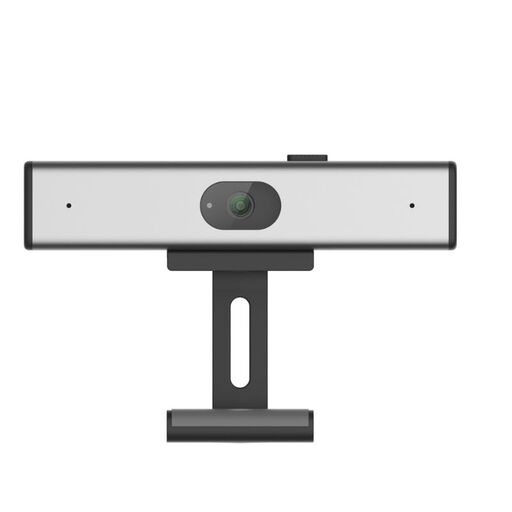
Philips SPL6308S/00 2K QHD Webcam
A clip-on webcam option for frequent video calls where the laptop camera is inadequate.
The description states 1440p QHD video, a noise-reduction microphone and clip-on mounting for desktop monitors and laptop screens.
Confirm the USB connector, cable length, operating-system support and conferencing-platform compatibility before buying. The EU version label alone does not establish suitability for a UK work-device setup.
Joybuy
Frequently asked questions
Do UK home workers have to buy their own monitor, keyboard or other equipment?
Not as a general rule. The Health and Safety Executive says display screen equipment regulations can apply to permanent, long-term and hybrid home workers using display screen equipment daily for continuous periods of an hour or more; where they apply, employers must assess the workstation and reduce identified risks so far as reasonably practicable.
What should I upgrade first for prolonged laptop work?
Start by separating the screen from the keyboard and mouse where your current setup prevents suitable positioning. The Health and Safety Executive advises a separate keyboard and mouse so a laptop screen can be elevated, and a separate display for prolonged laptop use; then check desk space and laptop connections before choosing a monitor.
Will any USB-C dock run two monitors and charge my laptop?
No. External-display capability depends on the exact laptop model, connection method and display resolution and refresh rate. Apple states that simultaneous display support depends on the Mac model and display settings, while Dell lists different charging outputs for Dell and non-Dell systems on its SD25TB4 dock.
Should a Teams user choose a certified headset or speakerphone?
Choose a certified device when supported physical controls for answering, muting, joining or managing calls matter to you in the installed Teams app. Microsoft notes that some older certified devices may not work as expected, so check the exact version and current support status.
Can I connect personally purchased accessories to an employer-issued laptop?
Ask your employer or IT team first when the accessory needs drivers, configuration software, Bluetooth pairing, device-management changes or access to corporate data. The National Cyber Security Centre treats device management as central to bring-your-own-device and flexible-working security.


