Who this setup suits

Home-office simulation players

If you switch between a management game, documents and browser tabs, look for enough screen space to keep interfaces usable. Dell’s S2725DC and LG’s 27QN880 are examples of 27-inch QHD IPS monitors; neither makes a high refresh rate essential for every simulation game.

Laptop-first desk users

If your laptop stays at a home desk, screen positioning and a compatible display connection may matter more than gaming speed. LG lists an adjustable Ergo stand and USB-C power delivery for the 27QN880, while BenQ lists USB-C connectivity and stand adjustment for the GW2790QT.

Smooth-motion mixed gamers

If the virtual-hospital game is only part of what you play, compare refresh rates alongside QHD resolution. Dell lists the S2725DC at 144Hz, while LG lists a 75Hz maximum for the office-oriented 27QN880; check that your computer and connection can deliver the mode you want.

What matters when choosing

QHD with higher refresh

Choose it when: You also play faster-moving games and want refresh rate to be a priority alongside space for game menus and office windows.

Check the trade-off: Confirm the chosen monitor’s stand, ports and laptop-charging capability rather than assuming a gaming specification covers desk use.

Adjustable QHD with USB-C

Choose it when: Laptop work and placing the screen comfortably at your desk take priority over higher-refresh gaming.

Check the trade-off: The LG 27QN880 is listed at up to 75Hz, and a monitor’s USB-C charging rating must suit the particular laptop.

ConcernWhat to checkWho this matters to
Interface space and detail Check screen size, native resolution and whether your computer can output QHD. I want game menus and office windows to remain usable on one screen without making 4K a requirement. Around 40% of consumers put interface space and readable detail first.
Desk fit and laptop use Check stand adjustment or clamp clearance, plus the laptop’s USB-C video and charging requirements. If I work from a laptop for long desk sessions, I need to position the display comfortably and connect it in a way that suits my laptop. Desk fit and laptop integration come first for around 30% of consumers.
Smoother mixed gaming Check refresh rate at the intended resolution and whether the computer, port and cable support it. I also play faster-moving games, so I care whether my setup can use the monitor’s higher-refresh mode. Roughly 30% of consumers prioritise smoother mixed gaming.

Buying pitfalls

  • Choosing by refresh rate alone

    A high refresh rate may matter for other games, but it does not tell you whether the screen has enough workspace, suitable connections or useful adjustment for a home-office desk.

    Decide whether interface space, laptop use or faster mixed gaming is your priority, then compare resolution, stand and ports alongside refresh rate.

  • Assuming USB-C will charge your laptop adequately

    LG lists power delivery up to 60W for the 27QN880, while BenQ lists up to 65W for the GW2790QT. Either rating needs to be considered against the particular laptop’s requirements.

    Check that the laptop supports video through the intended USB-C port and compare its charging requirement with the monitor’s stated output.

    If the monitor cannot meet that requirement, you may still need the laptop’s own charger or a suitable separate docking arrangement.

  • Overlooking desk depth and screen adjustment

    The Health and Safety Executive advises positioning the top of the screen at eye level and the display about an arm’s length away. A larger screen or clamp stand still needs enough room for that placement.

    Measure the intended viewing distance and, for a clamp-mounted stand, check desk-edge clearance before ordering.

    If the supplied stand cannot place the screen appropriately, a riser or monitor arm may be needed.

Brands to consider

Dell

The S2725DC is a model-specific example for someone seeking a 27-inch QHD IPS display with a gaming-oriented refresh rate and home-office adjustment.

  • Dell lists 2560 × 1440 resolution at 144Hz, an IPS panel and height, pivot, swivel and tilt adjustment for the S2725DC.
  • Check the exact model’s connections and USB-C charging against your laptop’s requirements.

LG

The 27QN880 illustrates an office-oriented QHD IPS setup built around an adjustable Ergo clamp stand.

  • LG lists extend-and-retract, swivel, pivot, height and tilt adjustment, plus USB-C power delivery up to 60W, for this model.
  • LG lists a maximum 75Hz refresh rate for the 27QN880, so check whether that meets your wider gaming plans and whether its mounting arrangement fits your desk.

BenQ

The GW2790QT is a laptop-desk example for buyers considering USB-C connectivity and physical screen adjustment.

  • BenQ lists USB-C data and power delivery up to 65W, multi-display daisy-chaining and height, tilt, pivot and swivel adjustment for the GW2790QT.
  • Check your laptop’s USB-C video capability and charging demand before relying on a one-cable setup.

Joybuy monitors for this setup

These monitors cover different ways to combine a management game with desk work: 27-inch QHD gaming displays, wider ultrawide screens and a larger office-oriented display. Compare the listed panel, refresh rate and desk fit against your main use rather than treating every model as the same solution.

Samsung Odyssey G6 S27DG612 monitor

Samsung Odyssey G6 S27DG612 27-inch QHD OLED 240Hz monitor

Consider this 27-inch QHD model if faster mixed gaming is a priority as well as space for a management-game interface.

Its OLED screen calls for particular care with prolonged static office interfaces because the listing warns of burn-in. Check laptop connection and charging requirements separately if you intend to dock through the monitor.

View on Joybuy

LG UltraGear 34GX900A-B ultrawide monitor

LG UltraGear 34GX900A-B 34-inch OLED WQHD 240Hz monitor

Consider the wider screen if you want room for management-game panels and office windows, and measure your desk before choosing a 34-inch ultrawide.

The listing warns that its OLED screen is susceptible to burn-in during prolonged static use. If laptop charging matters, compare the stated USB-C power delivery of up to 65W with your laptop’s requirements and check video compatibility.

View on Joybuy

HKC G27H2DPro monitor

HKC G27H2DPro 27-inch QHD Fast IPS 220Hz monitor

This 27-inch QHD IPS option suits someone who wants a gaming-oriented refresh rate while keeping to the QHD screen format.

Check that your computer and cable support the QHD refresh mode you intend to use. If eye-level positioning is important, confirm the stand’s height, swivel and pivot adjustment before choosing it.

View on Joybuy

Philips Evnia 6000 34M2C6500 ultrawide monitor

Philips Evnia 6000 34M2C6500 34-inch WQHD monitor

The 34-inch, 3440 × 1440 format is an option if a wider game and office workspace is your priority; check its fit on your desk.

The listing gives different maximum refresh rates by connection: 175Hz through DisplayPort and 100Hz through HDMI. Check your computer, port and cable for the mode you want.

View on Joybuy
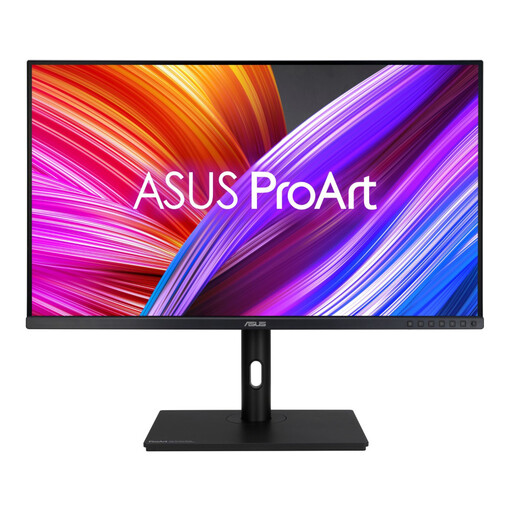
ASUS ProArt PA328QV monitor

ASUS ProArt PA328QV IPS WQHD monitor

Consider this office-oriented WQHD IPS model if desk work matters more to you than a higher-refresh gaming display.

Its listed refresh rate is 75Hz. Check that the 31.5-inch screen fits your intended viewing distance, and confirm laptop docking requirements separately.

View on Joybuy

Common questions

Do I need 144Hz for a virtual-hospital management game?

You need not choose 144Hz solely for a management game. Steam categorises Two Point Hospital as a simulation and management title; if that reflects your use, screen space and desk comfort may be more important to your choice. A higher refresh rate becomes more relevant if you also play faster-moving games and your computer supports the intended display mode.

Should I choose QHD or 4K for this desk?

Start by assessing whether a 27-inch QHD screen gives you the space you want for game interfaces and office windows. Dell and LG both list 27-inch QHD IPS examples; before choosing 4K instead, check your graphics output, preferred text scaling and viewing distance rather than assuming extra pixels will suit every setup.

Where should I position a home-office monitor?

The Health and Safety Executive advises placing the top of the screen at eye level and the display about an arm’s length away. Check that your stand, desk depth and any clamp mount let you achieve a workable position.

Will a USB-C monitor charge any laptop?

No: USB-C on a monitor does not by itself establish that its video connection and power output will suit your laptop. LG lists up to 60W power delivery for the 27QN880 and BenQ lists up to 65W for the GW2790QT; check the laptop’s USB-C display capability and charging requirement against the exact monitor.