For long drafting sessions, consider a shaped or low-profile keyboard that fits your typing position and desk; choose a compact, quiet-key model instead if shared-space noise and desk space matter more. A full-size layout is useful when proposal work involves frequent figures, while a UK ISO mechanical model may suit writers who want that key layout and configurable keys. Whichever you choose, follow the Health and Safety Executive’s workstation advice: keep the keyboard central, just below elbow height, with space in front for your hands and wrists.
Who is this for?
Long-session proposal drafters
If you spend extended periods writing and revising at one desk, keyboard position and room for your hands matter alongside key design. The Health and Safety Executive advises placing the keyboard centrally, just below elbow height, and leaving space in front to rest your hands and wrists.
Shared-home-office writers
If other people work or relax nearby, key noise and the ability to put the keyboard away may shape your choice. Logitech describes Pebble Keys 2 K380s as compact, with quiet low-profile keys and switching between up to three devices; check those features on the exact model you choose.
Data-heavy proposal editors
If you frequently enter budgets, quantities or table data, a dedicated number pad may be worth the extra desk width. CHERRY describes its STREAM KEYBOARD WIRELESS as a full-size model with a number pad.
What matters when choosing?
Start with the task that dominates your proposal work, then check whether the keyboard fits your workstation. Each audience below is defined by the need they would put first.
| Concern |
What to check |
Who this matters to |
| Comfort and workstation fit |
Check keyboard height and depth, and whether it can sit centrally with space in front for your hands. |
During long drafting sessions, I need a typing position that does not make me reach awkwardly. Roughly 36% of consumers would put workstation fit first. |
| Quiet typing and desk space |
Check the exact model’s key-noise description and footprint; note which dedicated keys a compact layout changes or removes. |
In a shared room, I want to keep typing noise down without taking over the desk. Around 29% of consumers would prioritise quiet, compact use. |
| Numeric editing |
Look for a dedicated number pad and allow enough width for the keyboard and mouse. |
When I repeatedly update budgets and tables, I want figures to be straightforward to enter. About 21% of consumers would make numeric editing their primary concern. |
| Devices and key layout |
Confirm the exact UK layout, device connections and operating-system support you need; check software compatibility before relying on remapping. |
I move between devices or use recurring shortcuts, so the right key labels and controls matter to my workflow. Roughly 14% of consumers would put device switching or layout customisation first. |
Buying pitfalls
-
Assuming an ergonomic shape fixes the workstation
A shaped keyboard can still sit too high or off-centre. The Health and Safety Executive also advises leaving room in front of the keyboard for your hands and wrists.
Check desk depth and position the keyboard centrally, just below elbow height, before deciding whether its shape suits you.
-
Choosing a compact layout without checking numeric work
A smaller keyboard may free desk space but leave you without the dedicated number pad you want for budgets and tables.
Think through the proposal edits you repeat most often, then compare the available keys with the desk width you can spare.
-
Assuming all mechanical switches sound alike
Switch choice affects how a mechanical keyboard feels and sounds; a quiet-key description on one office model does not describe every keyboard.
Check the exact switch variant and its sound description if you write near other people or take calls at the same desk.
-
Overlooking the regional key layout
Key legends and operating-system-oriented controls can vary between otherwise similar variants, creating friction with familiar shortcuts.
If you need UK-labelled keys, confirm the exact listing says English UK or UK ISO, then check its connection and software requirements.
Brands to consider
Logitech
Relevant if you are comparing shaped, compact quiet-key and full-size office keyboards.
- Logitech describes Wave Keys as wave-shaped with a cushioned palm rest and device switching; Pebble Keys 2 K380s has compact, quiet low-profile keys.
- Layout, footprint, charging method and software functions vary by model and regional variant; confirm the exact version before choosing.
Keychron
Relevant if UK ISO keys and mechanical-keyboard customisation are priorities.
- Keychron says its K10 Pro ISO range includes UK layouts, Mac and Windows keycaps, hot-swappable switches and VIA key programming.
- Those features concern the named range, not every Keychron model. Confirm the switch and layout variant, particularly for shared-room use.
CHERRY
Relevant if you prefer a conventional office layout and are considering wired or wireless options.
- CHERRY describes its STREAM KEYBOARD WIRELESS as full-size with a number pad; its office range includes wired and wireless models.
- Check the selected model’s language layout and connection method rather than assuming they are shared across the range.
Joybuy product choices
These keyboards cover shaped and full-size options for desk-based drafting, plus compact models for writers who value a smaller footprint. Check each product’s exact key layout and other practical limitations against your proposal workflow.
 No image available
HP 960 Ergonomic Split Layout Wireless Keyboard with Padded Wrist Rest
Consider its split layout if you want a shaped keyboard for sustained drafting and have room to position it comfortably.
The product name specifies a wireless design and padded wrist rest. Confirm the exact key legends and layout if UK-labelled keys are important to you.
View on Joybuy
 No image available
ET Silent Wireless Keyboard and Mouse Combo, US Layout
Consider this set if you want a full-size keyboard and mouse at a fixed proposal-writing desk.
The name specifies 2.4 GHz wireless connectivity and a US layout. Check that the key legends suit your writing and that both devices fit your desk; the Silent name does not establish how quiet it will sound in your room.
View on Joybuy
 No image available
Ticktype DP104 Tri-Mode Mechanical Keyboard, 108 Keys, Gecha Gray, Silent Tactile Switches, US Layout
Consider this full-size mechanical model if your proposal work involves figures and you want the specified switch variant.
The name identifies hot-swappable keys, Silent Tactile switches and a US layout. Check its dimensions against your desk and whether its key legends and switch sound suit your workspace.
View on Joybuy
 No image available
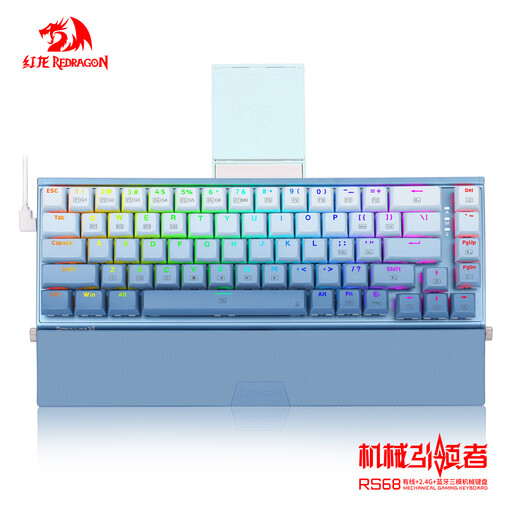
RS68 The Third Mock Examination Wireless Mechanical Keyboard, Gradient Blue
Consider this model if you prefer a smaller mechanical keyboard and want a detachable wrist support for your desk setup.
The name specifies wired, wireless and Bluetooth use, hot-plug capability and a detachable hand bracket. Confirm the exact key layout and typing noise before choosing it for a shared home office.
View on Joybuy
 No image available
HyperX Alloy Rise 75 Wireless Keyboard UK
Consider this 75% wireless model if a smaller desk footprint matters more to you than a conventional full-size layout.
The product name specifies a UK version, but check the precise key legends before ordering. If you write near others or enter figures often, also check its switch sound and whether the available keys suit those tasks.
View on Joybuy
Questions about choosing a keyboard
Should I choose an ergonomic keyboard for a long proposal?
A shaped keyboard is worth considering if prolonged typing is your priority and the board fits your desk and preferred hand position. It does not replace workstation setup: the Health and Safety Executive advises keeping the keyboard central and just below elbow height.
Is a number pad worth the extra space?
A dedicated number pad is useful if you repeatedly enter budgets, quantities or spreadsheet figures while editing a proposal. If those tasks are occasional and desk space is tight, compare a compact layout instead, making sure its remaining keys suit your work.
How should I position a keyboard when working on a laptop?
Place the keyboard centrally and just below elbow height, with room in front to rest your hands and wrists, in line with Health and Safety Executive guidance. Check the position of the screen and the rest of the workstation too, rather than changing only the keyboard.
What should I confirm before ordering a keyboard?
Confirm the exact model, key layout and connection method against your computer and writing tasks. If you need remapping, check software compatibility; also check which accessories are included and the retailer’s applicable returns and warranty information.


