Choose the keyboard format around the work that takes priority: a wireless board with device switching for drafting across devices, a compact programmable board for recurring shortcuts, or a wired split board for a fixed desk. Whichever format you choose, the Health and Safety Executive advises keeping the keyboard central and just below elbow height; for prolonged laptop use, a separate keyboard and mouse let you raise the screen.
Who is this for?
Long-session training planners
If you spend extended periods drafting agendas, learning materials and follow-up messages, consider keyboard placement alongside its shape. The Health and Safety Executive advises keeping the keyboard central and just below elbow height.
Shortcut-focused session organisers
If you reuse templates or move between planning documents and messages, configurable keys or device switching may be relevant. Check those features on the particular keyboard and devices you intend to use.
Small-desk laptop users
If desk space is limited, weigh a compact keyboard against the keys you use for timetables and attendee lists. For prolonged laptop work, the Health and Safety Executive advises using a separate keyboard and mouse so the screen can be raised.
What matters when choosing?
Start with the format that fits your main task, then check its physical key layout and connection against your desk and computer.
Wireless wave-style keyboard
Consider it: If you draft for long stretches and switch between supported devices, Logitech’s Wave Keys offers a one-piece wave-shaped layout, palm rest and Easy-Switch controls.
Trade-off: Check that its layout has the keys you use and that the board fits your workstation; its comfort claims are Logitech’s own.
Compact programmable mechanical keyboard
Consider it: If desk width and reusable shortcuts matter, the UK-ISO option of Keychron’s K3 Max combines a 75% layout with QMK/VIA remapping.
Trade-off: Check whether the compact key arrangement and selected switch type suit your planning tasks and workspace.
Wired split keyboard
Consider it: If you work at one Windows workstation, Microsoft’s Ergonomic Keyboard offers a USB connection, split arched layout and palm rest.
Trade-off: It does not provide wireless device switching, and its Office and Emoji keys require Windows 10 or Windows 11.
| Concern |
What to check |
Who this matters to |
| Extended drafting |
Check the keyboard’s shape and palm support, then whether your desk allows central placement just below elbow height, as the Health and Safety Executive advises. |
If I draft agendas and facilitator notes for long stretches, I want a layout that suits my hands and desk rather than relying on its shape alone. Around 42% of consumers put sustained typing and workstation comfort first. |
| Shortcuts and device switching |
Check supported operating systems and connection modes; if you want remapping, check how keys are configured. |
Moving between planning documents and devices makes repeatable actions and reliable switching important to my workflow. For around 33% of consumers, that workflow is the primary concern. |
| Desk fit and key layout |
Check usable desk space, access to your usual number and navigation keys, and the exact physical layout of the selected variant. |
On a small desk, I need room for my mouse without losing keys I regularly use for timetables or attendee data. Desk fit and essential-key access come first for around 25% of consumers. |
Buying pitfalls
-
Expecting the keyboard to fix the whole workstation
A shaped keyboard cannot correct a low screen or a position that makes you twist. The Health and Safety Executive treats keyboard and screen placement as parts of the workstation setup.
Keep the keyboard central and just below elbow height. For prolonged laptop work, use a separate keyboard and mouse so you can raise the screen.
-
Choosing a compact board without checking its keys
A 75% layout does not retain a full-size key arrangement, which matters if your training plans involve frequent numeric entry or particular navigation keys.
List the keys you use in a typical timetable, spreadsheet or attendee-list task before choosing a compact layout.
-
Assuming a UK listing has UK key placement
Keychron offers different national ISO versions of the K3 Max, so a product-family name alone does not identify the printed legends and key placement you will receive.
Confirm the selected physical layout explicitly says UK-ISO if that is the arrangement you need.
-
Overlooking device and operating-system requirements
Switching controls and special keys depend on the particular model and setup. For example, Microsoft says the Office and Emoji keys on its Ergonomic Keyboard require Windows 10 or Windows 11.
Check the connection mode, supported operating systems and devices you intend to use before choosing those features.
Brands to consider
Logitech
Relevant if you want a one-piece wireless keyboard with palm support and switching between supported devices.
- Logitech specifies Bluetooth, an included Logi Bolt receiver and Easy-Switch controls for Wave Keys.
- Its comfort and posture descriptions are Logitech’s own claims; check the physical layout and your workstation position.
Keychron
Relevant if you want a compact, low-profile mechanical keyboard with configurable keys for repeated planning tasks.
- The K3 Max range includes a UK-ISO option with a 75% layout, wired, Bluetooth and 2.4 GHz connections, and QMK/VIA remapping.
- Check the selected variant and whether a 75% key arrangement meets your numeric-entry and navigation needs.
Microsoft
Relevant to a fixed-desk setup where a wired split keyboard is preferable to wireless switching.
- Microsoft describes its Ergonomic Keyboard as USB-connected, split and arched, with a cushioned palm rest.
- Its Office and Emoji keys require Windows 10 or Windows 11; the wired connection does not offer wireless device switching.
Joybuy keyboards for this setup
These choices cover split wireless keyboards, a keyboard-and-mouse set, and compact or wired mechanical boards for preparing training sessions. Compare the key arrangement and connection of each one with your own desk and devices.
 No image available
HP 960 Ergonomic Split Layout Wireless Keyboard with padded wrist rest
Consider this split wireless board if you want a padded wrist rest while drafting at your home-office desk. Check the exact physical key layout and compatibility with your computer before choosing it.
View on Joybuy
 No image available
ET Silent 2.4 GHz Wireless Keyboard and Mouse Set, US Layout
Consider this keyboard-and-mouse set if you want wireless peripherals together for a fixed planning desk. Its stated US layout may not suit you if you need UK key legends or placement; treat the quiet-typing description as a product claim.
View on Joybuy
 No image available
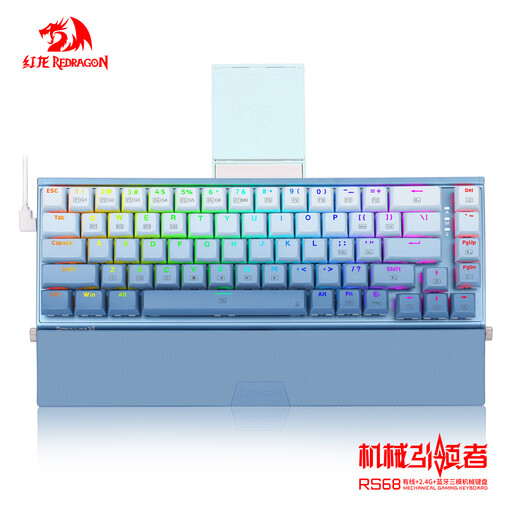
RS68 The Third Mock Examination Wireless Mechanical Keyboard, Gradient Blue
Consider this compact mechanical board where desk space matters during session planning. Its title lists wired and Bluetooth use and a detachable hand bracket; check its physical layout and access to the keys you use for navigation and numeric entry.
View on Joybuy
 No image available
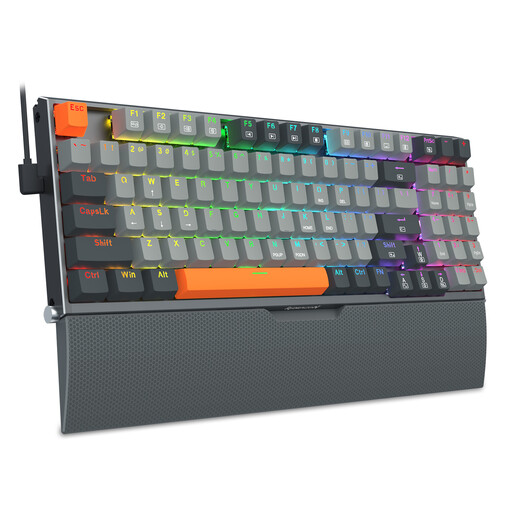
REDRAGON Wired 94-Key Metal Mechanical Keyboard with Wrist Rest and Phone Stand
Consider this 94-key wired board if your training-planning computer stays at one desk and you want the stated wrist rest. Check its physical key layout and compatibility with your computer.
View on Joybuy
 No image available
AJAZZ AK820 75% Wired Mechanical Keyboard, US QWERTY, Red Switches, Black
Consider this wired 83-key board if you want a compact arrangement for planning at one desk. The title specifies a volume knob and US QWERTY layout; check that the key arrangement works for your documents and symbols before buying.
View on Joybuy
Frequently asked questions
How should I use a keyboard with a laptop during long planning sessions?
Use a separate keyboard and mouse so you can raise the laptop screen for prolonged work, as the Health and Safety Executive advises. Keep the keyboard and screen central, avoid twisting, and position the keyboard just below elbow height.
Should I automatically choose a UK-ISO keyboard?
Choose UK-ISO if its physical key placement and legends match the way you type; do not assume that every listing offers it. Keychron identifies a UK-ISO option within its K3 Max range alongside other national ISO versions, so check the selected variant.
Can one wireless keyboard switch between my laptop, tablet and phone?
Some models can switch between supported devices: Logitech says Wave Keys uses Bluetooth or its included Logi Bolt receiver and has Easy-Switch controls. Check your particular devices and operating systems against the model’s compatibility information before buying.


