What matters when choosing
Start with the work that most affects your choice: repeated number entry, comfortable positioning, limited desk space or custom shortcuts. Then check the selected keyboard’s layout and connections.
| Concern | What to check | Who this matters to |
|---|
| Numbers and lists |
Decide whether frequent budget, quantity or rota entry warrants a dedicated number pad and a wider keyboard. |
When I spend much of the planning session entering figures, I want number entry to feel straightforward. Around 36% of consumers put this need first. |
| Long-session comfort |
Check where the keyboard and mouse can sit, then consider a familiar wave shape or an adjustable split design. |
If extended drafting leaves me struggling to position my hands comfortably, workstation fit takes priority. That is the main concern for around 29% of consumers. |
| Desk and device flexibility |
Measure keyboard and mouse space; confirm the intended devices, connection method and switching limit. |
I need room to work while moving between event documents and messages on my devices. Around 21% of consumers prioritise that flexibility. |
| Shortcuts and key feel |
Check how keys are programmed on your devices and which mechanical switch variant is supplied. |
For repeated planning actions, I would rather set up useful shortcuts or choose a particular key feel. Around 14% of consumers place that need first. |
Joybuy product choices
These keyboards cover several ways to plan from a home office: a split-layout option, full-size boards for number entry and a compact wireless model. Check each variant against your desk, key-layout and connection needs.
 No image available
HP 960 Ergonomic Split Layout Wireless Keyboard with Padded Wrist Rest
Consider its split layout for a desk where keyboard positioning matters during longer planning sessions. This is a wireless model with a padded wrist rest; check its exact UK key layout, device compatibility and the space needed for the numeric keypad described for this model.
View on Joybuy
 No image available
Targus EcoSmart Full Size Wireless Keyboard (UK)
Its full-size layout is worth considering if event budgets and rotas involve frequent number entry and your desk has room for a wider board. Confirm the exact key legends and whether the selected variant has the UK-ISO layout you want.
View on Joybuy
 No image available
HyperX Alloy Rise 75 Wireless Keyboard UK
Consider this wireless model if a smaller keyboard footprint takes priority over a full-size board. Check the exact UK key layout and whether the selected variant meets your number-entry needs before using it for frequent budget work.
View on Joybuy
 No image available
ET Silent Full-Size 2.4 GHz Wireless Keyboard and Mouse Combo, US Layout
This full-size keyboard-and-mouse set may suit a fixed planning desk where you want both devices together. Its stated US layout is a material difference if you prefer UK key legends; also check that your computer can accommodate the required wireless connection.
View on Joybuy
 No image available
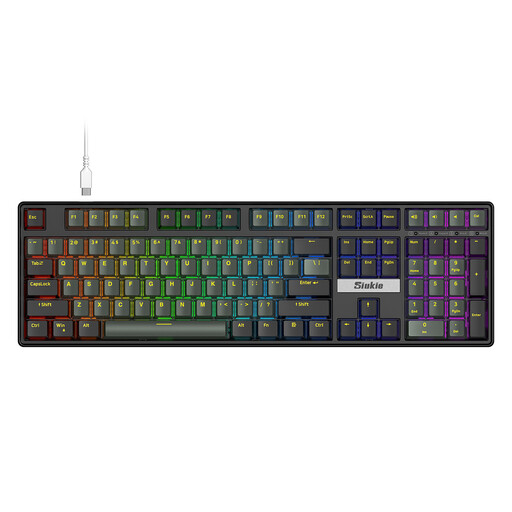
Siukie CR108 108Keys Detachable Switch Wired Mechanical Keyboard
Consider this wired mechanical model for a stationary desk where number-entry space is a priority. Check the switch supplied with this variant, its UK key layout and compatibility with your intended computer; a wired connection will not meet a need for wireless switching.
View on Joybuy
Common questions
Do I need a number pad for community-event planning?
A number pad is worth prioritising if you frequently enter budgets, headcounts, quantities or rota hours. If that work is occasional, a smaller keyboard may leave more room for your mouse; Logitech, for example, offers MX Mechanical in full-size and Mini versions.
Should I choose a UK-ISO keyboard?
Choose a UK-ISO variant if familiar UK key legends and placement matter to you. Check the selected variant rather than assuming that every keyboard listed for UK buyers has that layout; Keychron identifies UK-ISO options separately.
Will an ergonomic keyboard resolve discomfort during long sessions?
A different keyboard shape cannot by itself resolve an uncomfortable workstation. The Health and Safety Executive advises placing the keyboard centrally and just below elbow height, with the mouse in line with the elbow; seek appropriate professional advice for persistent or significant symptoms.
What should I check before using one keyboard with several devices?
Confirm compatibility with each intended device and operating system, the required Bluetooth, receiver or wired connection, and the model’s switching limit. Logitech documents switching across up to three devices for MX Keys S, while Keychron specifies Bluetooth connection to three devices for K8 Max.
Is a mechanical keyboard useful for event-planning shortcuts?
It can be useful if the particular model supports the remapping you want and you are willing to set it up. Keychron documents remapping for K8 Max, but check the selected variant’s software and connection requirements; mechanical switches alone do not establish shortcut support or a particular sound level.


