Laptop users adding a main screen
If you use documents, messages, a browser and calls throughout the working day, start with your laptop’s video output and the input on the monitor you want to connect.


Choose a monitor only after confirming your computer’s video output, the monitor’s matching input and the number of external displays your computer supports. For everyday desk work, a single display may meet your needs; USB-C charging or multiple displays call for further compatibility checks, while any screen and stand must fit the space where you work.
If you use documents, messages, a browser and calls throughout the working day, start with your laptop’s video output and the input on the monitor you want to connect.
A USB-C connection may reduce the number of cables on your desk, provided the laptop supports video through that port and the monitor’s power delivery meets its charging needs.
If several work windows need to stay visible, weigh a second monitor against your computer’s external-display limit, available desk space and the position of each screen.
For everyday home-office work, establish a working connection before deciding how much screen space and which desk features you need.
| Concern | What to check | Who this matters to |
|---|---|---|
| Computer and cable compatibility | Match the computer’s video output to the monitor input. If using USB-C, confirm that the port and cable support the intended display connection. | I need the new screen to connect to my laptop before its other features matter. Around 33% of consumers put connection compatibility first. |
| Desk fit and screen position | Measure usable desk depth and width, including the stand or clamp position; check whether the screen can be adjusted to the position you need. | When desk space is limited or I work at the screen for long periods, its position becomes my main concern. Around 27% of consumers prioritise desk fit and screen placement. |
| One or more displays | Decide which windows need to remain visible together, then confirm the computer’s supported number of external displays before planning a second screen. | I want to keep separate applications in view without constantly rearranging windows. Around 20% of consumers make workspace for multitasking their primary concern. |
| Everyday convenience | Consider integrated features only if they replace an accessory or cable you would otherwise use; check how each feature connects to the computer. | For routine work and calls, I would rather manage fewer separate desk accessories. Around 20% of consumers chiefly value that convenience. |
USB-C describes the connector, not every function available through it. A monitor’s charging rating alone cannot establish whether it will run and charge your particular laptop through one cable.
Check the laptop’s supported display output, the monitor’s USB-C video mode and its power-delivery rating against the laptop’s requirements.
A setup that cannot provide both functions may need a compatible adapter or dock, or a separate laptop charger.
Connecting two screens is not the same as having two independent external displays. The computer’s graphics capability and connection method determine whether the arrangement can be extended.
Confirm the supported external-display count before choosing separate outputs, a suitable dock or a documented daisy-chain arrangement.
A screen still needs room for its stand and a usable viewing position. A clamp stand also needs a suitable desk edge and installation clearance.
Measure the available depth, width and rear-edge space, then check the exact stand footprint or clamp instructions.
Model-specific display features do not replace arranging the workstation. The Health and Safety Executive advises positioning the top of the screen at eye level and placing it about an arm’s length away.
Check whether the supplied stand or a compatible mount lets you place the screen where you need it.
Dell has UK-listed USB-C monitors, including models with hub features that may suit a laptop-based desk.
BenQ GW-series models are relevant if USB-C connection and stand adjustment are priorities.
LG’s 32UN880K-B is a larger display option for a desk that can accommodate its clamp stand.
These displays cover fixed home desks and a portable laptop screen. Compare their stated connections and physical arrangements against your computer and workspace; the gaming-oriented models should be assessed for your everyday tasks rather than their gaming features alone.
 No image available
For a regular desk display, consider this WQHD IPS model if its screen and stand fit your workspace. Confirm a compatible video connection and check the USB-C charging rating against your laptop before planning a one-cable setup.
 No image available
For a desk with room for a curved screen, this model lists 3840 × 2160 resolution, a 165 Hz refresh rate, a USB hub and USB-C power delivery up to 65 W. Check its footprint, USB-C video compatibility and whether 65 W meets your laptop’s charging needs.
 No image available
For document and browser work on a larger desk display, this model’s title identifies an IPS screen and built-in speakers. Confirm the resolution, connection to your computer, stand adjustment and physical footprint for your planned position.
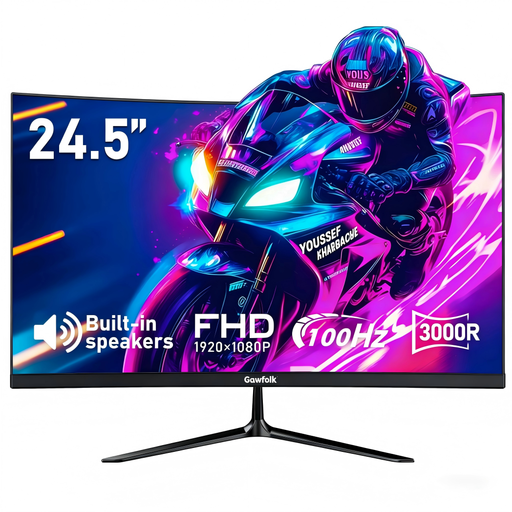 No image available
For a desk where a smaller screen is under consideration, this curved model lists HDMI, built-in speakers and a 75 × 75 mm VESA mount. Check the stand footprint, desired screen height and your computer’s video output before choosing it for daily work.
 No image available
For a portable second screen alongside a laptop, check that your laptop supports the USB-C video connection required for this display. Consider how you will position it at your desk and whether a portable screen provides enough workspace for your main tasks.
No: the laptop must support video output through its USB-C port, and the monitor must accept the intended video connection. If you also want charging through that cable, compare the monitor’s stated power delivery with the laptop’s requirements.
Do not rely on a splitter to provide two independent external displays. Check the computer’s supported display count and use a documented connection method, such as separate outputs, a suitable dock or a compatible daisy-chain arrangement.
The Health and Safety Executive advises placing the screen directly in front of you, with its top at eye level and the screen about an arm’s length away. Check that the stand or a compatible mount allows that position on your desk.
There is no automatic entitlement to a particular monitor. The Health and Safety Executive says that where a display-screen-equipment workstation assessment indicates that equipment is needed, workers cannot be charged for that required equipment; ask your employer how your home workstation is assessed.
GOV.UK says a seller must offer a full refund for an item that is faulty, not as described or does not do what it is supposed to do. If the monitor works as described but does not suit your desk, treat that as a different return question and check the applicable change-of-mind terms.