What to check before buying
Start with the workspace you need, then confirm that your laptop can support the screen and connections you plan to add.
| Priority |
What to check |
Your needs |
| Screen and input arrangement |
Check whether the screen can sit separately from the typing surface. If you raise a laptop, allow desk space for a separate keyboard and mouse. Check a stand’s stated laptop-size range. |
I want the screen, keyboard and mouse to be positioned independently during sustained work. A raised laptop works more practically with separate input devices than with its built-in keyboard and trackpad. |
| Monitor and dock compatibility |
Confirm the exact laptop model’s HDMI, Thunderbolt or video-capable USB-C support. Check supported external-display count, DP Alt Mode and Power Delivery requirements before choosing a dock, hub or adapter. |
I need the monitor setup to work with my own laptop, rather than assuming every USB-C port can carry video, charging and multiple displays. |
| Desk space and storage |
Choose between a fixed monitor-led desk and a compact stand-plus-input setup. Check stand dimensions, wireless connection type and the actual size of the laptop. |
I may need to clear the workspace after work, so a compact stand and separate wireless input devices can be more useful than a permanent display arrangement. |
Joybuy product options
Joybuy product options for a home laptop workstation, including separate input devices, external monitors and a USB-C dock for compatible laptops.
 No image available
HP 680 CFT Dual-Mode Keyboard/Mouse Combo
A separate wireless keyboard and mouse option for a raised laptop or external-monitor setup.
Bluetooth or receiver connection, support for up to three devices, quiet keys, wrist rest, programmable controls and an ergonomic mouse are stated. Compatibility with Windows, macOS and ChromeOS is stated.
Check the keyboard layout before buying if you require a UK layout. This set does not include a monitor or laptop stand.
Joybuy
 No image available
AOC Q32V4 31.5-inch QHD IPS Monitor
A separate display for a dedicated desk where document work, meetings or collaboration need more screen area.
The listing states a 31.5-inch QHD IPS panel, matte surface, 75 Hz refresh rate, HDMI and DisplayPort inputs, speakers, headphone output and 100 × 100 mm VESA mounting.
Confirm that your laptop supports the intended HDMI or DisplayPort connection and use a separate keyboard and mouse if the laptop is moved away from the typing surface.
Joybuy
 No image available
Targus USB-C Universal Dual HDMI 4K Docking Station with 100W Power Delivery Pass-Thru
A desk-expansion option for a compatible laptop needing displays, charging and peripherals through one connection.
The listing states USB-C Alt Mode host connection, two HDMI 2.0 outputs, USB ports, Ethernet, card readers and up to 100 W Power Delivery pass-through.
Check the laptop’s USB-C Alt Mode support, external-display count and operating-system behaviour. An external 100 W or higher adapter is stated as the power source; confirm what is included.
Joybuy
 No image available
Philips 3000 Series Wireless Keyboard and Mouse Combo, SPT6318B/05
A UK-layout keyboard-and-mouse bundle for use alongside a raised laptop screen or external monitor.
The listing states a UK English full-size low-profile keyboard, optical mouse, 2.4 GHz wireless connection, USB-A nano receiver and power-saving mode.
An available USB-A port is required for the supplied receiver; check whether your laptop needs an adapter. A stand and external monitor are not included.
Joybuy
 No image available
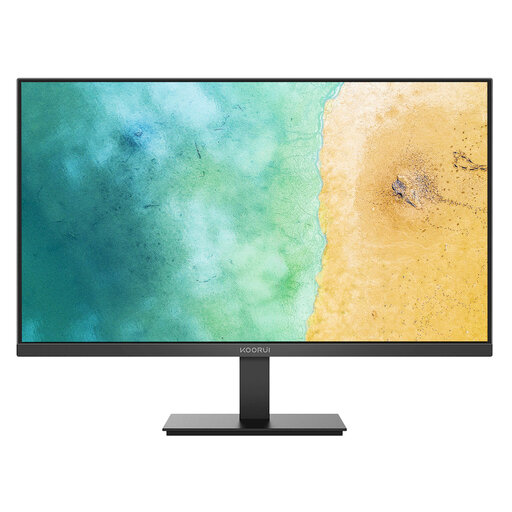
KOORUI MB27V29FS2 27-inch IPS Monitor
A separate-screen option for a fixed home desk with a compatible laptop connection.
The listing states a 27-inch Full HD IPS panel, 75 Hz refresh rate, HDMI and VGA inputs, tilt adjustment, flicker-free technology and 100 × 100 mm VESA mounting.
Check whether the laptop has compatible HDMI or VGA output, or needs an adapter. Buyers wanting QHD or higher should consider whether the stated 1920 × 1080 resolution suits their work.
Joybuy
Frequently asked questions
Do UK homeworking rules require me personally to buy a monitor, dock or particular laptop accessory?
No specific monitor, dock or accessory is prescribed in the Health and Safety Executive material. The HSE says its Display Screen Equipment Regulations can apply to people working at home permanently or long term, or routinely splitting work between home and a workplace. Employees should follow their employer’s DSE process for workstation arrangements.
If I raise my laptop on a stand, do I also need separate input devices?
For sustained homeworking, a separate keyboard and mouse are the practical companion to a raised laptop because the screen and input positions can be adjusted independently. A UK local-authority homeworking DSE FAQ says laptop-only use without a separate mouse, keyboard and monitor is not recommended for prolonged use.
Can every USB-C laptop run a dock with charging and two extended monitors?
No. Check the exact laptop first. Anker states that its cited A210B hub requires full-function USB-C, USB4 or Thunderbolt with DP Alt Mode and Power Delivery; its two-display behaviour differs between Windows extended mode and macOS mirroring for that hub.
Can an HDMI splitter create two separate extended desktop screens?
Usually no. Microsoft states that a display splitter duplicates the same signal rather than creating two independent signals. For two extended screens, choose a laptop and connection method expressly documented to support the required multi-display configuration.
How do I check whether a MacBook supports my planned monitor setup?
Use Apple’s support information for the exact Mac model. Apple states that the number of external displays depends on the Mac model and the resolution and refresh rate of each display, while ports that look similar can have different capabilities.


