For one additional work screen, start with an HDMI or DisplayPort monitor if your computer has a matching output. A USB-C hub monitor makes sense when the computer supports video over USB-C and the monitor's charging output meets its needs. For sustained desk work, check how you can position the screen; add a second external display only after confirming that your computer can extend the desktop to it independently.
Who needs a home-office monitor?
Laptop workers needing a desk screen
If you already have a computer but want a separate display for documents, calls and everyday multitasking, focus on a connection your computer can use. Which? includes home offices and second-screen upgrades in its monitor guidance.
Fixed-desk users seeking fewer cables
If you want one connection for video, peripherals and possibly laptop charging, check your laptop's documented USB-C video support alongside the monitor's hub and power-delivery specifications. A USB-C-shaped socket alone does not establish what it can do.
People working through long desk sessions
If you spend sustained periods reading or writing, screen placement matters alongside screen size. The Health and Safety Executive advises positioning the top of the screen around eye level and the display about an arm's length away.
What should you check before buying?
For a monitor connected to an existing computer, settle the connection first, then check whether the screen fits your working position and the amount of workspace you need.
| Concern | What to check | Who this matters to |
|---|
| Connection compatibility |
Match the computer's video output to the monitor's input. For USB-C, confirm video support, charging requirements and the cable needed. |
If I need one dependable work screen, I want to know it will receive a video signal from my computer before considering hub features. Around 42% of consumers would put connection certainty first. |
| Screen positioning |
Check stand height adjustment or the exact requirements for a compatible arm, and measure the available desk depth. |
During long reading and writing sessions, I need to place the screen comfortably without adapting my posture to a fixed stand. Around 33% of consumers would make positioning their primary concern. |
| Visible workspace |
Decide between one larger display and independently extended screens; confirm how many external displays your computer supports. |
When calls, documents and reference material need to stay visible together, I need enough usable screen space. Around 25% of consumers would prioritise expanded workspace. |
Common buying mistakes
-
Assuming every USB-C port carries video and charges a laptop
VESA describes DisplayPort over USB-C as using an alternate mode; the connector's shape alone does not establish video capability. Charging output also varies by monitor model.
Check the computer's documented display-output method and charging requirement against the exact monitor and cable before ordering.
A separate compatible cable, adapter, dock or laptop charger may be needed for the intended setup.
-
Expecting an HDMI splitter to extend the desktop
Microsoft explains that a splitter duplicates one signal rather than creating two independent work screens.
Check the computer's supported external-display count and use independently supported outputs or a compatible dock for an extended desktop.
-
Choosing screen size without checking its position
A larger display still needs to fit the desk and sit at a workable viewing height and distance. The Health and Safety Executive advises placing the top of the screen around eye level and the display about an arm's length away.
Measure desk depth and check the supplied stand's adjustments. If considering an arm, confirm the monitor mount and desk installation requirements.
A separate riser or compatible arm may be necessary if the supplied stand cannot provide the position you need.
Relevant monitor brands
Dell UltraSharp
A productivity-focused line worth examining if a fixed desk calls for USB-C hub features and an adjustable stand.
- Dell lists an integrated USB hub, 90W power delivery and height, pivot, swivel and tilt adjustments for the U2424HE.
- Those are U2424HE specifications, not features to assume across the UltraSharp line; check the exact model's ports and resolution.
Lenovo ThinkVision
A professional-monitor line to consider when desk connectivity and stand adjustment are priorities.
- Lenovo lists USB-C, HDMI, DisplayPort, Ethernet, USB hub functions and an adjustable stand for the ThinkVision P24h-30.
- Check availability and the specifications of the particular ThinkVision model you intend to buy.
BenQ Home Office
Includes compact USB-C monitors for a fixed desk where connection and screen adjustment both matter.
- BenQ lists 65W USB-C power delivery and pivot, tilt and swivel adjustments for the GW2486TC.
- Check laptop charging needs and multi-display support separately; BenQ's daisy-chain guidance for Mac devices requires a suitable Thunderbolt-based dock or other compatible device.
LG Ergo
Relevant if physical screen positioning and a clamp-mounted setup matter more than a conventional stand.
- LG lists extend, retract, swivel, pivot, height and tilt movement, plus USB-C power delivery of up to 60W, for the 32UN880K-B.
- Check desk-clamp clearance and whether that model's 31.5-inch screen fits your desk and tasks.
Joybuy monitor choices
These monitors offer different single-screen options for an existing desk computer, including USB-C and conventional video connections. Check each model against your computer and the space available on your desk; this selection does not establish support for a two-display setup.
 No image available
ASUS ProArt PA278CV IPS WQHD monitor
Consider this WQHD model for a single desk screen where display resolution matters. Confirm the connections, USB-C charging output and stand adjustment against your computer and working position.
View on Joybuy
 No image available
BenQ MA270UP 27-inch 4K USB-C Mac monitor
Consider this Mac-oriented model if you want a USB-C desk connection and a height-adjustable stand. Its title specifies a 27-inch 4K UHD Nano Glossy IPS display; confirm video and charging compatibility with your particular computer.
View on Joybuy
 No image available
CRUA 32-inch 1500R curved QHD monitor
Consider this single larger screen if keeping several work windows visible is your priority and the curved format fits your desk. Its title specifies 2560 × 1440 QHD resolution and HDMI and DisplayPort inputs; check the available viewing distance and whether its positioning options suit you.
View on Joybuy
 No image available
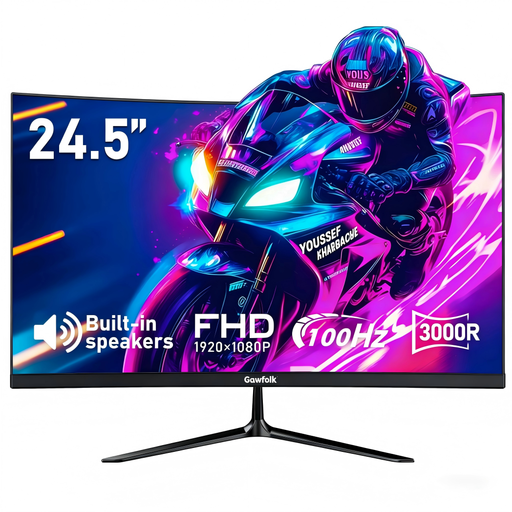
Gawfolk 24.5-inch FHD 3000R curved monitor
Consider this smaller single-screen option for a desk where a larger display would be difficult to place. Its title specifies Full HD resolution and HDMI input; confirm your computer's output and the exact mounting pattern if you plan to use an arm.
View on Joybuy
 No image available
Lenovo L32p-30 31.5-inch 4K UHD USB-C monitor
Consider this large single display if your desk has room and you want a 4K UHD screen. Its title specifies an IPS panel and USB-C; check your computer's video support, charging needs and the screen's available positioning range.
View on Joybuy
Frequently asked questions
Will a USB-C monitor work with every USB-C laptop?
No: the connector alone does not guarantee video output. VESA explains that DisplayPort over USB-C uses an alternate mode; check your laptop manufacturer's documented video support, the monitor's input mode, the cable and any charging requirements.
Can an HDMI splitter give me two separate work screens?
No: Microsoft says a splitter duplicates the same signal rather than creating two independent signals. For an extended desktop, check how many external displays your computer supports and use a compatible connection method.
Where should I position a monitor for desk work?
Aim to place the top of the screen around eye level and the display about an arm's length away, following Health and Safety Executive guidance. Check whether the stand or a compatible arm lets you achieve that position at your desk.
Does an employer need to assess a home worker's screen workstation?
Under UK display screen equipment rules, the Health and Safety Executive says employers must assess workstations used by workers who use display screen equipment daily for continuous periods of an hour or more; its guidance includes home workers. This employer duty does not require a private consumer to buy a particular monitor.


