What to check before buying
For a hybrid-work setup, check employer provision and any applicable DSE assessment first; then identify the one home-work problem you need to solve and check that the product works with your laptop and available space.
| Concern |
What to check when buying |
Who this matters to |
| Screen space and placement |
Measure the available desk space; check the stand, resolution and laptop-facing video and charging connections. |
If I work at a fixed desk, I want a separate display I can position without taking over the available surface. Around 28% of consumers in this setup put screen placement first. |
| Separate input devices |
Check the keyboard and mouse connection, pairing method, size and any workplace restrictions. |
If I raise my laptop screen or use it for long desk sessions, I want separate input devices that fit the workspace. Around 22% of consumers prioritise separate keyboard and mouse positioning. |
| Laptop reconnection |
Check the laptop’s exact ports, supported displays, charging needs and the hub or dock’s required power supply and cable. |
If I carry one laptop between work locations, I want to reconnect the home display and peripherals without paying for functions it cannot use. Around 22% of consumers put reconnection first. |
| Call audio |
Check the headset connection, supported meeting-platform variant and employer approval; distinguish audio issues from an unstable internet connection. |
If colleagues struggle to hear me or I need private listening for calls, I want to address that audio need rather than replace unrelated equipment. Around 17% of consumers prioritise call audio. |
| Camera position or image |
Check whether the built-in camera is insufficient, and confirm the external camera’s connection, mounting position and any required software. |
If the built-in camera does not meet my meeting needs, I want an external camera that fits my setup and can be installed on my work computer. Around 11% of consumers prioritise a camera upgrade. |
Joybuy product options
These Joybuy options cover call audio, laptop connections, a separate display, a webcam and separate input devices. Check each against your laptop, desk space and employer arrangements.
 No image available
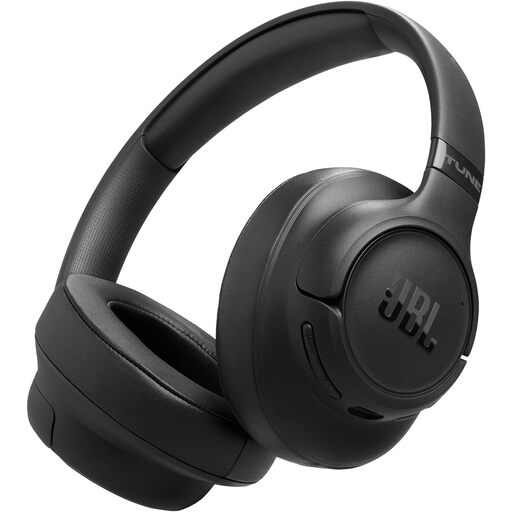
JBL Tune 780NC Wireless Over-Ear Noise-Cancelling Headphones – Black
A wireless headphone option to consider if call audio is the main issue; check its connection and microphone suitability against your work setup.
Joybuy
 No image available
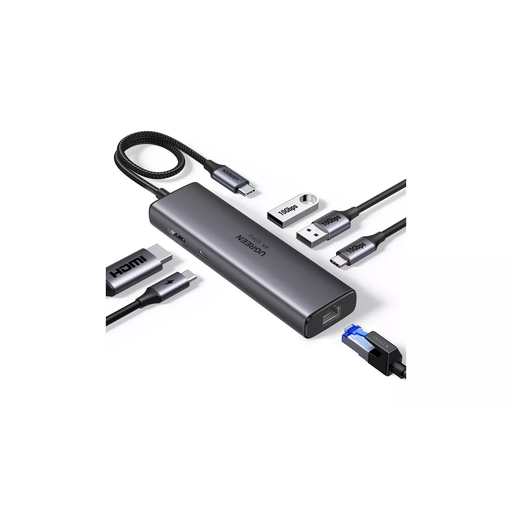
UGREEN USB-C Multifunction Docking Station, HDMI, 2xUSB-A3.2, 1xUSB-C3.2, RJ45, PD4K/60
Consider this dock if you need to reconnect a laptop to a display and desk peripherals; confirm that your laptop supports the required display and charging functions.
The product name lists HDMI, 2xUSB-A3.2, 1xUSB-C3.2, RJ45 and PD4K/60.
Joybuy
 No image available
MSI 27" 4K UHD MD272UPSW Smart Monitor with Google TV
Consider this separate-display option if its screen size and listed connections suit your desk and laptop.
The product name lists IPS, Dolby Audio, USB-C 65W and Multi-Control. Check the monitor’s footprint against your available desk space.
Joybuy
 No image available
Targus 2K Webcam with Auto Focus
Consider an external camera if your built-in camera does not meet your meeting needs; check mounting position and connection before choosing.
The product name identifies a 2K webcam with autofocus.
Joybuy
 No image available
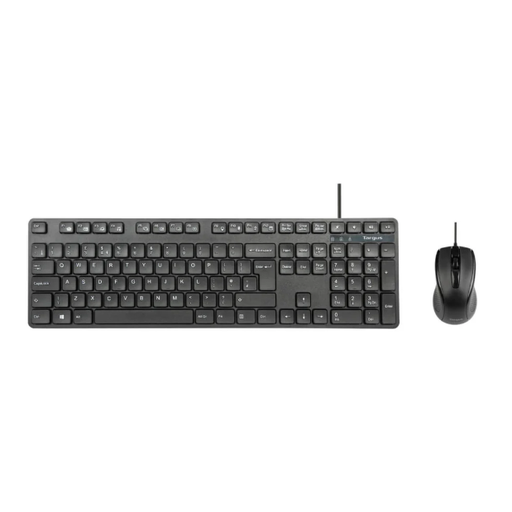
Targus Full-Size USB Wired Keyboard and Full-Size Optical Wired Mouse Combo
Consider this set if you want separate input devices for laptop work; check that a wired USB-A connection suits your desk and computer.
The product name identifies a full-size keyboard and full-size optical wired mouse.
Joybuy
Frequently asked questions
Should I buy a home monitor before speaking to my employer?
If the UK DSE rules apply to your work, ask about the assessment and existing equipment arrangements first. HSE says the assessment should consider home and office use where relevant, and workers cannot be charged for equipment it identifies as needed. This does not mean every preferred monitor must be provided.
Will any USB-C hub run my monitor and charge my laptop?
No; the connector shape alone does not establish compatibility. Check your laptop’s supported video output and charging requirements against the hub and monitor, and check what power supply and cable the hub requires. For the A8380 charging arrangement, Anker specifies a separate 100 W charger and USB-C cable.
How should I arrange a laptop for prolonged desk use?
HSE workstation guidance describes using a separate keyboard and mouse so the laptop screen can be elevated, or using a separate display. Follow the applicable workplace assessment and training for your setup.
Who handles equipment repairs or technical support?
Acas advises employers and staff to agree who provides or pays for equipment and repairs, and what technical support is needed. Clarify equipment ownership and the IT contact before buying for a managed work laptop; where applicable, the DSE assessment’s no-charge rule still applies.
What should I check about cancelling a UK online order?
GOV.UK guidance says sellers must tell customers that an eligible online goods order can be cancelled up to 14 days after delivery without giving a reason. Check the seller’s terms and any applicable exceptions, particularly when an employer rather than you placed the order.


