
24/7 Customer Support

Free returns

Same-day & Next-day Delivery

Quality Guaranteed

Unlock Your Welcome Offers: FREE Delivery | Up to 80% OFF | Free 30-day JoyPlus trial
Download the APP
By Joybuy Product Recommendation Officer | Published on 08 June 2026
Setting up or upgrading a home office involves many decisions, but few are as crucial as selecting the right printer. A modern home office demands more than just printing; it requires a reliable hub for scanning contracts, copying invoices and producing high-quality colour documents without fuss. The challenge is finding a device that balances features, performance and running costs.
This guide is designed to help UK-based professionals and busy households navigate the options. We will outline the key features to look for and present a selection of multifunction printers that offer practical solutions for real-world needs.
Before diving into specific models, understanding a few core concepts will help you make a more informed choice.
The long-term cost of a printer is largely determined by its ink. Traditionally, inkjet printers use disposable cartridges. While the printers themselves can be inexpensive, the cost of replacement cartridges can add up, especially with frequent use.
A more recent innovation is the ink tank printer. These models feature integrated, refillable tanks that you top up from bottles. While the initial purchase price is often higher, the cost per page is significantly lower, making them an excellent choice if you're looking for a printer with cheap ink for the long run. A Brother ink tank printer, for example, often includes thousands of pages' worth of ink in the box.
For a truly efficient workflow, look for these two features:
Print speed, measured in 'images per minute' (ipm), is a key indicator of performance. For a busy office, a fast colour inkjet printer ensures that client-facing documents and internal reports are ready without delay. Equally important is connectivity. A modern wireless printer for small business should offer robust Wi-Fi, mobile printing apps (like Apple AirPrint or Mopria) and Wi-Fi Direct for easy guest printing without needing to share your network password.
Based on these criteria, we've selected three all-in-one printers that cater to different home office needs and budgets.
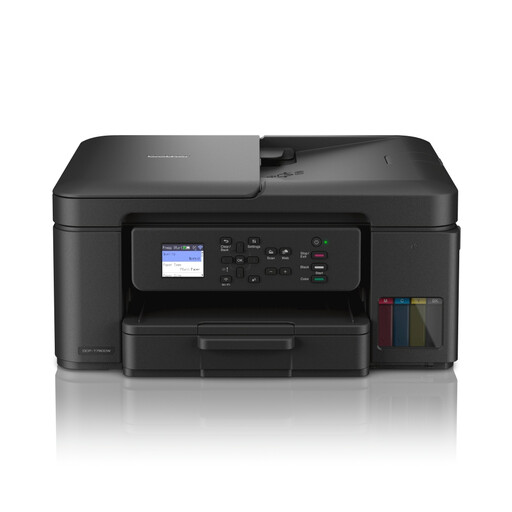
Why It Stands Out: The DCP-T780DW is built around one core principle: delivering an exceptionally low cost per page. It achieves this with a high-capacity ink tank system and an incredible amount of ink included straight out of the box—enough for up to 15,000 black and 5,000 colour pages. The innovative, mess-free refill system makes topping up the tanks simple and clean.
Pros:
Who is it for? This is an ideal choice for high-volume home offices, small businesses and busy families who prioritise minimal running costs and want to avoid thinking about ink replacements for a very long time.
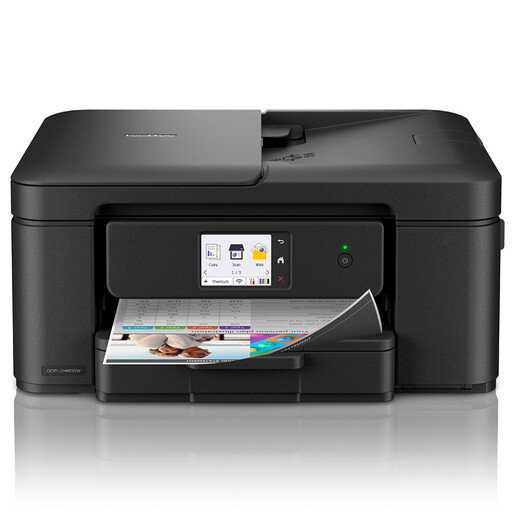
Why It Stands Out: The DCP-J1460DW packs a surprising number of premium features into a compact and affordable unit. The large 6.8cm colour touchscreen provides an intuitive, smartphone-like user experience, while the 20-sheet ADF and fast colour print speeds make it a true productivity tool.
Pros:
Who is it for? Perfect for home office professionals, remote workers and students who need a versatile, user-friendly A4 colour printer with strong productivity features for moderate daily use.
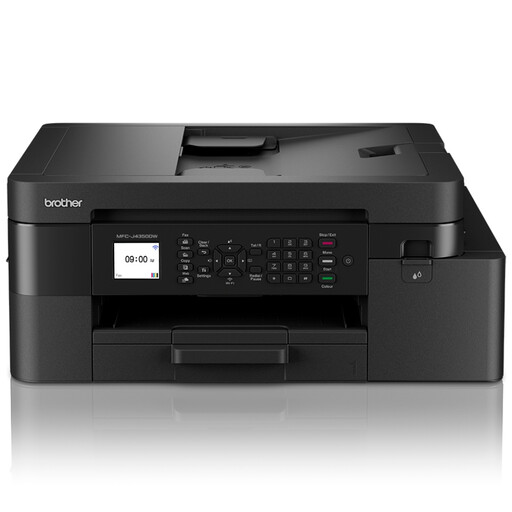
Why It Stands Out: This is a complete 4-in-1 business solution, adding fax capabilities and automatic duplex copying to the standard print, scan and copy functions. With print speeds of up to 20 ipm and support for high-yield XL cartridges (up to 3,000 black pages), it delivers laser-like performance and cost-efficiency in an inkjet format.
Pros:
Who is it for? Small businesses and demanding home offices that require a full suite of business tools, including fax and high-speed, two-sided document handling.
While these models represent excellent choices for many, every home office is unique. If you have different requirements, such as the need for A3 printing or an even more compact design, there are other printers to consider.
Explore our full range of ink printers to find the perfect model for your specific needs.
It depends on your print volume. Cartridge printers typically have a lower initial purchase price and are suitable for infrequent printing. Ink tank printers have a higher upfront cost but a much lower cost per page, making them more economical for anyone who prints regularly.
ADF stands for Automatic Document Feeder. It allows you to place a stack of pages into the printer for it to automatically scan or copy them one by one. If you frequently handle multi-page documents like contracts, invoices or reports, an ADF is an essential, time-saving feature.
Print speed is measured in 'images per minute' (ipm). For a busy home office, a monochrome print speed of around 15 ipm is a good benchmark for efficiency. For colour documents, a speed above 10 ipm is considered fast and will help keep your workflow moving smoothly.