Long-session laptop workers
If you work on a laptop for long periods, HSE guidance describes separating the keyboard and mouse so the screen can be raised independently. An added monitor is one option, not a universal requirement.


For routine laptop work, start by arranging the screen, keyboard and mouse independently; choose a fixed or portable second display only when your tasks and work locations justify the extra screen space. Add a hub or dock only after checking your laptop’s video output, display limit, charging needs and required ports. The Health and Safety Executive (HSE) says workers cannot be charged for equipment identified as necessary by a workstation assessment, so discuss assessed needs with your employer before paying for them yourself.
If you work on a laptop for long periods, HSE guidance describes separating the keyboard and mouse so the screen can be raised independently. An added monitor is one option, not a universal requirement.
If you regularly keep documents or applications visible together at a home desk, consider whether a fixed monitor fits your work, available space and laptop connections.
If you change work locations, weigh the usefulness of a portable second screen against carrying and setting up another device, or consider whether a simpler connection routine matters more.
For home and hybrid workers in Great Britain, HSE says those using display-screen equipment daily for continuous periods may need an assessment, and any additional equipment need should be considered individually.
| Concern | What to check when buying | Who this matters to |
|---|---|---|
| Screen and input-device position | Check whether a stand or arm suits the display and desk; allow space for a separate keyboard and mouse. | I want to position my laptop screen and input devices independently before adding more screen area. Around 29% of consumers put workstation position first. |
| Video and charging compatibility | Check the laptop’s video output and display limit, plus the monitor or dock’s required video mode and charging capability. | I need to know that my laptop can provide the required video and, if wanted, enough charging for a one-cable setup. Around 23% of consumers put connection and power compatibility first. |
| Fixed-desk workspace | Compare screen dimensions and native resolution with your desk space and the documents or applications you want visible together. | I want room to view work documents or applications together at a regular desk. Around 18% of consumers put fixed-desk workspace first. |
| Portable second screen | Check the screen’s weight and positioning options, and confirm that your laptop supports its video and power requirements. | I need a second view that can move between work locations rather than a permanent home display. Around 18% of consumers put portability first. |
| Meeting equipment | Check camera or audio connections, placement and any software needed for the features you intend to use. | I need a camera or audio arrangement that suits my calls, rather than another screen. Around 12% of consumers put meeting equipment first. |
The USB Implementers Forum describes USB-C as supporting distinct data, video alternate-mode and power capabilities. The connector’s shape alone does not confirm which features a particular laptop supports.
Check the laptop’s specifications, the dock or monitor’s required host capabilities, its charging arrangement, and the exact display combination you need before buying.
HSE guidance addresses positioning the screen separately from the keyboard and mouse for prolonged laptop use; extra display area alone does not arrange those devices.
Plan the screen, keyboard and mouse positions first, then decide whether your work also calls for another display.
Mounting patterns, display weight and desk-clamp dimensions vary. For example, Ergotron specifies desk-edge thickness requirements for its LX under-mount C-clamp arm.
Check the exact display’s mounting pattern and weight, and measure desk-edge thickness and clearance against the arm’s specifications.
HSE says workers cannot be charged for DSE equipment where a workstation assessment indicates that action, such as providing equipment, is needed.
Discuss the assessment and how its findings will be addressed with your employer before buying an item identified as necessary. Consider optional personal upgrades separately.
A fixed-desk monitor option illustrated by the 27E1N1600AE/00.
A fixed-desk hub-monitor option illustrated by the P2425DE.
A portable second-screen option illustrated by the ThinkVision M14d, part number 63AAUAT6WL.
A monitor-positioning option illustrated by the LX under-mount C-clamp arm, part number 45-503-216.
A USB hub option illustrated by the 553 USB-C Hub, model A8380.
A separate-camera option illustrated by the Brio 500 when the meeting workflow calls for one.
These listings cover meeting equipment, fixed and portable displays, monitor positioning and laptop docking. Match each option to your workspace, workflow and device connections.
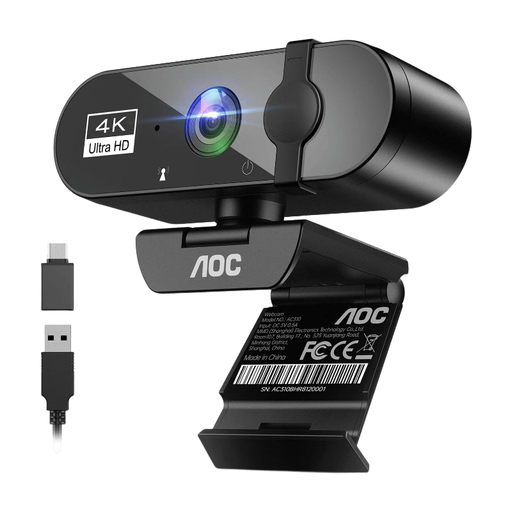 Image unavailable
For calls where your workflow needs a separate camera, this listing describes a webcam with a built-in microphone.
The listing specifies 4K video, a 99° field of view, noise cancellation and a sliding privacy cover.
 Image unavailable
For a regular desk where you want a separate display, this listing describes a 27-inch monitor with an adjustable stand.
The listing specifies 3840 × 2160 resolution, USB-C video and up to 90 W Power Delivery, with height, pivot, swivel and tilt adjustment. Check your laptop’s video and charging compatibility.
 Image unavailable
For a desk setup using two compatible displays, this stand listing describes independent positioning and integrated cable management.
The listing specifies 19–27-inch monitors up to 6 kg each and VESA compatibility up to 100 × 100 mm. Check the desk’s stability and capacity; other displays may need a compatible VESA adapter.
 Image unavailable
For workspaces where an additional display needs flexible positioning, this listing describes a portable monitor with several stand and mounting options.
The listing specifies a 23.8-inch Full HD display, USB-C with 60 W Power Delivery and HDMI. Check that your laptop supports the required connection and power arrangement.
 Image unavailable
For a desk where you regularly connect displays and peripherals, this listing describes a dock with dual HDMI outputs and additional connections.
The listing specifies up to 100 W Power Delivery pass-through, USB-A ports, Ethernet and card readers. It requires USB-C Alt Mode for the host connection and an external 100 W-or-higher adapter; check the supported display combination for your laptop and monitors.
No. HSE says home-working equipment needs should be assessed individually, and not everyone needs additional office equipment. For prolonged laptop use, its guidance discusses separating the keyboard and mouse and raising the screen, or using a separate display.
HSE says workers cannot be charged for DSE equipment when a workstation assessment indicates that action such as providing equipment is needed. Ask your employer how the assessment findings will be addressed; this is different from choosing an optional personal upgrade.
No. Check the laptop’s specified video output and external-display limit, the monitor or dock’s required video mode, and whether its power delivery matches your laptop’s charging requirements. A USB-C connector alone does not establish those capabilities.
Check the exact arm’s mounting pattern and supported monitor weight, then compare its clamp and clearance requirements with your desk. Position the screen for your workstation rather than assuming that mounting it will create a suitable setup.
For applicable UK distance purchases, UK Government guidance says the seller must explain that customers can cancel up to 14 days after delivery without giving a reason. Conditions and exceptions can apply, so check how the rules relate to your transaction.
HSE says the DSE rules can apply to permanent or long-term home workers and people who routinely split work between home and a workplace when they use display-screen equipment daily for continuous periods of an hour or more; occasional or short home use is treated differently. Where the rules apply, the employer should assess the workstation, including both home and workplace arrangements for hybrid workers. This workplace guidance does not require everyone to buy a particular product.