
24/7 Customer Support

Free returns

Same-day & Next-day Delivery

Quality Guaranteed

Unlock Your Welcome Offers: FREE Delivery | Up to 80% OFF | Free 30-day JoyPlus trial
Download the APP
Working from home has shifted from a temporary measure to a permanent reality for many across the UK. While the commute might be gone, the challenge of creating a productive and comfortable workspace remains. An improvised setup at the kitchen table can lead to discomfort and distraction, impacting both your well-being and work quality. This guide offers practical advice on selecting the right WFH equipment to build a home office that supports focus and efficiency.
We will explore key considerations for purchasing ergonomic office furniture and highlight a few recommended products that can form the foundation of a great home office setup.
Building a functional workspace doesn't have to be complicated. Focusing on a few core principles will help you make informed decisions that pay dividends in comfort and productivity.
Aches and pains are common complaints for remote workers. The solution often lies in ergonomic office furniture. Your chair should support your posture and your desk should be at the correct height. An adjustable standing desk is an excellent option, allowing you to alternate between sitting and standing. This simple change can improve circulation and reduce the strain of a sedentary day. When sitting, your screen should be at eye level and your wrists should be straight when typing.
Not everyone has a dedicated room to spare. Whether you're working from a box room or a corner of the living room, smart furniture choices are crucial. A well-proportioned computer desk for home can define your work area without overwhelming the room. For those tight on space, consider multi-functional or mobile pieces. An ultrawide monitor, for example, can provide the screen real estate of two separate monitors, saving valuable desk space and reducing cable clutter.
The right home office accessories can transform a basic setup into a high-performance workstation. A quality headset can block out household noise during important calls, while a multiport adapter can instantly connect your laptop to all your peripherals. A wireless keyboard and mouse combination helps to keep your desk tidy and free from tangled wires, contributing to a more organised and focused mindset.
Based on functionality, design and user needs, here are our recommendations for building a versatile and productive workspace.

Why It Stands Out The SIHOO D01 is a model of flexibility. It’s not just a desk but a mobile workstation that adapts to your needs. Its C-shaped base slides easily under a sofa or bed, making it an excellent solution for those without a dedicated office area. The height and tilt adjustments allow you to find a comfortable position whether you're sitting on a chair, the sofa or even working from bed.
Pros
Who is it for? This table is well-suited for students, freelancers in compact homes or anyone needing a flexible, portable desk that can be used in multiple locations around the house.

Why It Stands Out For those ready to establish a dedicated and health-conscious workspace, the Ochama Electric Standing Desk is a solid centrepiece. Its electric lift system allows for smooth, quiet transitions between sitting and standing heights at the touch of a button. The clean, minimalist design and white finish integrate seamlessly into modern home interiors, providing a professional look without appearing overly corporate.
Pros
Who is it for? Remote professionals and anyone spending long hours at their desk will benefit from the ergonomic flexibility of this adjustable standing desk. It's a foundational piece for a long-term home office setup.
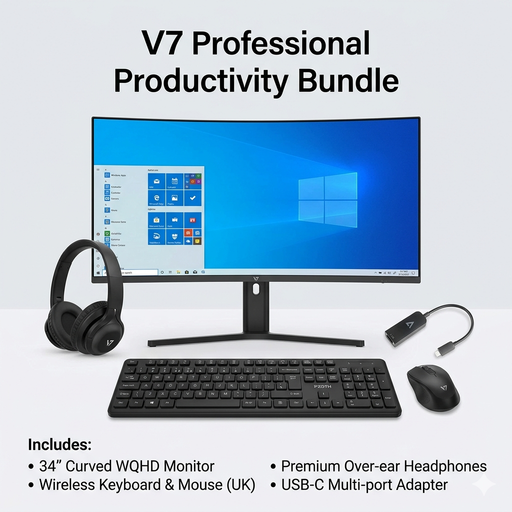
Why It Stands Out This bundle is a comprehensive solution designed to create a high-productivity ecosystem instantly. It removes the guesswork from selecting compatible components by packaging all the essential tech peripherals together. The centrepiece is the immersive ultrawide monitor, which provides an expansive digital canvas for serious multitasking.
Pros
Who is it for? This bundle is perfect for professionals, creatives and students who want to quickly and easily assemble a powerful and cohesive set of work from home essentials without researching and buying each item separately.
If you already have a desk you like but want to add ergonomic flexibility, a desk converter might be the right choice. These units sit on top of your existing furniture, allowing you to raise your workspace to standing height when needed.
To see a variety of models, Explore our range of Table Top Standing Desk converters.
The core essentials are a dedicated desk, a supportive chair, adequate lighting and a reliable internet connection. From this foundation, you can add ergonomic office furniture and accessories like an external monitor, keyboard and mouse to further improve comfort and workflow.
To improve ergonomics, position your monitor at eye level to avoid neck strain. Your elbows should be at a roughly 90-degree angle when typing, with your wrists in a neutral position. Ensure your feet can rest flat on the floor or on a footrest. Investing in an adjustable standing desk and an ergonomic chair are two of the most effective steps you can take.
An ultrawide monitor offers a continuous, bezel-free display, which is ideal for managing multiple windows or working on large spreadsheets and timelines. It also simplifies your setup with fewer cables and a smaller footprint on your desk compared to two separate monitors. The choice often comes down to personal preference and the specific nature of your work.