
24/7 Customer Support

Free returns

Same-day & Next-day Delivery

Quality Guaranteed

Unlock Your Welcome Offers: FREE Delivery | Up to 80% OFF | Free 30-day JoyPlus trial
Download the APP
As remote and hybrid work becomes a permanent fixture for many in the UK, the makeshift kitchen table setup is no longer a sustainable solution. An inefficient or uncomfortable workspace can lead to distraction, physical strain and a dip in productivity. The challenge is navigating the vast market of remote work equipment to build a space that is both functional and comfortable.
As the Joybuy Product Recommendation Officer, my role is to help you identify practical solutions for your home office. This guide will walk you through key considerations for building a better workspace and highlight some of our top recommendations to help you create a professional desk setup that supports your daily tasks.
Before diving into specific products, it is helpful to analyse your needs. A well-planned home office setup considers ergonomics, space and workflow.
Long hours at a desk can take a toll on your body. An ergonomic setup is not a luxury; it is essential for long-term comfort and health. This means ensuring your monitor is at eye level, your wrists are in a neutral position when typing, and your chair supports your posture. Look for equipment with adjustable features, such as monitor stands, height-adjustable desks and keyboards designed for comfort.
Not everyone has a dedicated room to spare. Whether you are working from a box room or the corner of your living room, choosing the right home office furniture is key. For smaller areas, consider compact desks, vertical storage and multi-functional pieces. An adjustable laptop desk on wheels, for instance, can provide a flexible workspace that can be easily moved and stored away.
Sourcing individual components—a monitor, keyboard, mouse and headset—can be time-consuming, and you risk running into compatibility issues. A pre-selected work from home bundle often provides a more streamlined solution. These bundles are curated to ensure all parts work together seamlessly, saving you the effort of matching specifications and aesthetics. They are an excellent starting point for anyone looking to upgrade their entire setup at once.
Based on features that promote productivity and comfort, here are a few options to consider for your workspace.
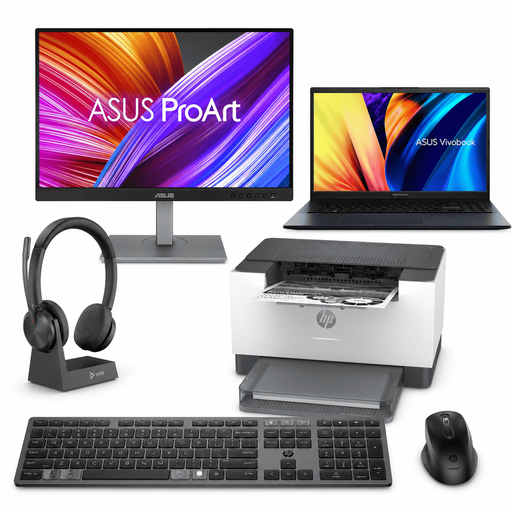
Why It Stands Out: This bundle is a comprehensive solution that covers nearly all your hardware needs in one go. It pairs a capable ASUS Vivobook Laptop with a high-fidelity ASUS ProArt Monitor, which is engineered for excellent colour accuracy. The inclusion of a compact HP Laser Printer and a full suite of wireless peripherals—keyboard, mouse and a Poly wireless headset with a charging dock—makes this a true straight out of the box professional workstation.
Pros:
Who is it for? Professionals, students and creators who need a powerful, all-in-one home office setup without the hassle of sourcing individual components. It is particularly useful for those who require colour-accurate visuals for their work.
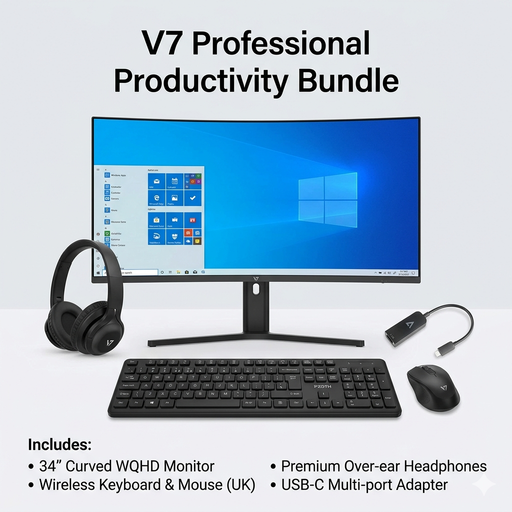
Why It Stands Out: The centrepiece of this bundle is the immersive 34-inch V7 Ultrawide Curved Monitor. Its expansive screen real estate allows you to view multiple documents or applications side-by-side without needing a second monitor. The bundle is completed with a reliable wireless keyboard and mouse combo, wired over-ear headphones for focus and a versatile USB-C multi-port adapter to connect everything to a modern laptop.
Pros:
Who is it for? Users who already have a laptop but want to create a powerful desktop-style workstation. It is ideal for data analysts, programmers and anyone who frequently works with multiple windows open simultaneously.

Why It Stands Out: This product offers exceptional flexibility for those with limited space or who prefer not to be tied to a single spot. The SIHOO D01 functions as a mobile standing desk, a sofa-side workstation, or an overbed table. With adjustable height and tilt functions and lockable wheels, it can be easily moved and adapted to your needs throughout the day.
Pros:
ergonomic workspace solution.Who is it for? Individuals living in smaller homes, students in dorms or anyone needing a flexible and mobile workstation that can be used in different rooms and easily stored away.
If a mobile and adaptable workspace is your top priority, the SIHOO table is just one example of what is available. For more choice in this area, you can explore our full range of portable laptop desks to find the perfect fit for your space.
Browse More Portable Laptop Desks
The core wfh essentials UK professionals should aim for include: a stable desk or work surface, a supportive ergonomic chair, a quality external monitor to reduce eye strain, a comfortable keyboard and mouse and adequate lighting. A reliable internet connection and a good headset for online meetings are also crucial.
Start by adjusting your equipment to fit your body. Your monitor should be at arm's length with the top of the screen at or slightly below eye level. Your elbows should be at a 90-degree angle when typing, with your wrists straight. Use a chair with good lumbar support, and ensure your feet can rest flat on the floor. Taking short breaks to stand and stretch every hour also makes a significant difference.
To create a professional desk setup in a compact area, focus on efficiency and organisation. Use vertical space with wall shelves or monitor stands that have built-in storage. Opt for wireless peripherals to eliminate cable clutter. A flexible solution like an adjustable laptop desk can serve as a dedicated workspace when needed and be moved aside when not in use. Finally, a clean, minimalist approach will make any small space feel more organised and professional.