
24/7 Customer Support

Free returns

Same-day & Next-day Delivery

Quality Guaranteed

Unlock Your Welcome Offers: FREE Delivery | Up to 80% OFF | Free 30-day JoyPlus trial
Download the APP
As working from home becomes a permanent fixture for many in the UK, the makeshift setup on the kitchen table no longer suffices. An uncomfortable chair, a slow laptop and a cluttered desk can hinder productivity and even affect your well-being. Creating a dedicated workspace is no longer a luxury but a necessity for focus and efficiency.
This guide is designed to help you build a functional and comfortable home office setup. We will walk you through key considerations when selecting your equipment and share some of our top recommendations to help you create a professional environment, right at home.
Building a productive workspace involves more than just picking a desk and chair. Here are a few practical tips to guide your purchasing decisions.
Spending eight hours a day in an unsuitable chair can lead to back pain and long-term posture problems. Investing in ergonomic office furniture is crucial. Look for an ergonomic office chair with adjustable height, lumbar support and armrests. Pairing it with a desk at the correct height ensures your screen is at eye level and your arms are comfortably positioned, reducing strain on your neck, shoulders and wrists.
A mismatched collection of devices can lead to a tangle of cables and compatibility issues. A complete home office bundle ensures all your components—laptop, monitor, keyboard and mouse—work together seamlessly. This not only creates a cleaner, more organised desk but also streamlines your workflow, as you are not left searching for the right adapter or dealing with connectivity problems.
The modern workday is often a sedentary one. A standing desk offers a simple way to introduce more movement into your day. Alternating between sitting and standing can help improve circulation and reduce the fatigue associated with prolonged sitting. When choosing one, look for features like a quiet motor for smooth adjustments and memory presets that allow you to switch to your preferred heights with a single touch.
Based on the principles of ergonomics, efficiency and value, here are our recommendations for building a high-performance home office.
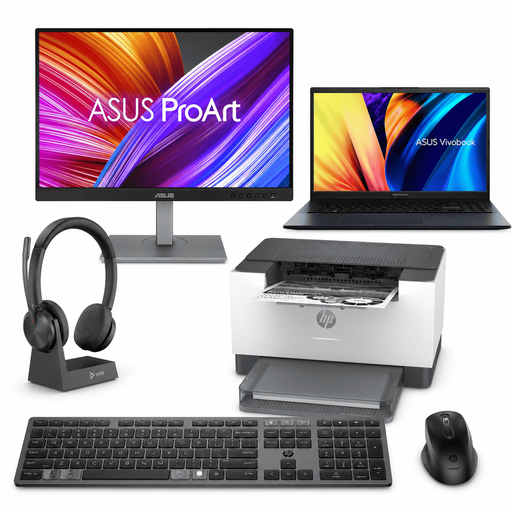
Why It Stands Out This complete home office bundle eliminates the guesswork of building a cohesive workspace. Every component has been selected to work in harmony, from the powerful ASUS Vivobook Laptop to the colour-accurate ASUS ProArt Monitor. It provides a synchronised, professional-grade ecosystem straight out of the box, including essential peripherals like a wireless keyboard, mouse and a high-quality Poly headset with its own charging dock.
Pros
Who is it for? Professionals, students or creators who want a powerful, ready-to-go workstation without the hassle of sourcing and matching individual components.
View the Work From Home Professional Bundle
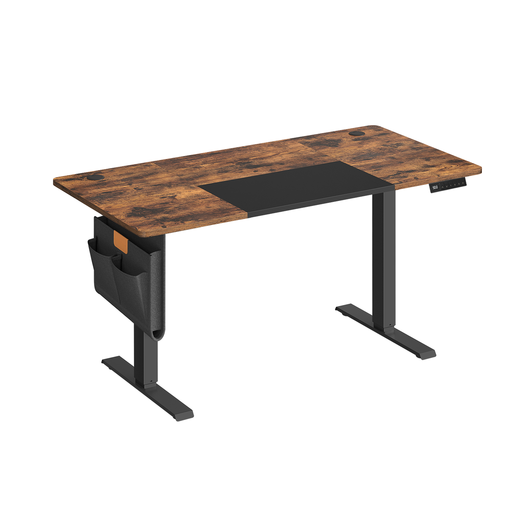
Why It Stands Out This standing desk offers a smooth, quiet transition between sitting and standing, allowing you to change your posture without disrupting your focus. The four memory presets make it effortless to return to your ideal heights. It also includes thoughtful design features like integrated cable management, a fabric storage drawer and side hooks for bags or headphones, helping you maintain an organised workspace.
Pros
Who is it for? Anyone looking to improve their posture and reduce sedentary time during the workday. It is particularly well-suited for those who value a clean, organised desk space thanks to its built-in storage and cable management.
Explore the Ochama Standing Desk
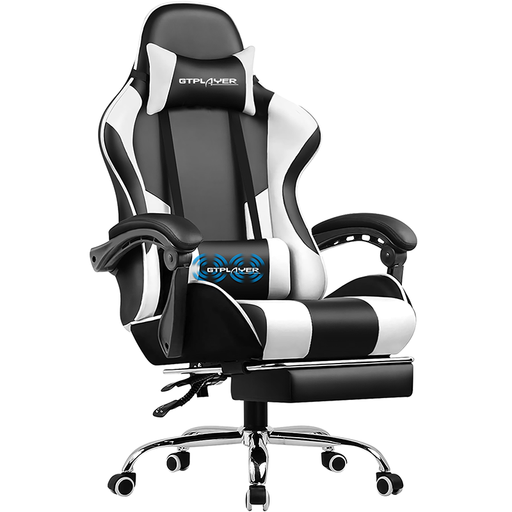
Why It Stands Out While its origins are in gaming, the features of this GTPLAYER model make it an exceptional ergonomic office chair. It goes beyond standard adjustments by including a vibrating lumbar massage cushion to ease back fatigue and a retractable footrest for moments of relaxation. The ability to recline up to 135 degrees provides a level of comfort that is hard to find in conventional office seating.
Pros
Who is it for? Remote workers who spend long hours at their desk and want superior comfort, adjustability and support for both focused work and moments of rest.
The desk is the centrepiece of any home office setup. If you are still searching for the perfect foundation for your workspace, we have a wide range of options to suit different spaces and styles.
Explore our full collection of Mechanical Desks to find the right fit for your needs.
What are the absolute essentials for a home office? The core of any productive home office setup includes a dedicated desk, an ergonomic chair and reliable technology (a computer and, ideally, an external monitor). These are the foundational work from home essentials. Quality peripherals like a comfortable keyboard, a precise mouse and a clear headset also make a significant difference in daily comfort and efficiency.
Is a standing desk really worth it? Many users report significant benefits. Alternating between sitting and standing can help reduce back discomfort, improve circulation and boost energy levels throughout the day. A modern standing desk with memory presets makes it easy to incorporate this healthier habit into your work routine without a second thought.
How can I make my small space work as a home office? Focus on compact and multi-functional ergonomic office furniture. A standing desk with a modest footprint, a chair that tucks away neatly and clever storage solutions can transform a small corner into a highly functional workspace. Using an external monitor can also help you multitask more efficiently without taking up much more desk space.