Desk-based stereo listeners
If you mainly play country music from a work computer, a separate left and right speaker may suit your desk. Plan where both cabinets will sit and check that the pair accepts your computer’s output.


Choose a compact stereo pair if you want separate left and right speakers at your home-office desk and a direct computer connection; check that both cabinets and the required cables fit your setup. A single wireless speaker suits a smaller, streaming-led arrangement, while wired studio monitors suit computer-centred listening. A networked stereo pair offers another mix of computer and streaming connections, but its exact inputs still need to match your sources.
If you mainly play country music from a work computer, a separate left and right speaker may suit your desk. Plan where both cabinets will sit and check that the pair accepts your computer’s output.
If you mostly play music from a phone or streaming service, a compact wireless speaker may be easier to place than a two-cabinet system. Check its setup requirements and the services or connection methods you use.
If you switch between a laptop, Bluetooth device and turntable, choose by the inputs each source needs. A turntable connection may also depend on its phono output, the speaker’s input and whether an adapter is required.
Choose it when: you want separate speakers and a direct laptop connection. Ruark lists USB-C audio and Bluetooth for the MR1 Mk3.
Allow for: two cabinet positions and the cable route between them.
Choose it when: your computer or audio interface is the main source and you want wired inputs and adjustment controls. Yamaha lists both for the HS3.
Allow for: a wired listening setup rather than assuming the pair provides wireless streaming.
Choose it when: one-box placement and streaming matter more than separate desktop speakers. Sonos lists Wi-Fi, Bluetooth and AirPlay 2 for the Era 100.
Allow for: phone or tablet setup on Wi-Fi and a Sonos Line-In Adapter if you need a wired auxiliary source.
Choose it when: you want separate speakers with computer audio and networked playback. KEF lists USB-C and HDMI ARC for the LSX II LT.
Allow for: its connection limits: KEF says this exact model has no 3.5 mm analogue input.
| Concern | What to check | Who this matters to |
|---|---|---|
| Desk layout and computer connection | Measure space for each cabinet and match your computer’s output to the speaker’s input. Check the required cables. | I want separate speakers beside my monitor without losing usable desk space, and I need to connect my work computer. Around 36% of consumers put this desk-and-computer requirement first. |
| Close-range adjustment | Check for room or tone controls and whether you can reach them after positioning the speakers. | At close range, I want to adjust the sound for where the speakers sit while I work. For around 29% of consumers, that control is the primary concern. |
| Multiple music sources | List each source’s output; for a turntable, check its phono setup and any speaker input or adapter requirement. | I move between a computer, phone and perhaps a turntable, so a connection that works for one source is not enough. Matching all planned sources comes first for around 21% of consumers. |
| Wireless setup | Check your preferred streaming method, Wi-Fi and app requirements, and whether a wired input needs an adapter. | I would rather start music from a phone and keep the desk arrangement simple than position two cabinets. Around 14% of consumers make that wireless convenience their first priority. |
A laptop, TV and turntable may need different inputs. Sonos specifies a Line-In Adapter for a wired auxiliary source, while KEF says the LSX II LT has no 3.5 mm analogue input.
Write down each source and its output before choosing a speaker; check the exact model’s inputs and any adapter or phono-stage requirement.
Using a wired auxiliary source with the Sonos Era 100 requires a Sonos Line-In Adapter.
Two cabinets need practical positions around the monitor, as well as space for their leads. A compact product name alone does not establish that the arrangement fits your desk.
Measure the usable space on both sides of the screen and plan the power and speaker-cable routes.
A connection or placement shown as an option may rely on a separate accessory; Sonos’s wired line-in is one example.
Check the exact listing’s box contents against the sources and placement you intend to use.
Ruark states a two-year guarantee for its product range. That statement does not establish the terms for a different brand or seller.
Check the guarantee, seller terms, supplied power configuration and included accessories for the exact item you plan to order.
The MR1 Mk3 is a compact active desktop pair for listeners combining computer audio with other music sources.
The HS3 is a powered studio-monitor pair suited to a wired computer or audio-interface setup.
The Era 100 offers a single-speaker route for a streaming-led desk setup.
The LSX II LT is a compact networked stereo pair for listeners combining computer and streaming sources.
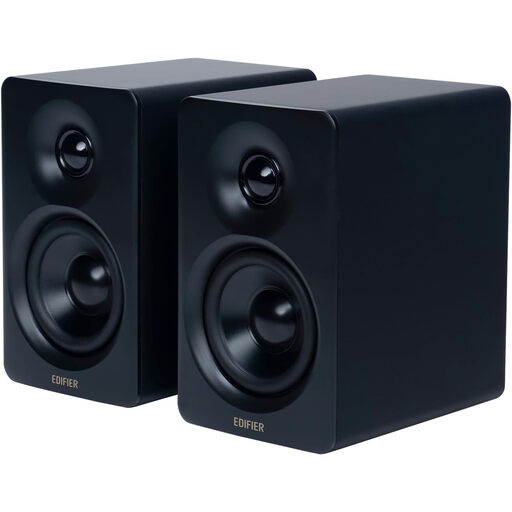
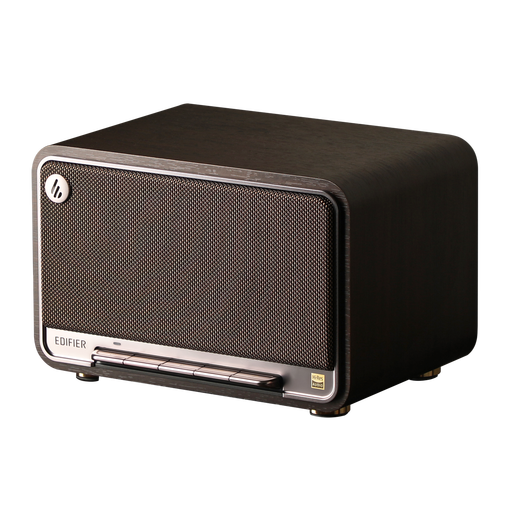
These Edifier speakers offer two ways to arrange music at a home-office desk: the M60 is listed with computer inputs and desktop speakers, while the D32 is a tabletop wireless model. Check each listing’s speaker configuration before treating either as a separated stereo pair.
 No image available
The M60 offers USB-C and AUX inputs for a computer-led desk setup, alongside Bluetooth 5.3. Confirm how many speaker cabinets are supplied and whether the cable needed for your planned layout is included.
 No image available
The tabletop D32 lists Bluetooth 5.3, AirPlay 2, USB-C and AUX for switching between wireless and wired sources. Check its dimensions against your desk and confirm its speaker configuration if separate left-right placement matters.
Choose a pair if separate left and right cabinets and a direct desktop connection matter most; choose a single speaker if simpler placement and wireless streaming take priority. Ruark MR1 Mk3, Yamaha HS3 and KEF LSX II LT are examples of pairs with differing inputs, while Sonos Era 100 is a one-speaker option.
A turntable connection depends on the exact speaker and the turntable’s output. Ruark lists a moving-magnet phono stage for the MR1 Mk3; Sonos requires a Line-In Adapter for a wired auxiliary source; and KEF says a turntable can connect to the LSX II LT only through Bluetooth because that model lacks a 3.5 mm analogue input.
Check the accessories needed for your planned sources and placement against the exact listing’s box contents. In particular, a wired auxiliary source for Sonos Era 100 requires a Sonos Line-In Adapter; for a two-speaker desk layout, confirm the supplied cables and how the cabinets connect.
Confirm the exact item’s guarantee, returns process, supplied cables, power configuration and delivery terms before ordering. Ruark’s stated two-year product-range guarantee should not be assumed to apply to another brand or seller.