Bass-aware electronic-music listeners
You want kick drums, basslines and synths to carry weight at your desk, without letting the desk, walls or room dominate what you hear.


Choose a pair of nearfield studio monitors if you produce music or prepare DJ sets and can place the speakers symmetrically at ear height. For everyday listening, a compact desktop pair puts desk space first, while a wireless or USB-C active pair puts convenient connections first. If bass is your priority, compare frequency-response figures on the same stated basis and plan the placement rather than relying on driver size or wattage alone.
You want kick drums, basslines and synths to carry weight at your desk, without letting the desk, walls or room dominate what you hear.
You need a close-range stereo setup for judging placement, tonal balance and mix details, rather than choosing solely for convenient playback.
You mainly play music from a laptop, phone or streaming source and want straightforward connections in a compact setup.
Start with what you do at the desk: mix and DJ work calls for a different set of connections and placement choices from everyday laptop listening. Then check how much space you can give a stereo pair and what you expect from bass-heavy tracks.
Choose it when: You need a defined stereo listening position for production, DJ preparation or critical listening.
Allow for: Symmetrical placement and connections suited to your interface or controller, rather than assuming laptop or phone playback will be effortless.
Choose it when: A stereo pair must fit a shallow desk and connect directly to the sources you use.
Allow for: Bass expectations that match the particular model; a small cabinet does not establish its low-frequency reach.
Choose it when: Streaming and everyday laptop listening matter more than studio-style inputs and controls.
Allow for: Checking each model's source connections and finding room for both speakers; wireless features do not solve placement problems.
| Concern | What to check | Who this matters to |
|---|---|---|
| Controlled bass | Check the stated frequency-response tolerance and whether the model offers room adjustment or a subwoofer output. | If basslines are central to my listening, I want weight without a room-dominated low end. Around 30% of consumers put controlled bass first. |
| Nearfield stereo | Check the inputs against your interface or controller, and confirm whether the listing contains one monitor or a pair. | When I prepare DJ sets or work on tracks, I need a stable stereo position for judging the mix. Accurate nearfield listening comes first for around 30% of consumers. |
| Desk placement | Measure cabinet and wall clearance, and check whether you can aim both speakers towards ear height. | On a crowded desk, I need both speakers to fit without forcing an uneven listening position. A workable placement is the main concern for around 20% of consumers. |
| Source connections | Match your devices' outputs to the listed inputs; do not treat USB-C, Bluetooth, AUX, RCA and balanced inputs as interchangeable. | If I switch between a computer and other music sources, I want playback that fits my daily routine. Around 20% of consumers prioritise straightforward connectivity. |
A driver measurement or power rating does not tell you how bass will sound at your desk. Manufacturers also quote frequency response using different tolerances, while placement changes what reaches your ears.
Compare low-frequency figures only where their measurement basis is clear, then consider the available placement and whether a subwoofer output matters for a later change to the system.
Genelec's monitor-placement guidance describes a listening angle of approximately 60 degrees, with the speakers aimed towards the listener. Walls, desk reflections and an uneven layout can affect what you hear.
Check that two cabinets will fit around your workstation and can be aimed towards ear height before choosing their size or any stands.
Yamaha lists its HS3 and HS4 as pairs but its HS5 as a single monitor. A model's suitability for stereo listening does not establish the quantity in a particular listing.
Confirm the number of speaker units and the exact variant in the product listing before ordering.
Its HS range includes compact HS3/HS4 desktop monitor pairs and the larger HS5 nearfield monitor.
The 305P MkII is a 5-inch powered nearfield monitor for a defined listening position.
The ROKIT 5 Generation Five is an active studio-monitor option for mixing and close-range listening.
The LSX II LT represents an active Hi-Fi pair for desktop listening and streaming.
Its cited desktop models range from the compact R33BT to the QR65 with more connection options.
These Edifier choices focus on compact desktop or tabletop playback for a home office. If you need a defined stereo monitoring position, confirm the number of speaker units in the exact listing before treating any of them as a studio-monitor pair.
 No image available
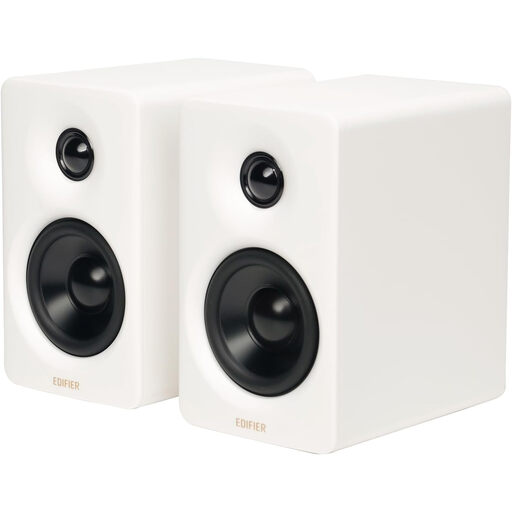
Consider the M60 if you want desktop playback with both wired and Bluetooth connection options.
The listing names USB-C and AUX inputs, 3-inch mid-bass drivers and 1-inch tweeters. Confirm how many speaker units are included, and check the published frequency-response details if bass reach is a deciding factor.
 No image available
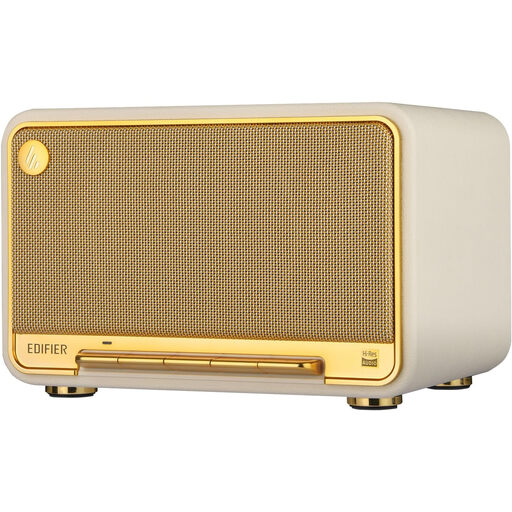
Consider the D32 if convenient tabletop listening from a computer or wireless source matters more than a defined monitor-pair setup.
The listing names Bluetooth 5.3, AirPlay 2, USB-C and AUX inputs, and an 11-hour playtime claim. Its stated 2.1 acoustic architecture does not establish that the package contains two separate speaker units; confirm the configuration and low-frequency specifications if those affect your choice.
 No image available
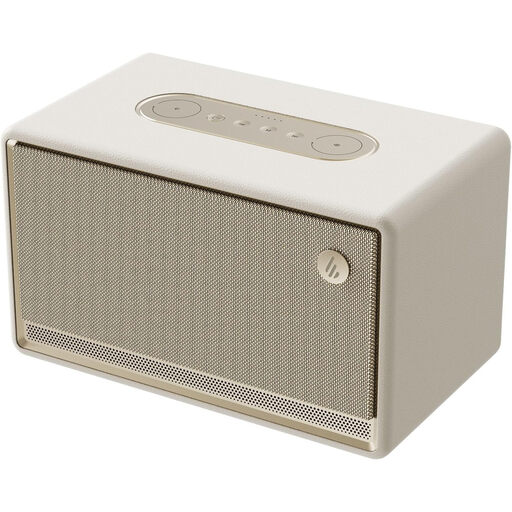
Consider the ES300 for tabletop listening if a Bluetooth source fits your usual home-office setup.
The listing names Bluetooth 5.3 and a 12-hour playtime claim. Check the exact wired inputs, power arrangement and number of speaker units before ordering; if low-frequency reach is important, compare the stated response details too.
Choose a nearfield studio-monitor pair for production or DJ work when you can set up a defined stereo listening position and connect your equipment. Choose an active wireless Hi-Fi pair when streaming and everyday computer playback take priority; check its inputs rather than assuming they suit an interface or controller.
Aim a stereo pair towards your listening position and keep the layout as symmetrical as the desk allows. Genelec's monitor-placement guidance recommends approximately a 60-degree angle between the speakers, with the acoustic axis near ear height; nearby walls and desk reflections also deserve attention.
Yes, when their size and connections suit your desk and your bass expectations suit the particular model. Yamaha quotes 70 Hz to 22 kHz for HS3 and 60 Hz to 22 kHz for HS4, both at −10 dB; Edifier quotes 70 Hz to 20 kHz for R33BT without the same tolerance in the cited specification. Those figures should not be treated as directly comparable predictions of in-room bass.
Confirm the number of speaker units, the inputs needed for your sources and whether the listing includes the accessories your setup requires. Yamaha lists HS3 and HS4 as pairs but HS5 as a single monitor, so check the exact model and package rather than relying on a range name.