What matters when choosing
Choose the speaker arrangement you can accommodate, then check how your laptop, screen or phone will connect. These setups address different priorities:
Compact active stereo pair
Consider it when: You can place separate speakers around your monitor and want a connection suited to your computer or screen. KEF lists USB-C, HDMI ARC and optical connections for the LSX II LT.
Allow for: Both cabinets need space, and an uneven layout may limit the stereo presentation you are seeking.
Active bookshelf pair
Consider it when: Your sources suit analogue, optical or coaxial inputs. Edifier lists these alongside Bluetooth for the R1280DBs.
Allow for: Cabinet size, cables and any connection adapter your computer requires.
Compact studio monitors
Consider them when: Nearfield listening and a small footprint take priority; the Genelec 8010A and IK Multimedia iLoud Micro Monitor offer different compact-monitor arrangements.
Allow for: Input requirements vary: the 8010A lists an XLR analogue input, so plan the complete route from your source.
Wireless tabletop speaker
Consider it when: Streaming and simple placement matter more to you than positioning a separate speaker on each side of the desk.
Allow for: Check app setup and what an external wired source needs; wireless convenience does not establish video synchronisation.
| Concern |
What to check |
Who this matters to |
| Voices and stereo placement |
Check that two speakers can sit on opposite sides of the screen at roughly equal distances from you. |
If I want dialogue and ensemble passages presented across a defined left and right layout, I need room to position both speakers. Around 33% of consumers might put that stereo arrangement first. |
| Desk and room fit |
Measure usable desk width and depth; allow for cables and nearby walls. |
On a shallow or crowded desk, I need cabinets that fit without awkward placement. Desk fit could be the main concern for around 27% of consumers. |
| Connections and video |
Identify your source output and confirm a compatible input; check synchronisation with filmed performances. |
When I play recordings from a laptop or watch a filmed show, I need the connection to work and speech to stay in sync. Around 20% of consumers might make reliable direct playback their priority. |
| Everyday streaming |
Check the streaming controls you use and what is required to connect an analogue source. |
If I mostly start music from a phone or service, I want playback that is straightforward to control. Streaming convenience might come first for around 20% of consumers. |
Joybuy product choices
These Edifier choices cover two different desk-listening arrangements: M60 desktop speakers for positioning a pair around your workspace, and the D32 tabletop speaker for a wireless-led setup. Check the connection and placement details that matter to your source before deciding between them.
 No image available
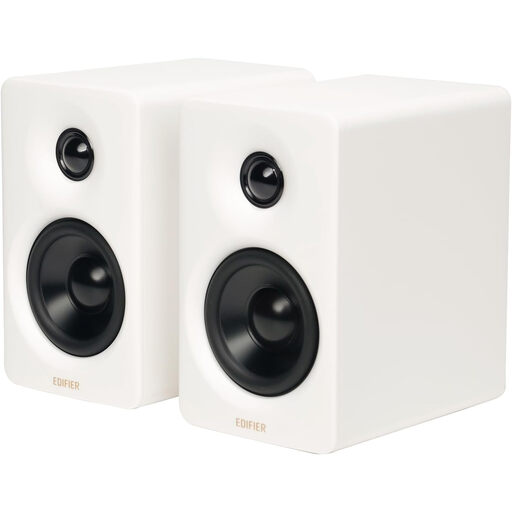
Edifier M60 desktop speakers, Bluetooth 5.3
Consider this listed speaker pair if you have room to position speakers on both sides of your desk.
The title lists 66 W RMS, USB-C and AUX inputs alongside Bluetooth 5.3. Confirm the wired inputs and power arrangement for this exact model before relying on a direct laptop connection, as its connection and charging descriptions conflict.
View on Joybuy
 No image available
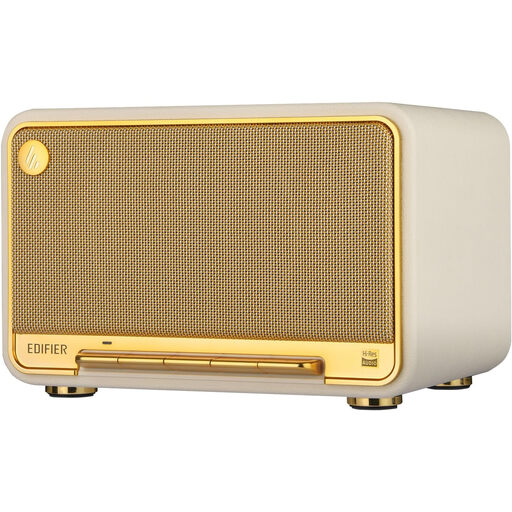
Edifier D32 tabletop wireless speaker
Consider this tabletop option if wireless playback matters more to you than placing separate left and right speakers around a monitor.
The title lists Bluetooth 5.3, AirPlay 2, USB-C and AUX inputs. Check its dimensions for your desk, the connections needed by your source and its speaker arrangement if stereo placement is important.
View on Joybuy
Common questions
Should I choose one speaker or two for musical theatre at a desk?
Choose a two-speaker system if stereo placement matters to you and you can position both speakers around your listening position. KEF’s placement guidance suggests roughly equal distances between the listener and each speaker as a starting point; a cramped or uneven desk may make that arrangement impractical.
Will Bluetooth keep filmed performances in sync?
Check the exact speaker and source rather than assuming it will. IK Multimedia specifies 155 ms Bluetooth latency for the iLoud Micro Monitor under its stated test conditions, compared with 1.02 ms for its analogue input, and notes that Bluetooth latency depends on the host. A compatible wired path is worth considering when lip-sync matters.
Can I use an analogue source with a Sonos Era 100?
Check the required line-in accessories and setup before treating the Era 100 as a direct analogue-input speaker. Sonos lists line-in for the Era 100, while its support instructions for the related Era 100 SL specify a Sonos Line-In Adapter; confirm the instructions and suitable cable for your exact speaker and source.
How should I dispose of an old speaker?
Use an appropriate electrical-equipment recycling or take-back route where one is available, rather than putting the speaker in general waste. GOV.UK’s guidance on waste electrical and electronic equipment covers recovery, reuse and recycling; check your local authority or retailer for an applicable route.


