Who each setup suits

Focused live-album listener

If you listen closely to the placement of performers and the surrounding crowd, a separated pair gives you a conventional stereo layout to arrange around your seat. Genelec's placement guidance recommends aiming the two speakers towards the listener.

Space-limited desk listener

If a monitor and work equipment already occupy the desk, compare the footprint of two compact speakers with that of one wireless speaker. The single unit uses one speaker position, while the pair needs room for left-right placement.

Multi-source home-office listener

If you alternate between a computer, phone and other audio sources, start with the outputs on those devices. A speaker's USB-C, analogue, optical or wireless options are useful only when they match the way you intend to play music.

What to check before choosing

Compact stereo pair

Choose it when: Live albums are a focused listening activity and you can place a speaker on each side of your seat.

Allow for: Two speaker positions, suitable connections and deliberate aiming rather than relying on power figures alone.

Single wireless speaker

Choose it when: One-box streaming and a smaller desk footprint matter more to you than physical left-right separation.

Allow for: A different stereo layout; if you later want two separated speakers, check whether the model supports a matched pair.

Concern What to check Who this matters to
Stereo presentation Confirm whether the purchase supplies two speakers or supports a matched stereo pair, and whether you can position them on opposite sides of your seat. If I listen closely to live recordings, I want room to place performers across a left-right stage rather than keep everything in one speaker position. Around 42% of consumers would put that separated presentation first.
Desk placement Measure usable width and depth, including cable clearance; check speaker angle and any stand arrangement. When my work surface is crowded, I need speakers that fit without obstructing the monitor or firing awkwardly across the desk. Roughly 33% of consumers would make workable placement their primary concern.
Source connections Match each device's output to the exact speaker inputs, and check whether an adapter is needed. If I switch between a work computer, phone and another music source, I want each playback route settled before buying. About 25% of consumers would prioritise connection and streaming workflow.

Buying pitfalls

  • Expecting one compact speaker to stand in for a separated pair

    Which? distinguishes listening through one Sonos Era 100 from pairing two for hi-fi-style stereo. If left-right placement is central to your enjoyment of live albums, assess the two-speaker layout from the outset.

    Decide whether you want one-box streaming or two physical speaker positions, then measure the space the chosen arrangement needs.

    A two-speaker arrangement may require a second matching unit if you begin with a single speaker.

  • Choosing by power figures without planning placement

    Genelec advises aiming a stereo pair at the listening position; nearby surfaces can affect what reaches you. A quoted output figure alone does not tell you how a speaker will work on your desk.

    Check cabinet dimensions and whether the supplied or intended stands let you aim both speakers towards your seat.

  • Assuming every audio source connects the same way

    Sonos specifies a Line-In Adapter for an auxiliary source on Era 100, while Ruark lists distinct USB-C, optical, line and moving-magnet phono inputs for MR1 Mk3.

    List the outputs on your computer and other sources, then match each one to the exact speaker model and any required accessory.

    A compatible cable or adapter may be needed for a source that cannot connect directly.

  • Overlooking electrical-equipment checks

    For a mains-powered speaker, the supplied power equipment and product instructions matter alongside the audio features. The UK Government also maintains a product-safety alerts, reports and recalls service.

    Check the supplied power equipment and instructions when the speaker arrives, keep your purchase record and consult official recall information if a safety concern arises.

Brands to consider

KEF

Its LSX II LT is a compact two-speaker system for listeners considering direct computer audio alongside other home sources.

  • KEF lists USB-C, HDMI ARC, optical input, Bluetooth and a subwoofer output for LSX II LT.
  • Check that the system's two-speaker footprint and available inputs suit your desk and devices; those specifications are not an independent sound-quality comparison.

Sonos

Era 100 is a one-speaker streaming option for listeners interested in wireless playback and the possibility of expanding their setup.

  • Sonos lists Wi-Fi, Bluetooth and AirPlay 2; Which? notes that two Era 100 units can be paired for hi-fi-style stereo.
  • An auxiliary source requires the Sonos Line-In Adapter, and one Era 100 is not a physically separated pair.

Ruark

The MR1 Mk3 is a compact desktop stereo system for a setup with several types of audio source.

  • Ruark lists USB-C audio, Bluetooth, a combined optical and line input, a moving-magnet phono input and a subwoofer output.
  • Confirm that your source outputs match those inputs. Ruark describes its frequency-response figure as typical in-room, so it is not directly comparable with figures measured another way.

Edifier

The M60 is a compact desktop model for listeners considering wired computer audio as well as Bluetooth playback.

  • Edifier lists USB-C, AUX and Bluetooth 5.3 for M60, along with angled stands intended to reduce coloration from the desktop surface.
  • Check the exact seller listing for the supplied speaker arrangement, power equipment and included accessories.

Joybuy product choices

These two Edifier listings offer different starting points for a home-office setup: the M60 is a desktop-speaker option with wired inputs, while the S300 is listed as a single wireless multi-room speaker. If a separated pair is your priority, confirm the M60 bundle contents or how an S300 stereo arrangement would be assembled before choosing.
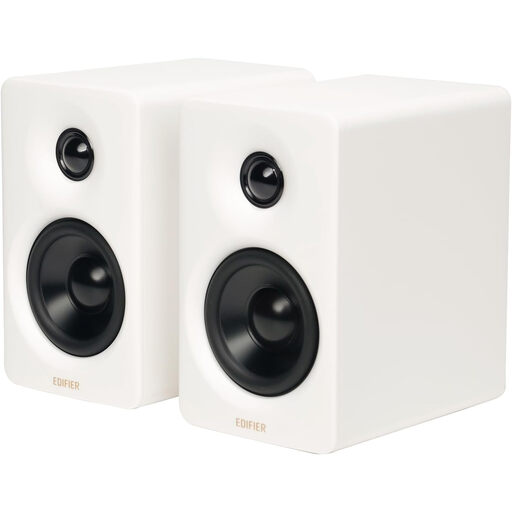
Edifier M60 desktop speakers

Edifier M60 Bluetooth 5.3 desktop speakers

Consider the M60 if you want a compact desktop setup with a direct computer connection. The named variant lists USB-C and AUX inputs, Bluetooth 5.3 and 66 W RMS total output; Edifier also lists angled stands for the M60.

Confirm that this particular bundle contains the left and right speakers you intend to use, and check its supplied power equipment before buying.

View on Joybuy
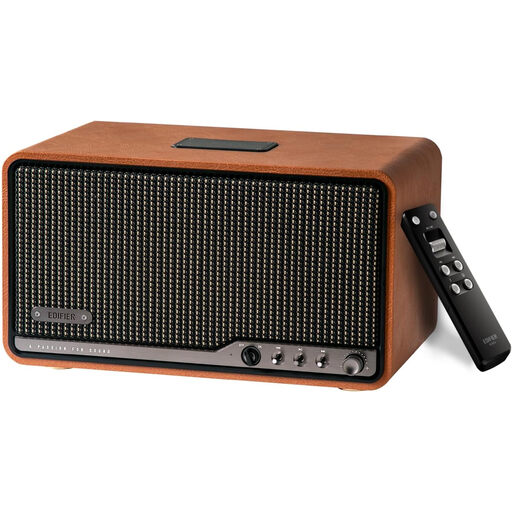
Edifier S300 wireless multi-room tabletop speaker in brown

Edifier S300 wireless multi-room speaker, brown

Consider the brown S300 if you would rather start with one tabletop speaker for a wireless, multi-room-oriented setup.

For separate left and right speaker positions, check the exact S300 pairing requirements, the space for another unit and the supplied power equipment before buying.

View on Joybuy

Common questions

How should I position a stereo pair at my desk?

Place the speakers symmetrically around your listening position and aim both towards you. Genelec's monitor-placement guidance suggests roughly a 60-degree angle between left and right speakers and ear-level alignment for typical two-way systems; nearby surfaces can also cause reflections. Treat this as placement guidance, not a promised result for a particular model.

Can one Sonos Era 100 replace a desktop stereo pair for live albums?

One Era 100 can serve as a single-speaker streaming choice, but it does not give you two physically separated speaker positions. Which? notes that two Era 100 units can be paired for hi-fi-style stereo, so plan for the space required by both if that is the presentation you want.

Will I need an adapter for a turntable or other analogue source?

That depends on the exact speaker and source outputs: Sonos says Era 100 needs its Line-In Adapter for an auxiliary source, while Ruark lists a moving-magnet phono input and a combined line and optical input on MR1 Mk3. Check whether your turntable has a built-in phono preamp and match its output to the intended input before choosing accessories.

What safety checks matter for a mains-powered speaker?

Check the power equipment and instructions supplied with the speaker, and retain your purchase record. The UK Government's product-safety alerts, reports and recalls service is a place to check if a concern arises; Great Britain's electrical-equipment rules address businesses placing applicable equipment on that market, rather than making an audio specification a safety guarantee.