Desk-centred music listeners
If you normally listen while seated at one desk, a compact pair gives you separate left and right speaker positions. An available USB audio input also lets you connect a compatible computer directly.


Choose a compact powered stereo pair if you usually listen from one desk seat and have room to position two speakers; a USB audio connection is worth prioritising when your computer is the main source. If you also play records, check for a compatible phono input, while a single Wi-Fi speaker suits streaming and flexible placement rather than a separated left-right desk setup. Check your sources, connections and available space before choosing.
If you normally listen while seated at one desk, a compact pair gives you separate left and right speaker positions. An available USB audio input also lets you connect a compatible computer directly.
If you move between computer audio, phone playback and records, list the outputs you actually use. A turntable may need a compatible phono input or its own phono preamp; analogue line-in alone does not settle that question.
If app control, Wi-Fi playback and use beyond the office matter more than two separated desk speakers, a compact wireless speaker is another route. Check its supported services and any adapter needed for a wired source.
Choose it when: Your computer is the regular source and you listen from a fixed desk position.
Allow for: Two speaker positions and the cables needed to connect the pair and your computer.
Choose it when: You need separate desk speakers and also want to connect a compatible turntable or other wired sources.
Allow for: The pair’s desk space and a check that the turntable’s output matches the speaker input.
Choose it when: Streaming control and the freedom to place one enclosure matter more than separate left and right speakers.
Allow for: Network and app setup where required, plus an adapter if the chosen model needs one for line-in.
For traditional dance music in a home office, start with the need that would decide your purchase, then check the connections and placement that need to support it.
| Concern | What to check | Who this matters to |
|---|---|---|
| Desk listening and stereo placement | Confirm that the package contains two speakers, that both fit beside your screen, and that your computer has a compatible wired connection. | If I listen mainly from one desk seat, I want room to position a left and right speaker and connect my computer directly. Around 40% of consumers would put this desk-focused need first. |
| Connections for several sources | Match each source’s output to an input; for a turntable, check its preamp and cartridge against the speaker’s phono or line input. | When I switch between computer playback, a phone and records, I need the connections to work with each source. Roughly 30% of consumers would make source flexibility their primary concern. |
| Wireless streaming and room use | Check Wi-Fi and service compatibility, app setup and whether wired playback requires an adapter. | If I want music in the office without arranging two desk speakers, straightforward streaming matters more to me. About 30% of consumers would prioritise that flexibility. |
A single Wi-Fi speaker can simplify placement, but one enclosure does not give you the physical separation of two speakers positioned around your screen.
Decide where you usually listen and measure space for a pair before choosing the more convenient single-speaker arrangement.
A turntable’s phono-level output and a speaker’s line input are not automatically compatible. Ruark Audio lists a moving-magnet phono input for the MR1 Mk3, while a wired line-level source for Sonos Era 100 requires its Line-In Adapter.
Check the turntable cartridge, whether it has a built-in phono preamp, and the connectors required by the speaker.
Depending on the equipment, you may need a separate phono preamp, line-in adapter or cable.
Desk surfaces, nearby walls and uneven left-right placement can affect what reaches your seat.
For a pair, begin with both speakers aimed towards your listening position and adjust their placement where the desk allows. Genelec’s monitor-placement guidance uses a 60-degree angle between left and right monitors as a starting point, not a rule for every desk.
A general product name may not establish the exact model or the inputs you need. The Joybuy Xiaomi Desktop Speaker listing, for example, says its specific model number should be confirmed.
Check the complete model identity, connections and package contents rather than assuming that two desktop speakers with similar names are interchangeable.
The MR1 Mk3 is a powered desktop stereo pair to consider when a computer shares the desk with other wired sources, including a compatible moving-magnet turntable.
The A2+ Gen 3 is a compact powered pair for a computer-centred desk with occasional playback from other devices.
Era 100 represents a single-speaker option for listeners more interested in streaming and app control than a separated desktop pair.
These Edifier tabletop and desktop speakers offer options for music playback in a home office. Check each listing’s speaker arrangement and connections against your preferred desk, computer and streaming setup; none should be assumed to include a turntable-ready phono input.
 No image available
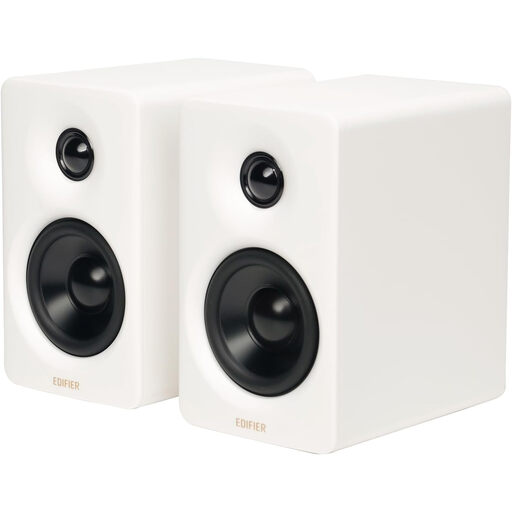
Consider these for a desk where USB-C or AUX connectivity is useful alongside Bluetooth playback.
The product name states 66 W RMS and Bluetooth 5.3. Confirm the package contents before planning a separated left-right setup: the listing also gives a quantity of one.
 No image available
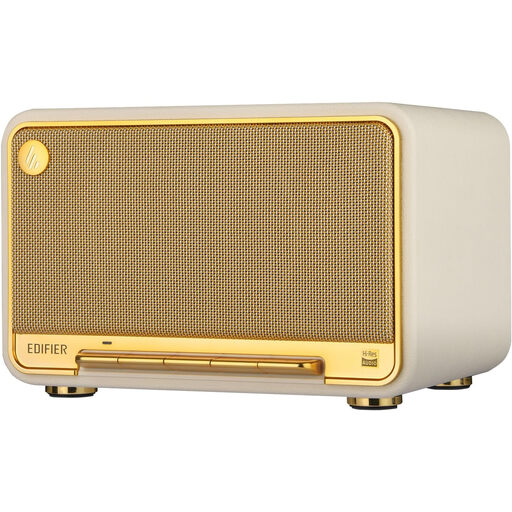
This tabletop option is relevant if you plan to play music over Bluetooth or use an AUX connection rather than arrange a separated desk pair.
The product name lists Bluetooth 5.3, AirPlay 2 and 60 W RMS. Check whether its USB-C port carries audio before choosing it for a wired computer connection, and confirm the speaker arrangement if left-right placement matters.
 No image available
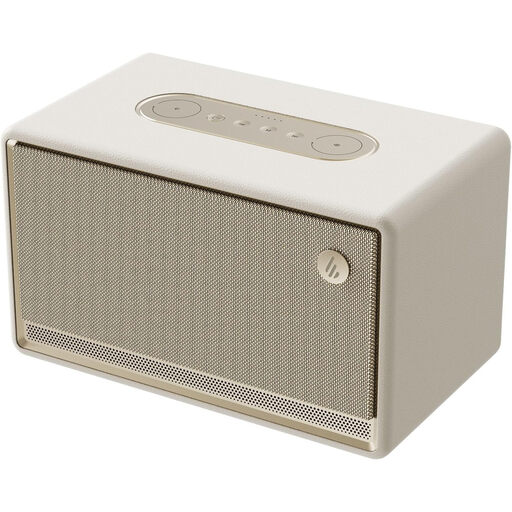
Consider this tabletop speaker if Bluetooth playback and flexible placement are more important to you than positioning two separate speakers around a monitor.
The product name specifies Bluetooth 5.3 and 12-hour playtime. Confirm the precise wired inputs and network playback options before relying on them for your computer or streaming services.
Choose two speakers if you normally listen from one seat and can position them on opposite sides of the screen. One Wi-Fi speaker is a practical alternative when streaming and simpler placement matter more than physical left-right separation. For a pair, Genelec suggests aiming both speakers towards the listener, with a 60-degree angle as a starting point rather than a requirement for every home office.
USB audio is useful if your computer will be the regular source and both it and the speakers support the connection; Bluetooth remains an option for compatible devices. Audioengine lists both USB-C audio and Bluetooth for its A2+ Gen 3, but a USB-C port on another speaker should not be assumed to accept audio without checking its stated function.
You can connect a compatible turntable directly when the speaker system accepts its output. Ruark Audio specifies a moving-magnet phono input for the MR1 Mk3, so check the cartridge and connectors; a system with line-in instead needs a line-level signal from a turntable’s built-in preamp or a suitable external phono stage. Sonos Era 100 also needs its separate Line-In Adapter for a wired line-level source.
Take an unwanted electrical speaker to an appropriate collection point rather than putting it in household rubbish. UK government guidance on electrical waste directs consumers towards suitable recycling collection; check the collection arrangements available where you live.