Relevant brands to consider
These model examples illustrate different network features; choose against your home layout and connected devices rather than the brand name alone.
TP-Link
TP-Link lists the Archer BE550 as a tri-band Wi-Fi 7 single router with one 2.5Gbps WAN port, four 2.5Gbps LAN ports and EasyMesh compatibility.
- Its listed ports are relevant when several compatible fixed devices need wired connections, while EasyMesh offers a possible expansion route.
- TP-Link’s advertised wireless rate is a product maximum, not a prediction of speeds or coverage in a particular home.
ASUS
ASUS lists the dual-band RT-BE88U with a 10G SFP+ port, a 10G WAN/LAN port and four 2.5G ports for wired-heavy setups.
- That port selection is worth examining for a home office with compatible wired computers or local video storage.
- Higher-capacity ports offer little benefit to a connection whose other devices or links cannot use them; the specifications do not establish coverage in your rooms.
NETGEAR
NETGEAR presents its Orbi 970 three-pack as a quad-band Wi-Fi 7 mesh system with 10Gbps and 2.5Gbps Ethernet connections.
- The multi-unit arrangement is relevant when coverage is needed in several separated parts of a home.
- NETGEAR’s coverage, device-count and speed figures are manufacturer claims; assess node placement and the actual layout before relying on them.
Joybuy products for these setups
These single-router and three-unit mesh options serve different needs: consider the router models where one position covers the home and wired connections matter, or the mesh systems where coverage between rooms is the priority. Check provider compatibility and the intended device connections before choosing.
 No image available
NETGEAR Orbi 370 RBE373 Wi-Fi 7 Mesh System, 3-Pack
Consider this three-unit system if the office and family viewing areas need coverage in separate rooms; check where the units could sit.
The product name specifies dual-band BE3600 Wi-Fi 7 and 2.5Gbps Ethernet. Confirm the connections needed by any wired computer or video-storage device.
View on Joybuy
 No image available
TP-Link BE9300 Tri-Band Wi-Fi 7 Router
Consider a single router if one location gives the office and family rooms adequate coverage, especially when fixed devices can be wired.
The product name identifies a tri-band Wi-Fi 7 model. Confirm this exact model’s Ethernet configuration and your provider’s connection requirements before buying.
View on Joybuy
 No image available
TP-Link Deco BE22 BE3600 Wi-Fi 7 Mesh System, 3-Pack
This three-unit mesh option is relevant if signal is weak between the office and family viewing areas; plan unit locations around the rooms that need coverage.
The product name specifies BE3600 Wi-Fi 7. If local video transfers depend on wired connections, check the Ethernet ports against the speeds your other devices require.
View on Joybuy
 No image available
TP-Link Deco BE65 BE9300 Tri-Band Wi-Fi 7 Mesh System, 3-Pack
Consider this three-unit system when the office and other regularly used rooms have persistent weak-signal areas.
The product name specifies tri-band BE9300 Wi-Fi 7. Check the exact Ethernet ports and possible node positions if wired video sharing and room-to-room coverage both matter.
View on Joybuy
 No image available
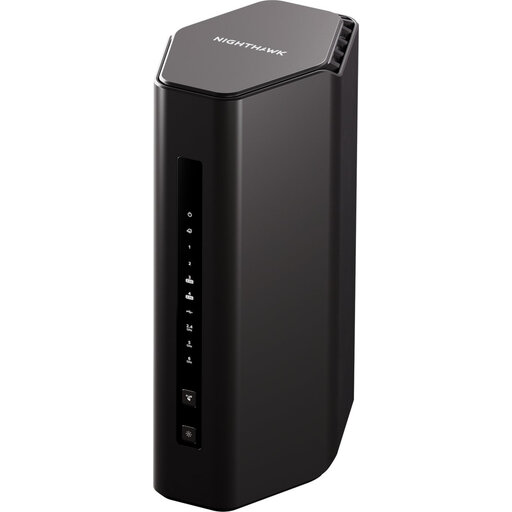
Nighthawk RS300 BE9300 Wi-Fi 7 Router
This single-router option is relevant if one router can cover the office and family rooms and you are assessing wired connections for fixed devices.
The product name identifies the RS300 and BE9300 Wi-Fi 7 variant. Check this exact variant’s port configuration before planning a multi-gigabit connection.
View on Joybuy
Frequently asked questions
Will a new router speed up work calls while the family streams video?
Only if the router or in-home Wi-Fi is the limiting part of the connection. Ofcom notes that Wi-Fi cannot outperform the broadband service, so check the service and the signal at your desk before replacing equipment; property-level broadband predictions can differ from speeds actually received.
When should I choose mesh instead of one router?
Choose mesh when the office or family rooms have persistent weak signal caused by distance, floors or obstructive materials. If a centrally placed single router covers those rooms adequately, mesh nodes may add complexity without addressing a remaining need; neither setup makes an inadequate broadband service faster.
Can I use my own router instead of my broadband provider’s?
Check with the provider before buying: the connection type, login requirements, bundled phone service and available support can affect the change. Ofcom warns that a personally purchased router may be harder to set up and that the provider may not support it when problems arise.
What should I check if I share video files from storage at home?
Check the Ethernet capability of the computer, storage device, router and any switch as one connection path. A faster router port cannot remove a slower link elsewhere; if storage will connect directly to the router, confirm that the exact model supports the file-sharing functions and storage format you intend to use.


