Before buying equipment, check your provider’s service status and compare a wired connection at the router with the work-room connection: Ofcom notes that Wi-Fi cannot outperform the broadband service feeding it. If the service is sound, try router placement first, then match the fix to the layout—an extender for one reachable weak spot, mesh for several rooms, or Ethernet for a fixed desk; check gateway and phone requirements before replacing a provider router.
Who these options suit
Multi-room home worker
If you work in a loft or spare room and need usable Wi-Fi elsewhere across floors too, compare mesh-node positions with a cable-backed option. Ofcom guidance and TP-Link’s Deco X50 specifications identify placement and Ethernet backhaul as relevant considerations.
Fixed-desk connection seeker
If you usually work at one desk, check whether Ethernet can reach your computer before buying equipment to extend wireless coverage. Ofcom recommends a direct Ethernet connection to the router for a faster, more reliable connection.
Single-dead-spot household
If most rooms connect adequately but one work room does not, compare router relocation with an extender placed where the existing signal is still usable. Ofcom’s Wi-Fi guidance identifies router position as a practical factor to check.
What to prioritise when choosing a fix
Start by identifying whether the issue is the broadband service, the router or coverage in the work room; then choose a route that fits the layout and the connections available.
Router placement or provider hub
Consider when: the router is low, off-centre or obstructed, or the provider’s hub is old or disconnects frequently.
Trade-off: moving one router may not reach a distant room behind substantial walls or floors.
Mesh Wi-Fi
Consider when: broadband at the router is adequate but several rooms need coverage and there are suitable positions for the units.
Trade-off: a mesh kit uses multiple units, and some systems require the main unit to connect to the existing gateway by Ethernet.
Single-router replacement
Consider when: the router itself appears to be the limitation and a replacement supports your broadband connection and household services.
Trade-off: one new router may still leave a distant work room with a weak signal; provider support may also be more limited.
Wi-Fi extender
Consider when: one weak area needs help and there is a position where the extender can receive an existing signal.
Trade-off: an extender’s mesh features may depend on router compatibility, and the placement affects the result.
Ethernet or powerline
Consider when: Ethernet can reach a fixed workstation, or powerline is worth testing where running a data cable is impractical.
Trade-off: powerline results depend on the home’s electrical wiring and the sockets used.
Broadband fault or service change
Consider when: the connection is poor at the router too, or your provider reports an outage.
Trade-off: coverage equipment cannot fix a provider fault or increase the speed supplied by an inadequate broadband service.
| Concern |
What to check when buying |
Who this matters to |
| Reliable connection at a fixed desk |
Check whether Ethernet can reach the computer and whether both devices have Ethernet connections. For powerline, check the receiving unit’s connections and trial the intended sockets. |
If my work computer stays at one desk, I want a dependable connection and would check whether a cable can reach it; around 28% of consumers put fixed-desk reliability first. |
| Coverage across several rooms |
Map the weak rooms and possible unit positions; check the kit size, Ethernet backhaul support and how its main unit connects to the existing gateway. |
When I work in a loft or spare room and need Wi-Fi in other rooms too, I look for coverage beyond one desk; around 22% of consumers prioritise several weak rooms. |
| One weak room |
Try router placement and identify an extender position that still receives a usable signal. Check router compatibility if unified mesh roaming matters. |
If only one work room has a weak signal, I would rather target that area than add equipment throughout the home; around 17% of consumers focus on a single dead spot. |
| Reaching a room without a data cable |
Check the available sockets, the receiving unit’s connection types and compatibility with existing adapters; trial powerline on the sockets you intend to use. |
When running Ethernet to my work room is impractical, I need another route to reach it; around 17% of consumers prioritise a room without a data cable. |
| Service or gateway diagnosis |
Check provider status and compare a wired connection at the router with the work-room connection. Confirm broadband and home-phone requirements before replacing a gateway. |
If I am unsure whether the fault is broadband, the router or room coverage, I want to diagnose it before buying equipment; around 16% of consumers put that check first. |
Buying pitfalls
-
Buying mesh to fix a provider-side fault
Wi-Fi equipment cannot repair an outage or improve the broadband connection feeding the router.
Check your provider’s service status and compare a wired connection at the router with the work-room connection before choosing coverage equipment.
-
Assuming every extender or mesh unit works with any router
Connection methods and mesh features vary. TP-Link says its main Deco unit needs a physical Ethernet connection to the existing network, while RE705X EasyMesh operation requires a compatible router.
Check the exact model’s connection method, router compatibility and intended unit position before buying.
-
Treating rated speed as the speed at the desk
Building layout and placement affect wireless coverage; powerline results also depend on the home’s electrical wiring.
Test the connection in the work room or on the intended sockets rather than relying on a headline rating.
-
Removing a provider hub without checking dependent services
A separately purchased router may be harder to set up and may receive less support from the provider. BT, for example, identifies Digital Voice phone ports on its Smart Hub 2 and Smart Hub 3; this does not describe every provider.
Confirm the connection settings, support arrangements and home-phone requirements with your provider before replacing its gateway.
Changing the hub can also mean extra setup work, and a phone service that relies on it may need another arrangement.
Relevant brands to compare
TP-Link
Compare the Deco X50 for multi-room mesh and the RE705X for a targeted extender or access-point route.
- TP-Link’s UK specifications list optional Ethernet backhaul for Deco X50 and a Gigabit Ethernet port and access-point mode for RE705X.
- RE705X EasyMesh operation depends on a compatible router; these model features do not establish performance in a particular home.
ASUS
ZenWiFi XD5 is a mesh option to compare if access-point, mesh-node and router modes matter.
- ASUS lists those three modes and two Gigabit Ethernet ports for the XD5.
- Check the exact pack and connection requirements; the model’s specifications do not establish compatibility with every provider service or room-by-room performance.
eero
The eero 6+ line is a mesh-router option to compare when expansion and Ethernet on each selected unit matter.
- eero distinguishes a 6+ router with two 1 GbE ports from its Wi-Fi-only 6+ Extender.
- The 6+ Extender cannot act as a standalone gateway or provide Ethernet backhaul, according to eero Support.
devolo
Magic powerline kits are an option to compare when a remote office is difficult to reach wirelessly and installing Ethernet is impractical.
- devolo lists two Gigabit LAN ports on Magic 2 WiFi next.
- devolo says Magic adapters do not pair with its older dLAN series. Powerline results depend on the household’s electrical wiring.
Joybuy product choices
These Joybuy choices cover mesh Wi-Fi, targeted Wi-Fi extension and powerline networking for a weak work room.
 Image unavailable
NETGEAR Orbi 370 RBE373 WiFi 7 Mesh System, 3-Pack
A three-unit mesh option for households seeking coverage across rooms. The product name specifies dual-band BE3600 and 2.5Gbps Ethernet; an existing modem or gateway is required.
Joybuy
 Image unavailable
TP-Link RE220BE BE3600 Wi-Fi 7 Range Extender
A range extender for a targeted weak area, provided it can be positioned within range of the existing router. The product name specifies Wi-Fi 7 and BE3600; EasyMesh roaming depends on a compatible router.
Joybuy
 Image unavailable
TP-Link Deco BE22 3-Pack BE3600 Whole Home Mesh Wi-Fi 7 System
A three-pack whole-home mesh system for a multi-room setup. The product name specifies Wi-Fi 7 and BE3600.
Joybuy
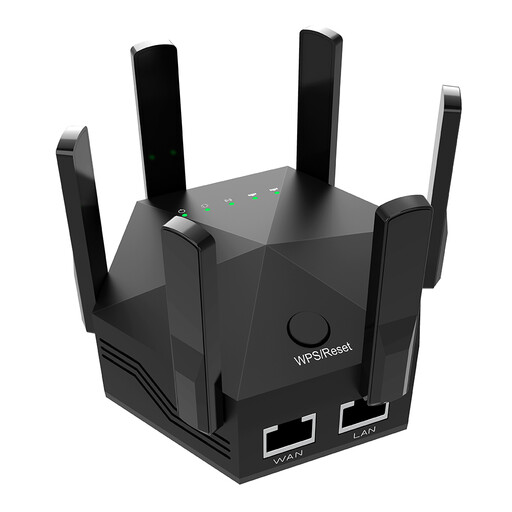 Image unavailable
Dual-Band 1200Mbps Wi-Fi Signal Booster with Six Adjustable Antennas
A Wi-Fi booster option for a targeted weak area; check its placement instructions and router compatibility before choosing. The product name specifies dual-band 1200Mbps, six adjustable antennas and a UK plug.
Joybuy
 Image unavailable
TP-Link TL-WPA8631P KIT AV1300 Gigabit Powerline Wi-Fi Extender Kit
A powerline Wi-Fi kit for a room that is difficult to reach with a data cable. Powerline results depend on household wiring, so trial the intended sockets and plug the adapters directly into wall outlets.
Joybuy
Frequently asked questions
How can I tell a Wi-Fi dead spot from a broadband fault?
Check your provider’s outage information and compare a wired connection at the router with the work-room connection. If the wired connection is also failing, contact the provider; if it is sound but the room is weak, investigate placement or an in-home network route. These checks help diagnose your household’s situation but do not guarantee that a particular purchase will fix it.
Can I connect mesh to my existing provider router without replacing it?
Some mesh systems can work alongside an existing router, but check the selected model’s instructions. TP-Link says the primary Deco needs a physical Ethernet connection to the existing router, modem or internet cable and cannot wirelessly repeat an existing router. Check any gateway-dependent services before changing the arrangement.
What should I check when installing a powerline kit?
Trial the kit on the wall sockets you intend to use, because powerline results depend on the home’s electrical environment. TP-Link advises plugging adapters directly into wall outlets and identifies electrical interference as a cause of reduced rates. Check adapter-family compatibility too: devolo says Magic 2 WiFi next does not support its dLAN adapters.
Will my provider support a retail router, and what happens to my home phone?
Provider support for a separately purchased router may be limited, so check connection settings and phone arrangements before removing the provider’s hub. BT identifies Digital Voice phone ports on its Smart Hub 2 and Smart Hub 3, but that example should not be assumed to describe every UK provider.


