Everyday home-PC replacers
You mainly browse, bank online and use email, and want everyday responsiveness without paying for unused performance. Which? discusses these everyday tasks in its desktop buying guidance.


Choose a replacement around where you use the computer, which existing screen and peripherals you can reuse, and whether changing components later matters. For email, online banking and browsing, compare the complete setup and the exact configuration before paying for capabilities you may not use; if the old PC runs Windows 10, check its upgrade eligibility or available support options before assuming replacement is compulsory.
You mainly browse, bank online and use email, and want everyday responsiveness without paying for unused performance. Which? discusses these everyday tasks in its desktop buying guidance.
You have a desk and may be able to reuse equipment, so screen compatibility, ports and the option to change components later can shape your choice. Lenovo’s model information and Which?’s monitor guidance highlight the need to check the particular connections and configuration.
You want a less cluttered desk and are weighing an all-in-one against a mini PC that uses a separate screen. The computer, display and accessories included vary by model.
Choose when: You have a fixed desk, can reuse a compatible monitor and peripherals, and want the option to change components later.
Trade-off: The separate case needs space, and a monitor or adapters may be needed for a complete setup.
Choose when: You want the computer and display together at a fixed household desk.
Trade-off: The screen and computer are less independently replaceable than separate units; upgrade options depend on the exact model.
Choose when: Desk space is limited and you have, or plan to select, a compatible screen, keyboard and mouse.
Trade-off: A mini PC may not include those separate items; Lenovo lists them as separately sold for its cited IdeaCentre Mini configuration.
Choose when: Using the computer away from one desk matters more than keeping a permanent desktop arrangement.
Trade-off: At a fixed desk, its built-in screen and portability may not be needed; check connections if you plan to use an external monitor and peripherals.
For everyday household use, Which? describes 8 GB of RAM as its minimum buying recommendation for a new desktop and suggests considering 16 GB. Treat this as buying guidance, not a universal requirement, and compare the exact computer’s memory, processor and storage with your tasks and files.
| Concern | What to check when buying | Who this matters to |
|---|---|---|
| Everyday responsiveness | Compare the exact processor, installed RAM and SSD capacity with the tasks and files you use; do not choose by an operating-system minimum alone. | If I mainly email, browse and bank online, I want the computer to feel responsive without paying for specialist capability. Around 29% of consumers replacing an ageing home PC put everyday responsiveness first. |
| Operating-system support and files | Check whether the old PC can upgrade, what operating system the replacement uses, and how you will transfer and verify files. | If I rely on familiar applications and need my household files on the new computer, I want to plan the move before retiring the old one. Around 23% of consumers prioritise a supported transition and file transfer. |
| Screen and peripherals | Check monitor inputs against the computer’s outputs, required ports, and which screen, keyboard and mouse are included. | If I want to reuse a monitor and peripherals or keep a desk uncluttered, I need to know how the complete setup will connect. Around 18% of consumers put screen and peripheral fit first. |
| Future component changes | Look for model-specific information about accessible memory, storage and slots rather than assuming every desktop can be upgraded alike. | If I want to keep the computer for longer by changing a component, I need the exact model to offer a practical route to do so. Around 18% of consumers prioritise future component changes. |
| Use away from the desk | Consider how often you will move the computer; for a laptop used at home, check its connection to the intended monitor and peripherals. | If I use the computer in more than one place, moving it matters more than a fixed desk arrangement. Around 12% of consumers prioritise use away from one desk. |
Microsoft’s Windows 11 minimum requirements establish eligibility, not how a particular household’s applications or multitasking will feel.
Compare the exact computer’s processor, installed memory and SSD with the tasks and files you expect to use, rather than choosing solely because it can run Windows 11.
A mini PC or tower may need a separate monitor and input devices, while an all-in-one integrates its display. Lenovo lists the monitor, keyboard and mouse as separately sold for the cited IdeaCentre Mini configuration.
Check what is included and whether your existing equipment connects to the computer before comparing complete setups.
Upgrade options differ by model, so a product-family description does not establish which components you can access in a specific configuration.
If later changes matter, check the exact model’s documentation for memory, storage and available slots before buying.
Missing files can disrupt the move, and a discarded computer may still contain personal information. Microsoft’s transfer guidance lists folders including Documents, Desktop, Downloads and Pictures.
Verify the transferred files before retiring the old computer, then remove personal information before recycling it. Oxfordshire County Council also advises clearing personal data before using a waste recycling centre.
IdeaCentre includes tower, all-in-one and mini desktop formats, which can help you compare different fixed-desk arrangements.
The OmniDesk Slim is a separate-case desktop option, while OmniStudio models combine the computer and display.
The Dell 24 all-in-one is a reference point if you are considering a combined screen and computer for a household desk.
Mac mini is a compact, separate-display route if you are open to using macOS rather than assuming a replacement must run Windows.
The choices below cover mini PCs and all-in-one desktops for a home PC replacement. Check each model’s configuration and the equipment needed for your desk setup.
 No image available
A mini PC option for a compact home-computing setup with a separate display.
The title lists Windows 11, 8GB DDR4 RAM, a 256GB SATA SSD, Bluetooth 5.2 and Wi-Fi 5.
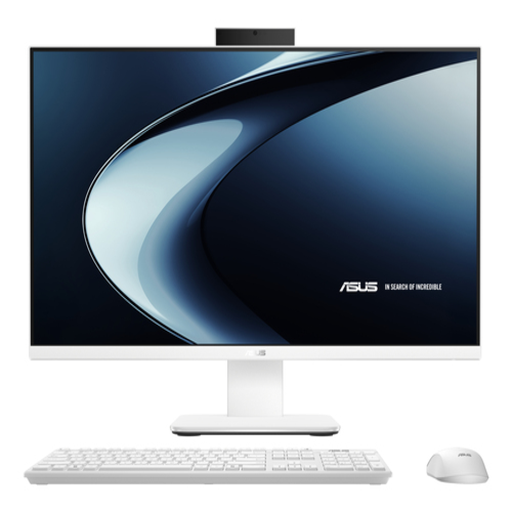 No image available
An all-in-one option if you want a combined computer and display at a fixed desk.
The title specifies a Core 5 210H processor, 16GB memory, 512GB storage and a 27-inch Full HD display.
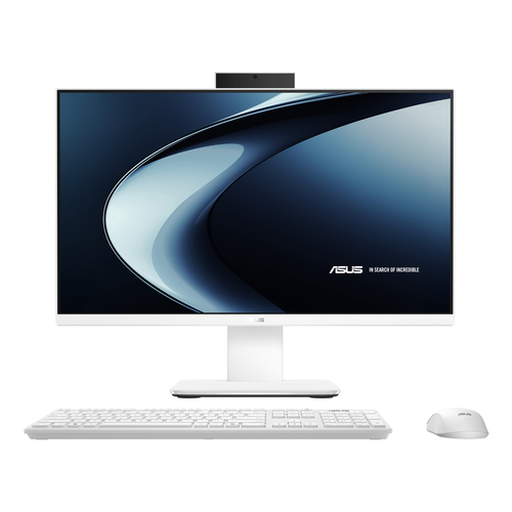 No image available
An all-in-one option for a fixed desk where you want the computer and display together.
The title specifies a Core 5 210H processor, 16GB memory, 512GB storage and a 23.8-inch Full HD display.
 No image available
A separate-display mini PC option for a compact fixed-desk setup.
The title lists Radeon 680M graphics, dual M.2 slots, triple-display support and Wi-Fi 6.
 No image available
A mini PC option if you have a separate monitor and want a compact computer for a fixed desk.
The title lists Windows 11, Radeon 780M graphics, HDMI, DisplayPort and Type-C video outputs.
No. Microsoft ended standard Windows 10 support on 14 October 2025, but that does not mean every computer must be replaced immediately. Check whether the PC is eligible for Windows 11; eligible consumers can use Microsoft’s Extended Security Updates through 12 October 2027. ESU provides specified security updates, not feature improvements or ordinary technical support.
Identify the files you need, copy them using an appropriate transfer method and verify the copy before retiring the old computer. Microsoft’s external-storage guidance calls out folders including Documents, Desktop, Downloads and Pictures. Copying files does not establish that your old applications will work on the replacement operating system.
Do not assume so. Lenovo lists the monitor, keyboard and mouse as separately sold accessories for its cited IdeaCentre Mini configuration. Check what is included with the exact computer and whether your existing equipment has compatible connections.
GOV.UK guidance says online customers generally have 14 days after receiving an item to tell the seller they are cancelling, then another 14 days to return it; conditions and exceptions apply. This change-of-mind process is separate from remedies for faulty goods.
Move and verify the files you need, then remove personal information before recycling the computer through an appropriate electrical-waste route. Check the collection arrangements where you live.