What to compare before buying
For home paperwork, decide whether you need colour, compare supplies against your likely use, then check whether scanning or copying—and a feeder in particular—will save you handling.
Mono laser
Consider it when: most of your paperwork is black-and-white text, or you need a mono all-in-one with a document feeder.
Trade-off: it cannot print colour, and some models use separate toner and drum units.
Colour cartridge inkjet
Consider it when: you need colour documents and expect relatively light printing; Brother’s DCP-J1200W is one model-specific print, scan and copy example.
Trade-off: compare the exact replacement cartridges and note that the DCP-J1200W specifies manual two-sided printing.
Refillable ink tank
Consider it when: you print colour documents regularly and want to compare refill bottles with cartridge supplies.
Trade-off: compare the printer’s purchase cost, the correct bottles and maintenance needs against your expected printing; rated yields are not a guarantee of household results.
| Concern |
What to check when buying |
Who this matters to |
| Black-and-white output |
Check whether colour is necessary and compare the exact toner and drum replacements where applicable. |
If most of what I print is black-and-white paperwork, I want clear text without paying for colour features I do not need. Around 29% of consumers put mono documents and their ongoing supplies first. |
| Batch scanning |
Confirm an automatic document feeder, its capacity and whether you need two-sided scanning. |
When I scan or copy several original pages, I want to avoid placing each sheet by hand. Around 29% of consumers prioritise handling multi-page documents. |
| Occasional colour |
Compare the printer and compatible cartridge costs, yields and any plan conditions for the exact model. |
If I only need colour now and then for forms or study materials, I want to weigh that need against the initial printer cost. Around 21% of consumers put occasional colour and upfront spending first. |
| Regular colour printing |
Compare the printer cost and correct refill bottles against expected pages, and check duplex and scanning features separately. |
For frequent colour documents, I would compare replenishment needs rather than assume a rated yield matches my use. Around 21% of consumers prioritise ongoing costs for regular colour printing. |
Printer brands to consider
These model examples illustrate different document-handling and supply choices; their specifications apply to the named models, not every product from each brand.
Brother
Brother’s DCP-J1200W and MFC-L2800DW illustrate colour cartridge and mono laser all-in-one options for different paperwork needs.
- The MFC-L2800DW has a 50-sheet automatic document feeder and automatic two-sided printing, according to Brother UK.
- The DCP-J1200W supports colour printing, scanning and copying, according to Brother UK.
- The MFC-L2800DW prints in mono and uses separate toner and drum units; the DCP-J1200W specifies manual two-sided printing.
Canon
Canon’s PIXMA G3570 is a refillable colour print, scan and copy model to consider when comparing bottle supplies with cartridge options.
- Canon specifies GI-51 ink bottles, Wi-Fi and a user-replaceable maintenance cartridge for the PIXMA G3570 series.
- Canon specifies manual two-sided printing for this model; check the exact printer’s handling requirements.
- Canon’s stated ink yields and savings depend on the manufacturer’s specified conditions and are not a household cost guarantee.
Epson
The EcoTank ET-2950 and ET-5150 show refillable colour all-in-one options with different document-feeding features.
- Epson specifies double-sided printing for both models; the ET-5150 also has a 35-page automatic document feeder.
- The ET-2850 is marked discontinued by Epson. Check the status of the exact model before choosing it.
- Epson’s stated ink yields are manufacturer figures; compare them with your expected use rather than treating them as guaranteed results.
HP
HP cartridge-printer ranges can involve different choices about individually purchased ink and optional Instant Ink plans.
- HP lists page-based Instant Ink plans for the UK; check the current terms for the exact printer and plan.
- HP says HP+ is not a subscription. Activating HP+ requires an HP account, an internet connection and Original HP Ink for the printer’s lifetime.
- HP+ and Instant Ink are different programmes, so check which terms apply to the particular printer.
Joybuy printer choices
These Joybuy listings cover refillable colour all-in-ones, colour inkjet models with batch-handling features, and a mono laser all-in-one for home document printing, scanning and copying.
 No image available
Epson EcoTank ET-2951 A4 Wireless Colour All-in-One Ink Tank Printer
For colour documents when you also need printing, scanning and copying in one device.
Specifications include automatic A4 duplex printing, Wi-Fi, Wi-Fi Direct, USB and a 100-sheet input tray.
View on Joybuy
 No image available
Brother MFC-J6760DW All-in-One Inkjet Printer
For colour document printing and multi-page scanning or copying where A3 printing is also needed.
Specifications include a 50-page automatic document feeder, automatic double-sided printing, fax, A3 printing and a 250-sheet input tray.
View on Joybuy
 No image available
Canon MAXIFY GX6150
For regular colour document printing with scanning and copying, using a refillable ink-bottle system.
Specifications include a 50-sheet automatic document feeder, automatic duplex printing, Wi-Fi, Ethernet, USB and a 350-sheet paper capacity.
View on Joybuy
 No image available
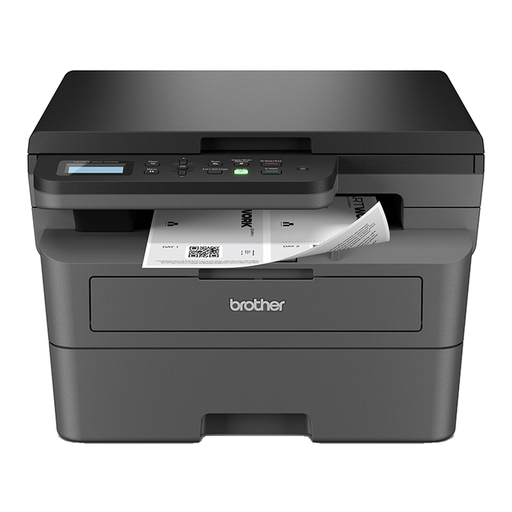
Brother DCP-L2627DWE 3-in-1 Mono Laser Printer
For black-and-white paperwork when you need printing, copying and scanning; this model does not print in colour.
Specifications include a 50-sheet automatic document feeder, automatic duplex printing, Wi-Fi, Ethernet, USB and a 250-sheet input tray.
View on Joybuy
 No image available
Epson EcoTank ET-5150 +Ink A4 Multifunction Printer
For colour documents and multi-page scanning or copying with a refillable ink-tank system.
Specifications include a 35-page automatic document feeder, automatic duplex printing, Wi-Fi, Wi-Fi Direct, Ethernet and a 250-sheet tray.
View on Joybuy
Home printer FAQs
Does an all-in-one printer automatically scan a stack of pages?
No. Check the exact model for an automatic document feeder and its capacity. Brother specifies a 50-sheet feeder for the MFC-L2800DW and Epson specifies a 35-page feeder for the ET-5150; a print, scan and copy label alone does not establish batch-scanning capability.
Does two-sided printing mean the printer turns pages automatically?
Not necessarily. Check the exact model’s specification for automatic duplex printing: Brother lists manual two-sided printing for the DCP-J1200W, and Canon does the same for the PIXMA G3570. Check two-sided scanning separately.
What should I check before setting up wireless printing?
Check the exact model’s supported operating system, driver or app, and connection methods against your computer or phone. Brother lists driver information for the MFC-L2800DW, while Canon lists Wi-Fi and operating-system support for the G3570 series; confirm that the functions you need work with your device.
What should I do if an Epson inkjet prints with missing colours?
For Epson inkjets covered by its UK troubleshooting guidance, run a nozzle check and then head cleaning if indicated. Follow the instructions for your exact model rather than treating repeated cleaning as routine.
Is HP Instant Ink required if I activate HP+?
No. HP says Instant Ink is optional, while activated HP+ requires an HP account, an internet connection and Original HP Ink for the printer’s lifetime. Check the terms for the exact printer and any plan before activation.


