Choose a multifunction printer if you expect to scan or copy paperwork, and look for an automatic document feeder (ADF) if originals regularly run to several pages. For mostly black-text documents, particularly with long gaps between print jobs, compare mono laser models; for frequent colour documents, compare refillable ink-tank models alongside their initial cost. A cartridge inkjet can suit lighter mixed use, provided its replacement ink, two-sided printing and device compatibility meet your needs.
Who needs which features?
Households printing schoolwork and forms
If you print A4 homework, forms and occasional colour documents, a cartridge inkjet all-in-one is worth considering when you also need simple copying or scanning. Check replacement ink, wireless compatibility and whether the exact model prints on both sides automatically.
Home offices printing mainly black text
For recurring letters, invoices and forms without a regular need for colour, compare mono laser multifunction printers. If paperwork also needs digitising, confirm that the model scans and copies rather than assuming every laser printer does.
Households handling frequent printing and multi-page scans
Frequent document printing makes consumable costs more consequential, while an ADF can reduce page-by-page handling when scanning. Compare ink-tank and other multifunction models against your expected black and colour output, and check the ADF, two-sided printing and connectivity on each model.
What should you check before choosing?
Decide whether you need colour and scanning first; then compare the printing system and the exact model's workflow features.
| Priority | What to check | Your needs |
|---|
| Ongoing supplies |
Estimate black and colour pages. Compare current ink or toner costs with declared yields on a comparable basis, including any conditions attached to an ink subscription. |
I print documents regularly, so replacement ink or toner matters alongside the printer's initial cost. Which? identifies tank inkjets as a value option for high print volumes, but the calculation still depends on the models and supplies compared. |
| Scanning workflow |
Confirm print, scan and copy functions. For multi-page originals, check ADF presence, capacity and accepted paper; verify two-sided scanning separately from two-sided printing. |
When I scan a form or a stack of school papers, feeding each sheet by hand would interrupt the job. Which? describes an ADF as a tray that feeds multiple pages automatically. |
| Text and colour |
Decide whether regular colour output is necessary. For mostly black-text jobs and long idle periods, compare mono laser models; confirm scan and copy functions if required. |
Most of my output is letters or forms, and the printer may sit unused between jobs. Which? notes that ink can dry out in an inkjet left unused for a long period, whereas laser printers use dry toner. |
| Shared use |
Check the exact model's Wi-Fi options, supported devices and printing apps. Confirm automatic two-sided printing and its supported paper sizes rather than relying on a general wireless or duplex description. |
People in my household print from different laptops or phones, and I would rather not turn pages manually for routine two-sided documents. |
Common buying mistakes
-
Choosing by the printer's initial cost alone
For recurring jobs, replacement supplies can change the cost comparison. Which? identifies tank inkjets as a value option at high print volumes, not as the cheaper choice for every household.
Estimate your likely black and colour pages, then compare current supplies and the declared yield basis for the exact models you are considering.
-
Assuming every all-in-one handles multi-page or two-sided scans
Scanning, an ADF, automatic two-sided printing and automatic two-sided scanning are distinct features. Without the workflow you need, a multi-page job may require more handling.
Check the ADF's accepted originals and capacity, and confirm duplex scanning separately if you often digitise two-sided paperwork.
-
Choosing an inkjet without considering long gaps between jobs
Which? notes that ink can dry out when an inkjet is left unused for a long period; laser printers use dry toner.
If your jobs are mainly black text and printing is irregular, compare a mono laser multifunction model. If colour keeps you with an inkjet, follow the manufacturer's maintenance guidance.
-
Assuming an ink subscription will cost less
HP says Instant Ink is based on pages rather than cartridge volume. Its service requires an eligible enrolled printer, an internet connection and a current billing method.
Compare the plan's page allowance and terms with your monthly printing and with buying cartridges directly; assess any bundled trial before enrolling.
A page plan creates an ongoing charge, and printing beyond its allowance may affect what you pay under the plan's terms.
Brand and model references
These examples illustrate features to compare on specific models; a brand name alone does not establish a printer's scanner, connectivity or consumable setup.
Brother
Brother's DCP-J1360DW is an example of a compact inkjet multifunction printer for household documents.
- Brother UK lists an ADF, automatic two-sided printing, 5 GHz Wi-Fi and a 150-sheet input tray for the DCP-J1360DW.
- For recurring output, compare the exact model's cartridges and their declared yields with your expected use.
Canon
The Canon MAXIFY GX4050 is a refillable MegaTank multifunction model to examine when document printing is frequent.
- Canon UK specifies an ADF and automatic A4 two-sided printing for the GX4050.
- Canon's declared bottle yields of 6,000 black and 14,000 colour A4 document pages are manufacturer figures under its stated test basis, not a calculation of your running cost.
HP
HP offers different routes, including cartridge inkjet and mono laser multifunction printers; compare features by series and model.
- HP's DeskJet 4300 series information lists a 35-page ADF, while its UK listing identifies the LaserJet M234dw as a black-and-white multifunction model with two-sided printing.
- For an eligible printer, HP Instant Ink uses a page plan and requires an internet connection and a current billing method; compare its terms with cartridge purchases.
Epson
Epson EcoTank is a refillable-ink route for buyers assessing repeated document printing.
- EcoTank models include multifunction options; check the exact model for scanning, paper handling and connectivity.
- Do not apply one EcoTank model's functions or declared ink yield to another. Compare the relevant bottles and yield conditions for your shortlisted model.
Joybuy printer options
These options cover refillable ink-tank, cartridge inkjet and mono laser multifunction printers for household or home-office documents and occasional scanning. Compare their paper handling and supplies against how often you print and scan.
 No image available
Canon MAXIFY GX6150
A refillable ink-tank multifunction option for recurring colour documents and multi-page scanning. The product information specifies a 50-sheet ADF, automatic two-sided printing, Wi-Fi, Ethernet and 350-sheet total paper capacity. Compare bottle costs and the stated yield basis; confirm two-sided scanning if you need it.
View on Joybuy
 No image available
Epson EcoTank ET-5150 A4 multifunction printer
A refillable ink-tank model with print, copy and scan functions for recurring documents. The product information specifies a 35-page ADF, automatic two-sided printing, Wi-Fi, Ethernet and a 250-sheet tray. Check bottle costs and yield conditions, and confirm whether the ADF scans two-sided originals automatically.
View on Joybuy
 No image available
Brother DCP-J1310DW
A cartridge inkjet multifunction option for household colour documents and occasional scanning or copying. The product information specifies automatic two-sided printing, Wi-Fi, Wi-Fi Direct and a 150-sheet tray. Confirm whether the exact unit has an ADF before relying on automatic multi-page scanning, and compare replacement cartridges for your expected volume.
View on Joybuy
 No image available
Brother DCP-L1640W mono laser printer
A print, copy and scan option when documents are mainly black text rather than colour. The product information specifies Wi-Fi, Ethernet and a 150-sheet tray, but no ADF and only manual two-sided printing. Allow for handling pages yourself, and compare replacement toner yield and cost before choosing.
View on Joybuy
 No image available
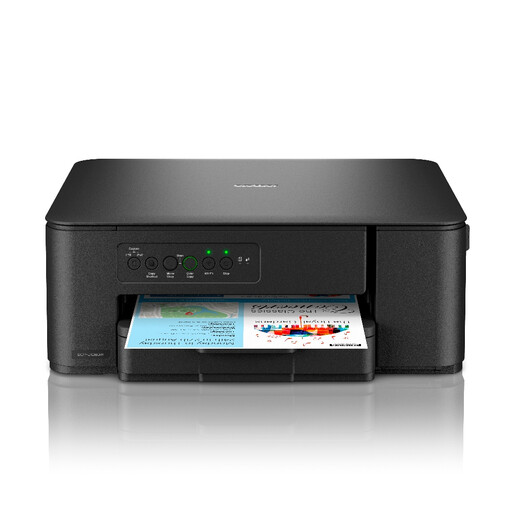
Brother DCP-J1260DW inkjet printer
A colour multifunction inkjet to consider for household documents and occasional copying or scanning. The product information identifies Wi-Fi, Wi-Fi Direct and a 150-sheet tray, but uses both DCP-J1260DW and DCP-J1260W model identifiers. Confirm the exact variant and its scanner and two-sided printing features before buying; compare replacement cartridge costs for recurring use.
Purchase link unavailable
Frequently asked questions
Do I need an all-in-one printer?
Choose an all-in-one if you expect to copy or scan paperwork as well as print it. If scans regularly involve several pages, check that the exact model has an ADF; a print-only device does not cover those scanning tasks.
Does automatic two-sided printing include two-sided scanning?
No. Duplex printing and duplex scanning are separate features, so confirm automatic two-sided scanning in the exact model's specifications if your originals have printing on both sides.
When should I compare a mono laser with an inkjet?
Compare mono laser multifunction printers when most jobs are black-text documents and the printer may sit unused for long periods. Which? notes the ink-drying issue for idle inkjets; a mono model, however, cannot cover a regular need for colour documents.
What matters before joining HP Instant Ink?
Check printer eligibility and whether a page-based plan fits your expected monthly printing compared with buying cartridges. HP says Instant Ink requires an enrolled printer connected to the internet and a current billing method.


