For mostly black-text notes and forms, consider a mono laser; for colour materials, compare cartridge inkjets for modest use with refillable tanks for regular printing. Which? distinguishes these routes by print needs and running costs, while a scanner is a separate choice: opt for an all-in-one if you need to copy or digitise documents, and check for an automatic document feeder if you handle page bundles. Before buying, compare supplies for the exact model and check any subscription conditions.
Who these printers suit
Text-heavy households
If you mainly print notes, forms and reading packs in black and white, prioritise text documents and compatible toner over colour features. Which? discusses mono laser printers for black-text printing, and Brother lists supplies for its DCP-L2620DW.
Colour-study households
If you need colour diagrams, compare the exact model’s replacement cartridges or ink bottles with how often you expect to print. Which? notes that cartridge and refillable-tank printers involve different upfront and ongoing-cost considerations.
Document-scanning households
If you regularly copy or digitise coursework and forms, check whether the model has the scanner features your documents require. Which? distinguishes all-in-one printers from standard models, and Canon specifies a 35-sheet feeder for its PIXMA TS7750i.
What to prioritise when choosing
Decide whether colour is essential, match the printer to how often you print, then add scanning features only if you need them.
| Concern |
What to check when buying |
Who this matters to |
| Frequent black-text printing |
Check that monochrome output is enough, then compare compatible toner and any separate drum. |
When my notes and forms are almost all black text, I want to avoid colour features I will not use; around 27% of consumers put frequent black-text printing first. |
| Occasional colour documents |
Confirm colour is needed and check the exact model’s replacement cartridges. |
If I print colour study pages only now and then, I need to weigh that against the printer’s ongoing supplies; around 20% of consumers prioritise occasional colour documents. |
| Scanning page bundles |
Check for an automatic document feeder and whether it handles the originals you use; verify two-sided scanning separately. |
When I need to copy or digitise several pages, I want to avoid feeding every sheet individually; around 20% of consumers prioritise batch scanning. |
| Regular colour running costs |
Compare the exact model’s compatible ink bottles, stated yields and any maintenance supplies. |
If I print colour materials regularly, I want to understand the cost of the supplies I will need; around 20% of consumers put regular-colour running costs first. |
| Infrequent basic printing |
Consider how often you need hard copies, whether black-only output is sufficient and if scanning is necessary. |
For occasional straightforward documents, I want a printer that matches what I actually use; around 13% of consumers prioritise infrequent basic printing. |
Buying pitfalls to avoid
-
Choosing by printer cost without checking replacement supplies
A low initial cost does not establish the cost of running a printer. Cartridges, toner, a separate drum or a maintenance cartridge may all be relevant, depending on the model.
Before deciding, identify the exact compatible supplies and compare them against how much you expect to print. Which? highlights the distinction between a printer’s purchase cost and its ongoing ink costs.
-
Assuming every all-in-one can handle page bundles automatically
Print, scan and copy functions do not by themselves tell you whether a model has an automatic document feeder or can scan both sides automatically.
If you regularly process multipage documents, check the exact feeder and original-handling specifications. Confirm two-sided scanning separately.
-
Assuming every ink-tank printer prints on both sides automatically
Two-sided printing can require manual page handling. Canon specifies manual two-sided printing for the PIXMA G3570.
Check the manufacturer’s specification for the exact model before relying on automatic duplex printing.
-
Assuming a subscription or stated ink yield fits every household
HP says its Instant Ink service requires an eligible enrolled printer to be connected to the internet and the payment method to remain current. Stated supply yields also depend on their test or manufacturer conditions.
Check eligibility, plan terms and your likely page usage before enrolling or using a stated yield to estimate your own printing.
Printer brands to consider
Brother
Brother’s DCP-L2620DW is a UK example of a mono laser all-in-one for black-text home documents.
- Brother specifies automatic two-sided printing and a 250-sheet tray for this model.
- It does not print in colour. Brother lists TN2510 and TN2510XL toner and a separate DR2510 drum for this model.
Canon
Canon’s UK examples include cartridge-based and refillable-tank printers for different colour and document-scanning needs.
- Canon specifies a 35-sheet document feeder for the PIXMA TS7750i; the refillable PIXMA G3570 prints, scans and copies.
- Canon specifies manual two-sided printing for the G3570. The TS7750i uses PG-585 and CL-586 cartridges, while the G3570 uses GI-51 bottles and an MC-G04 maintenance cartridge.
Epson
Epson’s UK EcoTank ET-2950 is an example of a colour, refillable-tank all-in-one with automatic two-sided printing.
- Epson describes the ET-2950 as a print, scan and copy model and advertises included ink and stated page yields.
- The stated yields and any savings depend on the manufacturer’s conditions and do not establish what a household will spend or print.
HP
The HP ENVY 6520e is a UK example of a cartridge-based all-in-one with a document feeder and an optional Instant Ink service.
- HP lists print, scan and copy functions for the ENVY 6520e.
- HP says Instant Ink requires an eligible enrolled printer to be connected to the internet and the payment method to remain current. Its dynamic-security measures can block cartridges with modified or non-HP circuitry.
Joybuy printer options
The products below span mono laser, colour inkjet and ink-tank printers for home documents and study. Compare colour needs, scanning requirements and the specifications of each exact model.
 No image available
Epson EcoTank ET-2951 A4 Wireless Colour All-in-One Ink Tank Printer
For colour study printing where a refillable-tank model suits your expected use. The listing names an A4 wireless colour all-in-one ink-tank printer with print, scan and copy functions and automatic duplex printing.
Joybuy
 No image available
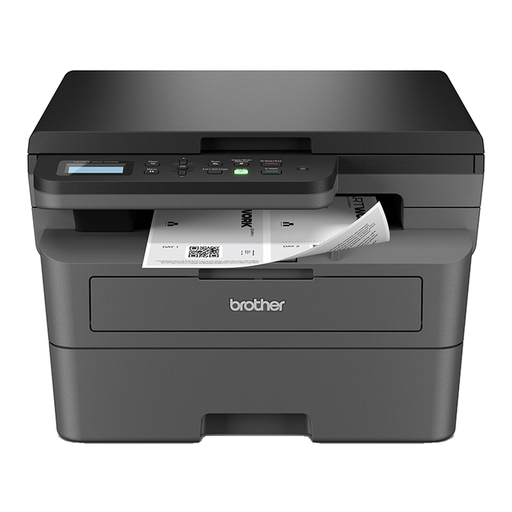
Brother DCP-L2627DWE 3-in-1 Mono Laser Printer
For black-text documents when colour output is not needed. The product name identifies it as a 3-in-1 mono laser printer.
Its monochrome output does not cover colour study materials.
Joybuy
 No image available
Epson EcoTank ET-5150 +Ink A4 Multifunction Printer
For colour printing where a refillable-tank model fits your needs. The product name identifies an A4 multifunction printer with print, scan and copy functions and Wi-Fi.
Joybuy
 No image available
Epson Expression Home XP-3200 A4 Colour Multifunction Inkjet Printer
For colour documents and study materials when an inkjet suits your printing needs. The product name lists an A4 colour multifunction inkjet with Wi-Fi, automatic duplex printing and a 1.44-inch LCD.
Joybuy
 No image available
Brother DCP-L1640W Mono Laser Printer
For black-text home documents when colour is not required. Two-sided printing is manual, so allow for turning pages between sides.
Joybuy
Printer questions answered
How can I tell whether a printer will scan a stack of study pages?
Check the exact model’s specifications for an automatic document feeder rather than relying on the term all-in-one. Canon specifies a 35-sheet feeder for the PIXMA TS7750i; check separately if you need two-sided originals scanned automatically.
What supplies should I check before buying a printer?
Match supplies to the complete model name. Brother lists TN2510 or TN2510XL toner and a separate DR2510 drum for the DCP-L2620DW; Canon lists GI-51 bottles and an MC-G04 maintenance cartridge for the G3570. These compatible supplies do not guarantee an individual running cost.
Does an ink subscription work without an internet connection?
For HP Instant Ink, HP says the eligible enrolled printer must be connected to the internet and the payment method kept current. Check the plan’s current eligibility, cartridge and cancellation terms before enrolling; subscription requirements do not apply to every printer.
Can I return an unwanted printer bought online?
GOV.UK guidance says online-order customers generally have 14 days after receiving an item to notify the seller that they wish to cancel, followed by another 14 days to return it, subject to applicable conditions. Check the retailer’s return arrangements, and treat change-of-mind cancellation separately from issues involving faulty or misdescribed goods.


