What should you check before choosing?
Start with when and where you watch: that determines whether to plan a fixed projector setup, use a portable one or keep a television as the main display.
Home-cinema projector
Consider it: For shared films or sport when you can dim the room and leave enough space for a repeatable projection position.
Trade-off: The image depends on room light, size, alignment and the viewing surface, not on a brightness figure alone.
Portable projector
Consider it: For occasional indoor viewing when being able to put the equipment away or change rooms matters.
Trade-off: You still need to establish suitable room light, power, streaming access and sound for each place you use it.
Television
Consider it: For frequent daytime viewing or a bright, multipurpose living room where a consistent picture matters more than a very large projected image.
Trade-off: It does not offer the same flexibility to project an image onto a temporary viewing surface.
| Priority | What to check | Your needs |
|---|
| Room light and image |
Assess daylight and lamps at your usual viewing time; set an intended image size; compare stated brightness on the same measurement basis. BenQ’s UK guidance says larger images and ambient light can raise brightness requirements. |
I want films to remain watchable at the image size I plan to use, not just when the room is dark. |
| Placement and screen |
Measure the projector-to-screen distance and available wall space. Decide whether a fixed, retractable or temporary surface fits the room; check the exact projector’s placement requirements. |
The equipment needs somewhere practical to stand, and I may need to clear the wall after viewing. |
| Streaming and sources |
Check named UK apps on the exact model, its HDMI inputs and any conditions for using an external streaming device. A smart-projector label alone does not identify the services available. |
I need access to the services and source devices my household actually uses. |
| Shared-viewing sound |
Consider where viewers will sit and listen. If adding speakers or a soundbar, confirm a documented, compatible audio-output method and its cable or placement requirements. |
Dialogue must be clear to everyone watching; I do not want to assume the built-in speaker will meet that need. |
| Everyday display |
Compare the whole projector arrangement with a television in your normal room light, including setup and any screen or audio equipment. Expert Reviews notes that televisions generally deliver more consistent brightness and colour depth. |
If we often watch daytime sport or television, I would rather have a consistent picture than set up a larger image each time. |
Relevant brand references
These examples illustrate different projector formats and setup considerations; brand ranges do not establish what any particular Joybuy listing can do.
Epson
Epson’s EH-LS12000B is an example to examine when planning a more fixed home-cinema arrangement.
- Epson lists 4K resolution, HDR10+ support and powered zoom, focus and lens shift for the EH-LS12000B.
- Those are specifications for this model, not facilities to assume across Epson’s range or a guarantee of fit for a particular room.
BenQ
BenQ’s UK guidance is useful when planning room light, projection distance and a screen as one setup.
- Its guidance distinguishes brightness needs in dark and brighter rooms and discusses screen surfaces for different lighting conditions.
- These are brand-authored guidelines; assess the exact projector and screen in the conditions where you will use them.
TCL
TCL’s PlayCube illustrates a portable smart-projector format for flexible indoor placement.
- TCL lists rotation, a battery and Google TV with Netflix certification for the PlayCube.
- PlayCube features do not establish the apps, battery arrangements or room suitability of a different TCL model.
Nebula
Nebula lists compact Capsule and Mars projectors alongside larger models such as Cosmos and X1.
- The listed formats give shoppers different physical setups to investigate.
- Check app support, audio connections and room-light fit for the particular model rather than inferring them from the range.
Joybuy projector and screen options
These options include projectors for fixed or flexible home viewing and a foldable screen for a temporary setup. Choose between them using your room, source devices and audio needs; the screen is an accessory, not a display on its own.
 No image available
TCL C1 Smart Projector, 1080P FHD, grey
A portable-projector option for shared viewing where you can control room light. The name lists 1080P FHD and 4K support; do not treat 4K support as native 4K resolution. Confirm the image size at your available distance, required UK apps and audio connection before choosing it.
View on Joybuy
 No image available
Magcubic HY350Max Projector, native 1080P, 900 ANSI lumens
Consider this model for a planned indoor projection position rather than relying on its stated brightness to predict the picture in daylight. Its name lists Android 14, HDMI and USB, alongside 8K input support; confirm the image size your room permits, the UK apps you need and compatibility with your audio setup.
View on Joybuy
 No image available
XBJ 360° Portable Projector, 1080P
The listed rotating design may suit a temporary position, but check where it can stand in your room and the image size achievable there. Its name states 500 lumens and HDMI connectivity; establish the brightness measurement basis, required UK apps and compatible audio output before relying on it for shared viewing.
View on Joybuy
 No image available
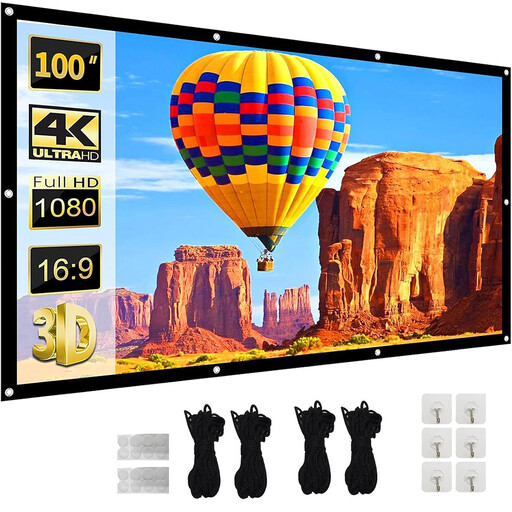
XBJ 100-inch 16:9 Foldable Projector Screen
This is a viewing surface for a projector, not a projector itself. Its listed foldable design, ropes and hooks call for a suitable fixing point; check that the 100-inch format, projector position and room lighting work together before planning the setup.
View on Joybuy
 No image available
Lite Entertainment Magcubic HY300 Pro Mini Projector, grey
A compact option to assess for occasional viewing in a room you can dim. Its name distinguishes native 720p resolution from 1080p support and lists a 180° rotating stand. Check that its placement range, required UK apps and audio connection suit your intended setup.
View on Joybuy
Common questions
How can I tell whether my room suits a projector?
Measure the available projector-to-screen distance, choose an intended image size and assess the room at the time you normally watch. BenQ’s UK guidance says many dark-room setups showing a 100–120-inch image perform well at 1,500–2,000 lumens, while ambient light or a longer throw may call for 3,000 lumens or more; those ranges do not guarantee a result for a particular model or room.
Can I rely on a portable smart projector for my streaming services?
Only after checking that the exact UK model lists the services you need. Also check its HDMI inputs if you intend to connect a compatible external streaming device; a smart-projector label does not confirm every app.
Do I need a screen instead of a white wall?
A flat, smooth wall can provide a starting surface, while a screen may be worth planning if you need a repeatable viewing area. BenQ’s UK guidance distinguishes screen surfaces by room-light conditions; choose a fixed or retractable format according to the space and installation you can accommodate.
How should I plan sound for several viewers?
Check whether the exact projector’s built-in sound meets your listening needs. If you plan to add a soundbar or speakers, confirm its documented audio output, compatibility and cable arrangement before choosing the external equipment.


