Households with a planned viewing room
If you can leave a projector in place, control the lighting and plan where the image will fall, a fixed home-cinema setup lets you make those decisions before each film or match.


Choose a fixed home-cinema projector if you can plan its position and control the room light; choose a portable model if moving and storing it between viewings matters more. In either case, check brightness against your intended image size and room light, then confirm how you will get sound and access the films or sport you want to watch.
If you can leave a projector in place, control the lighting and plan where the image will fall, a fixed home-cinema setup lets you make those decisions before each film or match.
A portable projector suits occasional viewing in different rooms or locations, provided you are willing to check placement, light and sound each time. Which? notes that portable projectors can differ considerably in picture and sound quality.
If particular fixtures and clear audio matter most, check the service, subscription and sound connections as carefully as the projected image. TV Licensing says the requirement for a TV Licence when watching live TV applies regardless of the viewing device.
Choose it when: You can plan one projector position and darken the room for shared viewing.
Allow for: The screen position, projection distance, power and cables all need to work in that room.
Choose it when: You need to move the projector between rooms or store it after viewing.
Allow for: You may need to reposition it and manage the room light each time; Which? reports differences in picture and sound between portable models.
| Concern | What to check | Who this matters to |
|---|---|---|
| Room light and image size | Check the intended image size and light falling on the viewing surface; compare brightness figures only with their measurement standards in mind. | If I want to watch sport while the living room is still light, I need to know whether the planned image will remain visible. Around 31% of consumers would put room light and image impact first. |
| Planned-room picture | Measure the projector-to-screen distance and check the exact model's supported image size and placement adjustments. | For regular films in a room I can arrange around the screen, repeatable placement matters more to me than moving the projector. Fixed-room picture planning would come first for around 25% of consumers. |
| Portability and setup | Check the size, power arrangement and positioning features against every place you intend to use it. | If I will set up for occasional film nights and put the projector away afterwards, I need that routine to be manageable. Portability would be the primary concern for around 19% of consumers. |
| Streaming and sound | Check the exact app or HDMI route, your sport subscription and compatible audio connections. | I need the intended match to play through my own service and be audible to everyone watching. Around 25% of consumers would prioritise streaming access and shared sound. |
ProjectorCentral advises starting with screen size and the image brightness needed. A larger image and light in the room affect the result, so one brightness figure cannot establish how a projector will look in your space.
Measure the available projection distance and intended image size, and note whether you can control light reaching the viewing surface.
Darkening the room may also call for blinds or a different viewing surface.
Google TV Help says an app can be installed when it is available for the device. App access alone does not establish that your subscription includes a particular fixture.
Check the app on the exact projector and confirm the event with your service. If necessary, check whether an external streaming device can use the projector's HDMI input.
An external streamer needs its own power and connection arrangement.
Speaker provision and external-audio connections vary by model; a stated speaker specification does not tell you how clearly dialogue will carry across your room.
Check the exact model's audio connections and whether your soundbar or speakers accept the available output.
External audio may add another device and cables to the setup.
GOV.UK says you need a TV Licence to watch or record live TV on any channel or service. TV Licensing also states that using BBC iPlayer requires one; using a projector does not change those conditions.
Check that your household is covered before watching live sport or using BBC iPlayer.
Epson's home-cinema range is relevant to a planned, more permanent viewing setup.
The TK700STi is a BenQ model to examine where shorter-distance placement and external audio connections matter.
XGIMI's HORIZON 20 is a home-entertainment model for households considering an integrated Google TV route.
Anker Nebula is relevant when occasional, movable viewing is the priority.
These portable models are options for film nights or sport viewing where the projector may be moved between setups. Check each one against your room light, placement, sound and intended streaming service; this selection does not represent fixed home-cinema installations.
 No image available
Consider it if you want to move the projector between occasional viewing locations rather than leave it installed.
The title specifies a built-in battery, native 1080P resolution, WiFi 6, Bluetooth and sound by JBL. Check the planned image size against your placement and confirm access to your intended sport service.
 No image available
Consider it for a movable room setup if its projection distance works with the space you have.
The title specifies native 1080P, 8K support, Android 14, WiFi 6, Bluetooth 5.4, 180° rotation and auto keystone correction; 8K support is not a native-resolution claim. Check image size at your chosen position and the apps you need.
 No image available
Consider it if you want a portable projector and can verify that your viewing services work with your chosen content source.
The title specifies 1080P FHD and 4K support; it does not describe 4K as native resolution. Confirm the image size at your available distance and access to any live-sport app you intend to use.
 No image available
Consider it where changing projection direction matters, subject to a suitable position and viewing surface.
The title specifies Full HD 1080P, 360° rotation, auto keystone correction and a stated 120-inch display. Check whether that image size is achievable at your available distance, as well as the connection route for your sport service.
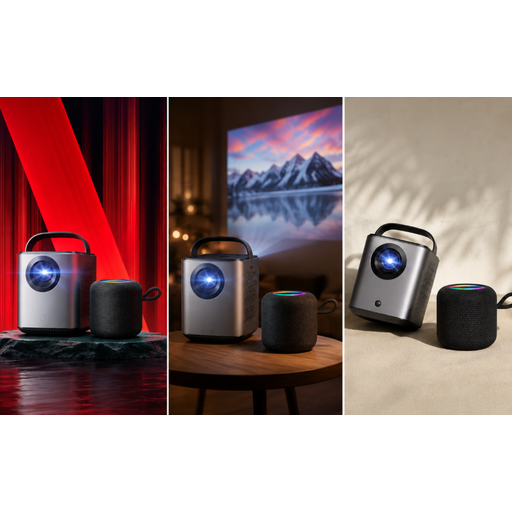 No image available
Consider this bundle if carrying the projector and arranging separate Bluetooth audio fit your viewing plans.
The title identifies the carry case and HC30 Oceano BT Speaker as part of the bundle. Check the projector's image size at your available distance and how you will access the films or sport you want.
You need a TV Licence if you watch or record live TV on any channel or service, including live sport, according to GOV.UK; TV Licensing also says using BBC iPlayer requires one. The requirement concerns what you watch, not whether you use a projector or television.
No. Google TV Help says an app can be installed when it is available for the device. Check availability on the exact projector, then confirm separately that your service and subscription include the event.
No. ProjectorCentral advises assessing brightness alongside screen size, and room light also affects image visibility. Compare figures using their stated measurement standards and check the image size you can achieve in your room.
Consider them if shared viewing calls for more audible dialogue than the projector's own speaker provides. Check compatible connections on both devices: BenQ, for example, lists eARC on the TK700STi, but connection options vary by model.
Yes, if the projector has a compatible input and the streaming device can be powered and connected. Epson says an external device can stream through either HDMI port on its EH-TW7000; check the connections on the exact projector you choose.