First-time computer songwriter
You want to record a voice or acoustic instrument directly into a computer without assembling a separate interface setup. Headphone monitoring matters when you sing along to an existing track.


Choose a USB condenser if you want to record straight into a computer, especially if headphone monitoring on the microphone matters. An XLR dynamic vocal microphone suits an interface-based setup, but needs compatible recording hardware; a dual-connect condenser lets you start with USB and retain an XLR option. For vocals in a difficult room, consider pickup pattern, placement and pop control rather than expecting any microphone type to remove unwanted sound.
You want to record a voice or acoustic instrument directly into a computer without assembling a separate interface setup. Headphone monitoring matters when you sing along to an existing track.
You need to manage unwanted sound, breath pops and stand vibration while recording vocals. Microphone position and the exact model's pickup pattern and accessories matter more than assuming a condenser will fix the room.
You may add an audio interface or record more instruments later. The choice between USB, XLR and a microphone with both connections affects what recording hardware and cables you will need.
Choose it when: You record into a computer and want the microphone to provide its own USB connection and headphone monitoring, as the Audio-Technica AT2020USB+ does.
Trade-off: A USB-only microphone does not provide the analogue XLR connection needed for an interface-based microphone input.
Choose it when: You have, or plan to add, compatible recording hardware with an XLR microphone input; Shure describes its SM58 as a cardioid dynamic vocal microphone.
Trade-off: An XLR microphone alone cannot make a direct USB connection to your computer.
Choose it when: You want USB recording now and an XLR connection for later equipment; RØDE specifies both connections for its NT1 5th Generation.
Trade-off: Features can depend on the connection used: the NT1 5th Generation's 32-bit-float output applies to USB, not analogue XLR.
| Concern | What to check | Who this matters to |
|---|---|---|
| Connection and monitoring | Check for USB, XLR or both; if recording by USB, check the headphone output and monitoring controls. | I want to sing over a track on my computer without setting up a separate interface, and I need to hear myself as I record. Around 30% of consumers put that direct connection and monitoring need first. |
| Room and vocal noise | Check the pickup pattern and whether a pop filter or shock mount is included; plan where the microphone will sit. | In an untreated room, I want to manage breath pops, stand vibration and sound arriving from outside the front of the microphone. Roughly 30% of consumers make that practical vocal control their primary concern. |
| Voice and acoustic sources | Check the exact model's microphone type, connection and suitability for the sources you intend to record. | When recording both singing and an acoustic instrument, I want to choose a condenser route that fits my room and setup. Around 20% of consumers prioritise that recording approach. |
| Loud sources and expansion | For louder instruments, check the stated maximum sound-pressure level; for future equipment, check XLR connectivity and included cables. | I may record a loud instrument or add an interface later, so the microphone must fit the source or the next stage of my setup. Roughly 20% of consumers place that flexibility first. |
A conventional XLR setup needs recording hardware with a compatible microphone input and gain control. A USB microphone provides a different, direct computer connection.
Before ordering, trace the connection from microphone to computer and check which cables and recording hardware you already have.
An interface and XLR cable may be needed, along with a stand or headphones for your setup.
Phantom power supplies microphones that require it; it is not a general recording-quality setting. Focusrite cautions that it can damage equipment not designed to receive it.
Check the exact microphone and connected equipment manuals before enabling 48V, particularly when using older or unusual equipment.
A cardioid pattern can reduce pickup from some directions, while pop filtering and shock isolation address different sources of unwanted sound. None removes every reflection or outside noise.
Start with a quiet recording position and stable mounting, then check whether the exact model includes the pop filter or shock mount you need.
The NT1 5th Generation is a studio condenser option for recording by USB now and XLR with compatible equipment later.
The AT2020USB+ is a computer-focused USB cardioid condenser for vocal and home-studio recording.
Shure's SM58 dynamic vocal microphone and SM4 home-recording condenser offer different model-specific approaches to recording a singer.
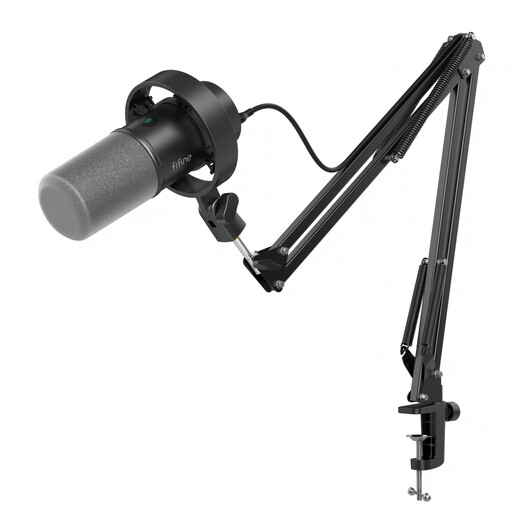
These FIFINE dynamic microphones offer USB and XLR connection choices for recording vocals at home. Check the controls and accessories for the connection you plan to use.
 No image available
Consider this kit if you want to record vocals by USB and retain an XLR connection for compatible recording hardware.
The product name specifies a boom arm, mute button, headphone jack and gain knob. Check which controls work with your intended connection; an XLR cable is not included.
 No image available
Consider this model for home vocal recording if you want a desktop stand and the option of USB or XLR connection.
The product name specifies a headphone jack, mute button and RGB light. Check whether its USB-mode monitoring and controls suit your workflow; an XLR cable and boom arm are not included.
Choose USB for a direct computer connection, or XLR if you have compatible recording hardware and want an analogue microphone connection. A dual-connect model offers both paths, but check which controls and features work through each one.
Not every XLR microphone does: Focusrite explains that condenser microphones require electrical power, while normal dynamic microphones do not require 48V phantom power. Check the exact microphone and recording hardware instructions before switching it on.
An XLR microphone setup needs compatible recording hardware and an XLR cable; your recording position may also call for a stand, pop filter or headphones. With a USB microphone, check the supplied cable, mounting accessories and headphone-monitoring controls before choosing a bundle.