Start with a wheel and pedal combination that supports your PC or exact console generation, then choose a mounting arrangement that keeps the controls stable. A sturdy desk can suit occasional racing; a foldable stand offers a repeatable position when storage matters, while an adjustable cockpit suits a more permanent setup for regular, longer sessions. Check mounting hardware and included seating separately before committing to either a stand or cockpit.
Who is this setup for?
Racers with limited space
If the controls must be put away between sessions, a foldable stand can keep the wheel and pedals together without a permanent cockpit. Next Level Racing describes its Wheel Stand 2.0 as foldable for limited storage space; check its dimensions both folded and in use.
Console-first racers
Your existing PlayStation or Xbox determines which wheel variant to consider. Logitech G and Thrustmaster list separate console versions of some similarly named wheels, so check the exact model and any planned accessories against your console generation.
Regular, long-session racers
If you want to return to the same seating and pedal position each session, an adjustable cockpit is worth considering. GT Omega lists separate pedal-plate, wheel-deck and seat-position adjustments for its ART cockpit; check which seat and display parts you would need alongside the frame.
What matters when choosing?
Desk-mounted wheel
Choose it when: You race occasionally and have a sturdy desk with room to mount the wheel.
Trade-off: The pedals and chair need their own stable positions, and some wheel bases require a separate clamp or hard mounting.
Foldable wheel stand
Choose it when: You need to store the controls between sessions but want to keep the wheel and pedals in a repeatable arrangement.
Trade-off: It still takes floor space while in use; check the exact stand against your wheel base, pedals and intended mounting method.
Dedicated cockpit
Choose it when: You race regularly and can leave an adjustable driving position assembled.
Trade-off: It needs a permanent footprint, and the frame may require a separately selected seat or display arrangement.
| Concern |
What to check |
Who this matters to |
| Platform compatibility |
Check the exact wheel variant against your PC or console generation, then check planned accessories against that wheel ecosystem. |
If I already own a console, I need the wheel and any later controls to work with that specific platform. Around 36% of consumers put compatibility first. |
| Space and mounting |
Compare in-use and stored dimensions; confirm the desk clamp or stand mounting pattern. |
When a room has other uses, I need somewhere to put the controls after racing without rebuilding their positions each time. Compact mounting comes first for around 29% of consumers. |
| Long-session stability |
Consider pedal and chair movement, adjustable wheel and pedal positions, and whether flooring needs protection. |
For longer sessions, I want the chair and pedals to stay where I set them and the controls to fit my seating position. Around 21% of consumers prioritise that stability. |
| Extra controls |
Check console support and mounting space before adding a shifter, handbrake or upgraded pedals. |
If I plan to add controls for the games I play, I need a place to mount them and a way to connect them. Expansion is the main concern for around 14% of consumers. |
Setup mistakes to avoid
-
Assuming a wheel family works with every console
Logitech G lists separate PlayStation/PC and Xbox/PC G923 variants. In modular systems, console operation can also depend on the steering wheel fitted to the base, as Fanatec notes for its CSL DD.
Check the full product designation and official platform list, then confirm each planned shifter, handbrake or pedal upgrade against that combination.
-
Planning for a wheel but not a complete mounting position
A cockpit frame does not necessarily include a seat or display solution. Fanatec also specifies hard mounting or a separately sold table clamp for its CSL DD.
List the wheel, pedals, mounting method, chair or seat, display position and any accessory mounts before choosing furniture for the setup.
-
Letting a rolling chair move under braking
Chair movement changes your distance from the pedals. Next Level Racing offers a chair cradle with its Wheel Stand 2.0 for controlling movement during heavy braking.
Check whether your stand has a chair cradle, secure the chair by another suitable method, or consider a cockpit with a fixed seat.
-
Buying a shifter or handbrake before checking the games you play
Extra controls add mounting and connection requirements, but their usefulness depends on your preferred games and vehicles.
Choose the wheel and pedals first, then check game, platform and mounting compatibility before adding a separate control.
Brands to consider
Logitech G
A wheel-and-pedal range with PC and console variants, plus a Driving Force Shifter for specified G-series wheels.
- Logitech G lists separate PlayStation/PC and Xbox/PC G923 variants and identifies the G923, G29 and G920 as wheels designed for its Driving Force Shifter.
- Select the exact console variant; TRUEFORCE-dependent features also require game support.
Thrustmaster
The T248 range includes distinct PlayStation/PC and Xbox/PC wheel variants.
- Thrustmaster lists the PlayStation T248 for PS5, PS4 and PC, with magnetic pedals offering four brake-pressure modes.
- Check the platform-specific designation rather than relying on the T248 family name.
MOZA Racing
The R3 range includes an Xbox-and-PC direct-drive bundle and a separate PC-focused option.
- MOZA Racing lists the Xbox R3 bundle for Xbox Series X|S, Xbox One and PC, with a 3.9 Nm motor and steel pedals.
- Confirm the exact bundle and a suitable mounting method before choosing it for a desk or stand.
Fanatec
A modular direct-drive range in which platform support and mounting depend on the chosen configuration.
- Fanatec lists the Gran Turismo DD Pro for PS5, PS4 and PC; its stated 8 Nm configuration uses the included Boost Kit 180.
- For the CSL DD, Fanatec specifies hard mounting or a separately sold table clamp, and says Xbox operation depends on the steering wheel.
GT Omega
Cockpit and wheel-stand options for moving beyond a desk-mounted setup.
- GT Omega lists pedal-plate, wheel-deck and seat-position adjustments for its ART cockpit.
- Check the frame package for its seat, screen solution and other separately selected parts.
Joybuy wheel choices
These wheel choices cover PlayStation-and-PC or Xbox-and-PC controls, plus a compact Xbox-and-PC wheel. Match the exact platform first, then choose a desk, stand or cockpit arrangement separately.
 No image available
Thrustmaster T248 wheel and magnetic pedal set — PS5, PS4, PC
Consider this variant for a PlayStation or PC setup where you want a wheel and pedal set together.
Thrustmaster lists four brake-pressure modes for the T248 PlayStation pedal set. Check the mounting method and hardware needed for your desk or rig.
View on Joybuy
 No image available
Thrustmaster T128 force-feedback wheel and pedal set — PS5, PS4, PC
This PlayStation-and-PC variant suits a setup that needs a wheel and pedals rather than a wheel alone.
Confirm how the wheel mounts to your chosen desk or stand before buying.
View on Joybuy
 No image available
Thrustmaster T-248X wheel and pedals — Xbox, PC
Consider this Xbox-and-PC variant if those are the platforms for your home racing setup.
Check the exact Xbox generation supported and whether its mounting arrangement fits your desk or stand.
View on Joybuy
 No image available
Thrustmaster T128 force-feedback wheel and pedal set — Xbox Series X/S, Xbox One, PC
This is the Xbox-and-PC T128 variant for consumers pairing a wheel with pedals.
Check its mounting method for your desk or stand; do not confuse it with the PlayStation-and-PC T128 above.
View on Joybuy
 No image available
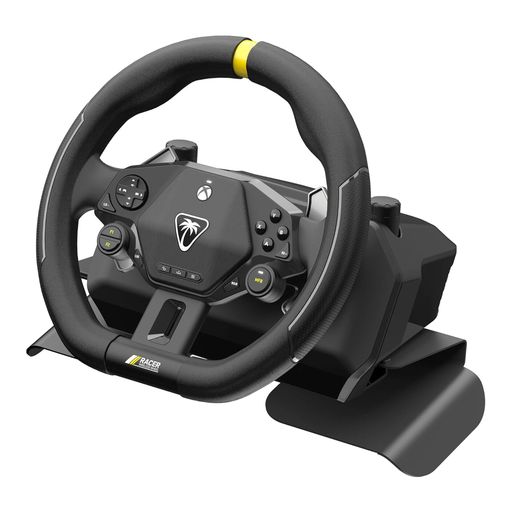
Turtle Beach Racer wireless wheel — Xbox, PC
For a compact Xbox-or-PC arrangement, compare this wireless wheel with a separate wheel-and-pedal set before deciding how you want to control the throttle and brake.
Check whether its integrated controls meet your needs and confirm force-feedback support if that feature matters to you.
View on Joybuy
Frequently asked questions
How do I avoid buying the wrong wheel for my console?
Check the exact model's supported-platform listing, not just its family name. Logitech G lists different G923 variants for PlayStation/PC and Xbox/PC, while Thrustmaster sells separate T248 console variants; with modular systems, also check whether the steering wheel affects console support.
Do I need a wheel stand or cockpit at home?
Not necessarily: a sturdy desk can work for occasional racing if the wheel mounts securely and the pedals stay put. Choose a foldable stand when storage and repeatable control placement matter; consider a cockpit when you have room for a permanent, adjustable seating position.
How can I stop my chair moving when I brake?
Secure the chair in relation to the pedals, either with a suitable chair cradle or another appropriate arrangement. Next Level Racing describes the chair cradle on its Wheel Stand 2.0 as a way to limit movement under heavy braking; a cockpit with a fixed seat is another option for a permanent setup.


